The author and CHERRY BON bear no responsibility for any direct or indirect consequences or losses arising from the use or distribution of the information in this article. The user assumes full responsibility.
CHERRY BON reserves the right to modify and interpret this article. If you wish to reprint or distribute it, you must preserve it in its entirety, including all copyright notices. Without permission from CHERRY BON, you may not alter, add to, or use this article for any commercial purpose.
Author: Zhiyuan CAI (Poc Sir). This article is divided into six sections. Estimated reading time: 30 minutes. Please plan accordingly.
Open-source project: Packer Fuzzer — Version: V1.4 — Stars: 3.2k
Repository: https://github.com/rtcatc/Packer-Fuzzer
0x01 Introduction
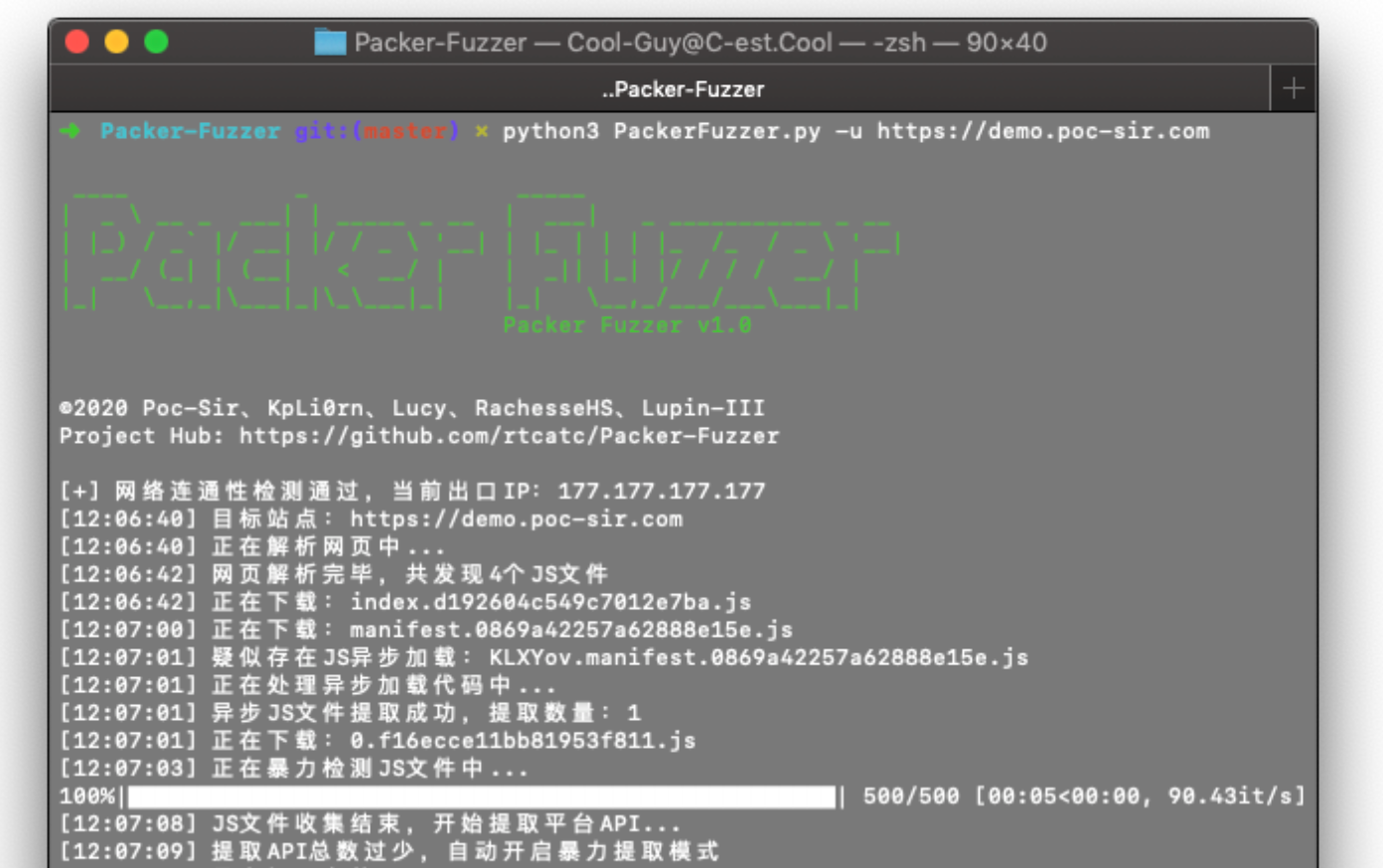
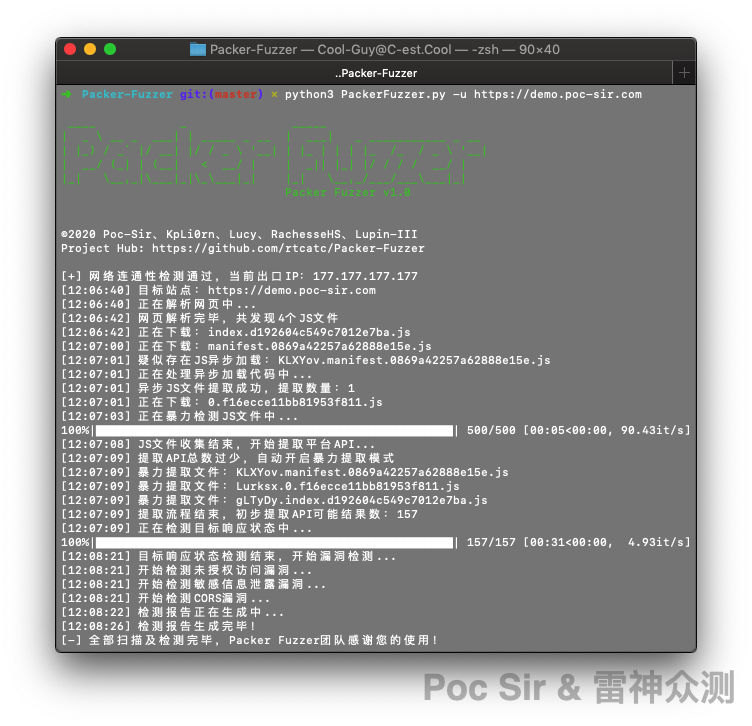
Packer Fuzzer currently supports automatic extraction of JS resource files, using both rule-based matching and brute-force extraction to pull out API endpoints and their parameters. After extraction, the tool performs fast, fuzzy detection of seven vulnerability categories: unauthorized access, sensitive information disclosure, CORS misconfiguration, SQL injection, horizontal privilege escalation, weak passwords, and unrestricted file upload. Once the scan is complete, the tool automatically generates a report. You can choose from an HTML version for easy analysis or a more formal doc, pdf, or txt version.
You also do not need to worry about language barriers—the tool ships with five major language packs (including report templates): Simplified Chinese, French, Spanish, English, and Japanese (ranked by translation accuracy), translated by our very unprofessional team. Due to time, resource, and other constraints, the first release only includes optimized rules for the Webpack bundler. Support for other bundlers is coming soon.
We also hope that readers who encounter new and different examples will contribute new rules, and that anyone who hits a bug will report it to us—that is exactly why we open-sourced this. We are just a small team that built a framework; making this tool truly great depends on contributions from the community. On behalf of the whole team, Poc Sir sincerely thanks everyone for their support!
0x02 JS File Extraction
0x021 Primary JS Extraction
The output of any frontend bundler is delivered to the browser as JS files. So the first step in analyzing such a website is extracting all relevant JS files. For readers who are less familiar with bundlers, here is a typical Webpack-generated HTML page:
<!DOCTYPE html><html lang=en><head><meta charset=utf-8>
  <title>CHERRY BON</title></head>
  <body><noscript><strong>We're sorry but dasbounty doesn't work properly without JavaScript enabled. Please enable it to continue.</strong></noscript>
  <script src=/js/chunk-vendors.d1m05ef2.js></script>
  <script src=/js/app.d1m0h997.js></script></body>
</html>
A bundler-generated site is a pure-JS site—the HTML source contains almost no markup, and all frontend content depends on the browser parsing JS files. These sites typically include a noscript notice telling users without JavaScript enabled to turn it on. Webpack-generated JS files also follow a recognizable naming pattern (though not universally): a two-part format like xxx.randomalphanumeric.js, and each JS file’s content begins with webpackJsonp.
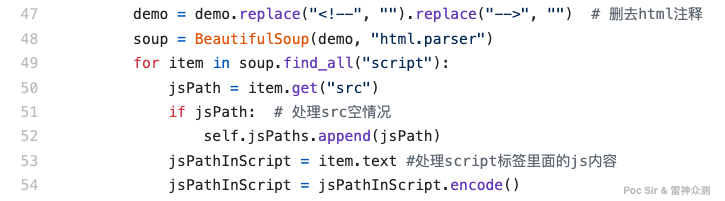
Packer Fuzzer first calls lib/ParseJs.py to process the HTML embedded in the user’s target page and extract the initial JS file references. At line 47, the program strips all HTML comments (<!-- XXX -->) before parsing, because the bs4 library used in this module cannot parse elements inside commented-out script tags. Starting at line 49, the program iterates over all <script> tags and extracts their src attribute paths, while also checking whether any tag contains inline JS—if so, it saves that too, to avoid missing any code (some developers embed the main JS content directly in <script> tags rather than linking an external file):
The program also handles sites that place JS paths in <link> tags:

After collecting all JS paths from the current page, the program applies URL normalization rules to build the full URL for each JS file’s src path:
| Resource format | Handling |
|---|---|
https:// or http:// | Already a full URL; use as-is |
../ or ../../ (multi-level) | Traverse up one or more levels; loop until reaching the root domain |
// (protocol-relative) | Prepend the current protocol (http or https) |
/ (root-relative) | Prepend the root domain |
| No prefix | Prepend the current path |
./ prefix | Remove ./ then treat as « no prefix » |
This is handled by the dealJS() function at line 92:
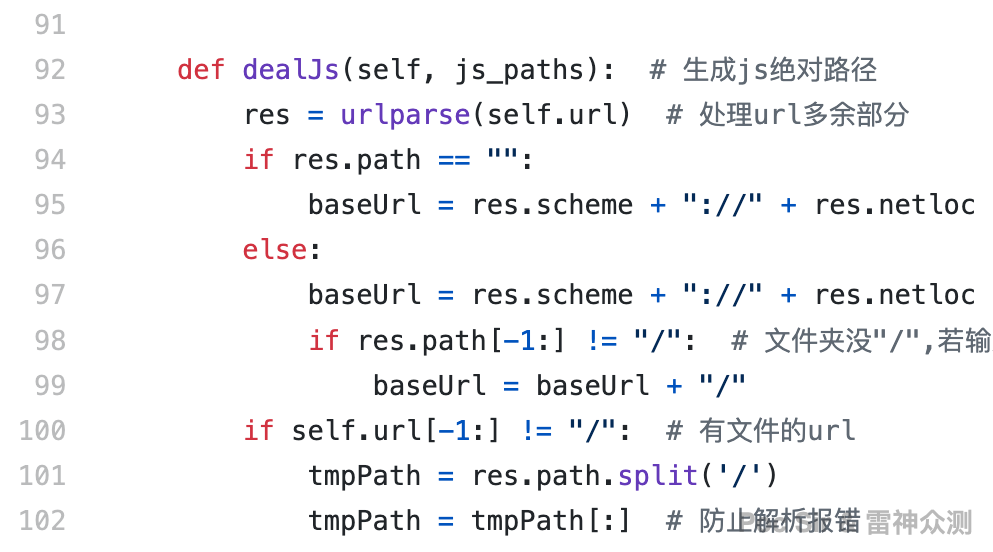
In the rare case that automatic extraction misses some JS files, the tool supports supplementing the list via the -j (or --js) command-line flag, which accepts additional JS URLs separated by commas. All paths are stored in the extJSs array and downloaded by downloadJs():
DownloadJs(self.jsRealPaths,self.options).downloadJs(self.projectTag, res.netloc, 0)
extJS = CommandLines().cmd().js
if extJS != None:
        extJSs = extJS.split(',')
        DownloadJs(extJSs,self.options).downloadJs(self.projectTag, res.netloc, 0)
0x022 JS Filtering and Downloading
Before downloading begins, the program calls the jsBlacklist() function in lib/ParseJs.py to filter out files that were not generated by the bundler—such as third-party libraries and public CDN files—which would otherwise reduce the accuracy of later extraction steps. The core logic is:
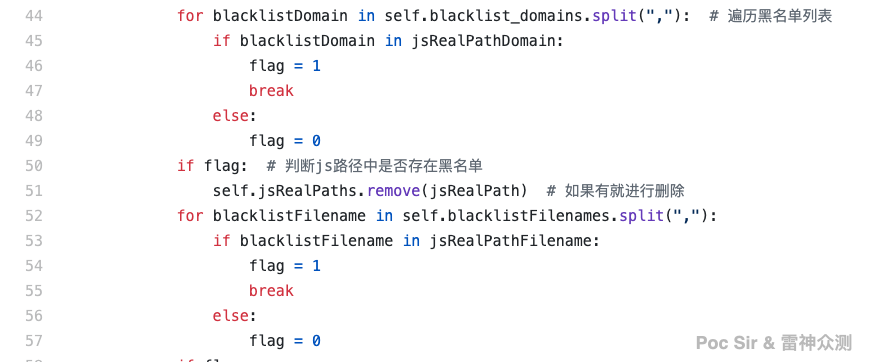
The function reads a blacklist of filenames and domains from config.ini in the project root and excludes them:
[blacklist]
filename = jquery.js,flexible.js,data-set.js,monitor.js,umi.js,honeypot.js,.min.js,angular.js
domain = api.map.baidu.com,alipayobjects.com
After downloading, the program deduplicates the JS files and writes their metadata into the js_file table of the project’s cache database for later use:
| Column | Type | Description |
|---|---|---|
| id | INT (PK, auto) | Auto-increment identifier |
| name | TEXT | JS filename |
| path | TEXT | JS file URL |
| local | TEXT | Local saved filename |
| success | INT | Download success flag (1 = success) |
| spilt | INT | Async load ID; empty by default |
Some readers may wonder why we bother parsing JS files ourselves instead of just using Selenium to load the page in a real browser and extract JS from there. The answer: Selenium is slow, memory-intensive, and requires browser drivers to be set up correctly. More importantly—and this is the key reason—browser simulation cannot extract all JS files. Read on for why.
0x023 Handling Asynchronously Loaded JS
During actual testing, we discovered something we had overlooked by relying on the browser console: frontend bundlers support a very useful feature called code splitting (also called lazy loading or on-demand loading). This splits large JS files into multiple smaller chunks that are only fetched when the corresponding page is visited. Because JS is loaded on demand, the browser at any given page will only have loaded a subset of the total JS—which is exactly why Selenium cannot retrieve everything, and why parsing JS directly is more reliable.
Async loading code is typically found in JS files starting with manifest or app, and commonly looks like this (X, Y, Z represent single lowercase letters):
X.src = Z.p + "static/js/" + Y + "." + {
    0: "d1m0ecbdb81953f82a",
    1: "d1m0qe11bb81zz3f81"
}[Y] + ".js";
Or (other variations exist):
X.src = Z.p + "static/js/" + Y + "." + {
    "gre5g4e": "d1m0ecbdb81953f82a",
    "y5h1tr5": "d1m0qe11bb81zz3f81"
}[Y] + ".js";
Evaluating both patterns in the console gives:
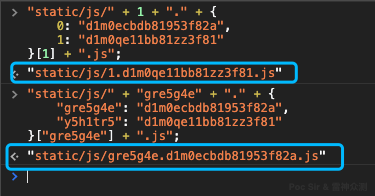
Now that we know what to look for, extraction starts at line 71 in the checkCodeSpilting() function in lib/Recoverspilt.py:
if "document.createElement(\"script\");" in jsFile:By checking whether a JS file contains code that creates a <script> DOM element, we can immediately rule out files that do not use async loading—saving us from running regex against every single file. For files that pass this check, we apply the following regex at line 73:
pattern = re.compile(r"\w\.p\+(.*?)\.js", re.DOTALL)
jsCodeList = pattern.findall(jsFile)
            for jsCode in jsCodeList:
                jsCode = jsCode + ".js\""
The extracted code can be generalized as (Y is any lowercase letter a–z):
"XXXXXX" + Y + "." + {
    ......
}[Y] + ".js";
After extraction, the code is passed to jsCodeCompile(), which rebuilds it into a runnable function:
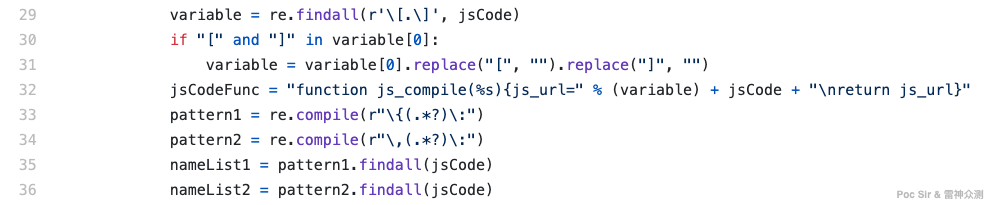
The resulting executable function looks like:
function js_compile(Y) {
  js_url= "XXXXXX" + Y + "." + {
        ......
    }[Y] + ".js";
return js_url}
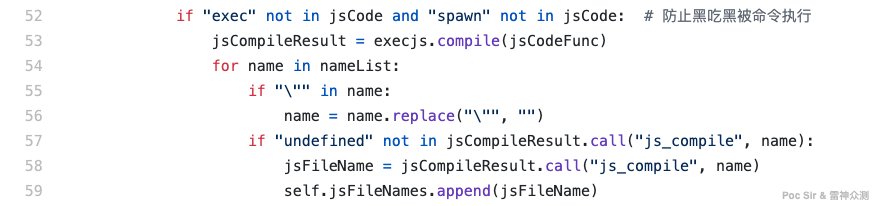
To guard against code injection, at line 52 the program first checks whether the extracted code contains any dangerous function keywords before executing it (not that anyone would be that bored…). The program then uses the execjs module to run the generated function via node.js (Node.js must be installed; other JS engines will cause an error):
After parsing, the async JS results are written to the js_split_tree table in the cache database:
| Column | Type | Description |
|---|---|---|
| id | INT (PK, auto) | Auto-increment identifier |
| jsCode | TEXT | Async JS code content |
| js_name | TEXT | Source JS filename |
| js_result | TEXT | Parsed result |
| success | INT | Parse success flag (1 = success) |
Once all async JS filenames are obtained, getRealFilePath() builds the full URLs and downloads them. But if you think the async module ends here—think again.
In many cases where async loading is used, the chunk files follow a predictable sequential naming pattern: 0.ef6vbi5iopi561j8.js, 1.ef6vbi5iopi561j8.js, 2.ef6vbi5iopi561j8.js, etc. Even if we cannot execute the source code to extract them, we can brute-force their names. This brute-force logic lives in checkSpiltingTwice(). The program first extracts all downloaded JS filenames and splits them by .:
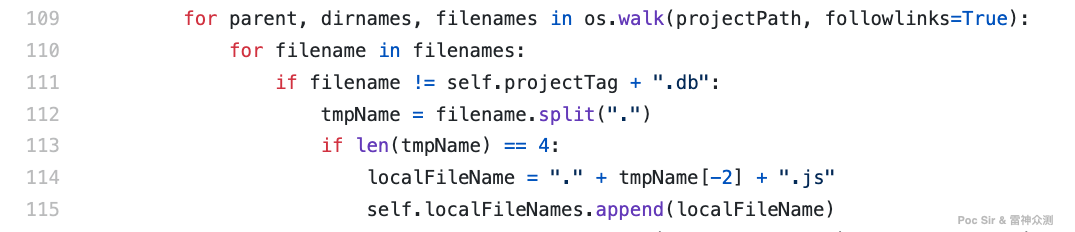
To avoid filename collisions (e.g., /js/index.js and /static/index.js both existing), Packer Fuzzer adds a random tag prefix when saving files locally (e.g., the remote file 1.index.js is saved as 15zfe.1.index.js). After splitting by ., a file following Webpack naming conventions will have four parts: TAG, chunk name, shared hash, and .js extension. We keep only the last two parts (e.g., 15zfe.1.index.js → .index.js) and deduplicate.
- If there are three or fewer unique suffixes after deduplication, we brute-force numbers 1–500 against each:
1.ef6vbi5iopi561j8.js ... 500.ef6vbi5iopi561j8.js. - If there are more than three unique suffixes, the pattern is likely entirely random (e.g.,
gre5g4e.d1m0ecbdb8195.js), so brute-forcing all of them is unlikely to be productive. In this case, we apply a « luck of the draw » strategy and only attempt brute-forcing the first match.(Finding vulnerabilities is all about timing—if you did not find it, it just was not meant to be… yet.)
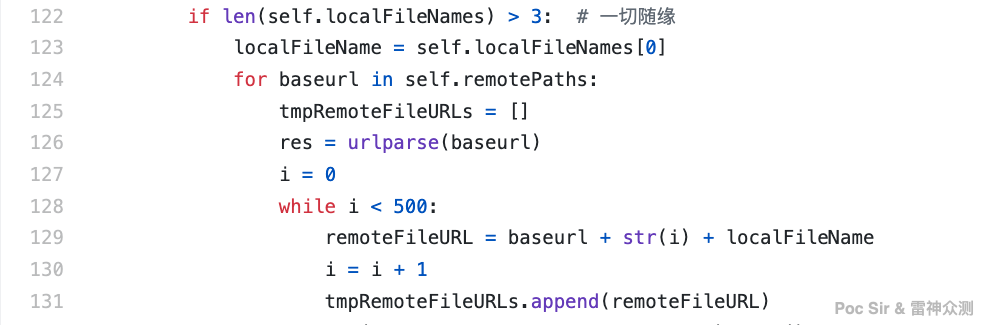
Async JS chunk counts typically range from 5 to 200, so brute-forcing up to 500 should reliably cover everything without wasting too many requests. To avoid hammering the target with up to 1,500 HTTP requests (3 suffixes × 500 numbers) all at once—which wastes bandwidth and can trigger rate limiting—requests are batched into groups of 20. If an entire group of 20 consecutive requests all return 404, the tool stops and skips all remaining groups. For example, if the highest-numbered chunk is 165.ef6vbi5iopi561j8.js, the tool will only send requests for the first 9 groups (20 × 9 = 180), and stop after seeing no valid responses past number 165 in group 9—skipping group 10 entirely.
Some servers behave oddly and return HTTP 200 with a full HTML error page even for non-existent files. The fix is straightforward: a legitimate JS file will have a Content-Type of text/javascript or application/javascript, never text/html (an HTML Content-Type for a JS file would itself be a misconfiguration, potentially enabling XSS if the content is attacker-controlled). So we treat any response with text/html as a 404:
if "text/html" not in text.headers['Content-Type']:
        flag = 1
Unfortunately, for chunk files with fully random names in both parts—like sd7g9.ef6vbi5iopi561j8.js or b2tr9.rg5rr85iotr5grt5.js—there is no pattern to guess from. Unless the chunk is referenced in another already-downloaded JS file, no person or tool can quickly discover it through guessing alone (unless physical access or a directory listing vulnerability is in play).
That concludes the JS extraction module. After all three sub-stages, the success rate for extracting Webpack-bundled JS files exceeds 95%.
0x03 API and Parameter Extraction
0x031 Platform API Extraction
Extracting JS files is not the point—the goal is to use them to find exploitable API endpoints. Before diving into extraction, let us define what a « valid » API path looks like (bold examples are considered valid):
| Example | Verdict |
|---|---|
| /user/login | Valid API |
| api/backdoor | Also a valid API |
| / | Obviously not |
| a | Too short |
| /video/demo.mp4 | Has a file extension — skip |
/_&§:./+= | What even is this? |
| /bushishell.do | Still counts as an API |
| /v1/test?dev=1 | Strip the ? and it is an API |
| /我是CHERRY BON | Nobody writes API paths in Chinese |
From this table, the filtering rules are clear: an API path must not be empty or a bare /; it must not contain special characters like *, §, &, =, or +, and normally will not contain non-ASCII characters; it must not end with extensions like .mp4, .mp3, or .ppt; any query string after ? should be stripped; and it must be longer than one character. What remains after these filters is a reasonable API candidate.
The extraction approach: the primary method is regex matching. Based on Webpack patterns, the tool ships with 5 common regex rules in /lib/ApiCollect.py:
self.regxs = [r'\w\.get\(\"(.*?)\"\,',
                            r'\w\.post\(\"(.*?)\"\,',
                            r'\w\.post\(\"(.*?)\"',
                            r'\w\.get\(\"(.*?)\"',
                            r'\w\+\"(.*?)\"\,']
The tool loops through each downloaded JS file, calls self.apiCollect(), reads the file content, applies regex at line 36, and at line 38 checks whether the result is empty or just /:
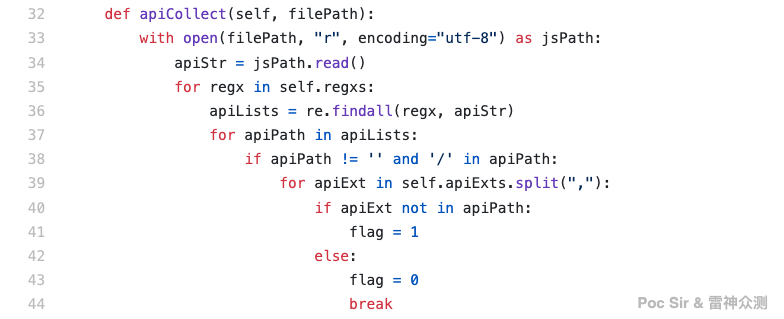
At line 39, a for loop checks whether any character in the apiExts blacklist appears in the extracted path (if apiExt not in apiPath). The apiExts variable is loaded from config.ini at line 29:
self.apiExts = readConfig.ReadConfig().getValue('blacklist', 'apiExts')[0]The corresponding config.ini entry lists special characters and file extensions that will never appear in a valid API path:
[blacklist]
apiExts = *,+,=,{,},[,],(,),<,>,@,#,",',@,:,?,!, ,^,\,.docx,.xlsx,.jpeg,.jpg,.bmp,.png,.svg,.vue,.js,.doc,.ppt,.pptx,.mp3,.png,.doc,.pptx,.xls,.mp4
If a blacklisted character is found in the extracted path, self.apiTwiceCollect() runs a second regex pass to avoid false positives (regex can sometimes produce « nested » matches):
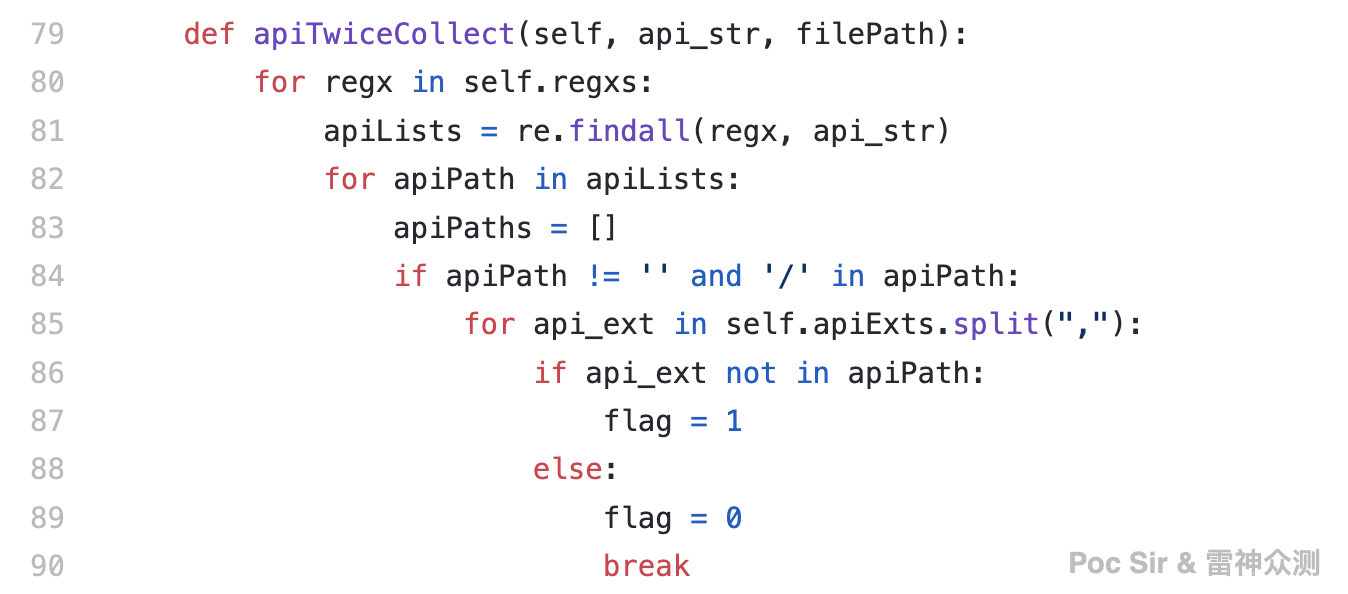
Back in the main function apireCoverStart(): if regex extraction yields fewer than 30 API paths, the tool assumes the extraction is incomplete and automatically enables brute-force API extraction mode (most sites with a user system have more than 30 API endpoints). If 30 or more paths are found, the tool asks the user whether to enable brute-force mode as well.
The brute-force function apiViolentCollect() is deliberately simple and aggressive:
violentRe = r'(?isu)"([^"]+)'
with open(filePath, "r", encoding="utf-8") as jsPath:
    apiStr = jsPath.read()
    apiLists = re.findall(violentRe, apiStr)
    for apiPath in apiLists:
            if apiPath != '' and '/' in apiPath and apiPath != "/":
                    for apiExt in self.apiExts.split(","):
The regex r'(?isu)"([^"]+)' matches everything inside double quotes—since all API paths are string literals in JS code, they will be captured. We then enforce that a / exists in the result and apply the same apiExts blacklist filter. The result is a higher-recall but lower-precision extraction—there will be false positives, but we would rather cast a wider net than miss any real endpoint.
After API extraction, we still need to build complete URLs. Many Webpack sites use one of two patterns: domain + BaseURL + API path or just domain + API path. For example, if the full path is https://woshipinyin.cn/v1/api/hello, the BaseURL might be v1. The tool uses getBaseurl() to extract the BaseURL using these regex rules:
self.baseUrlRegxs = [r'url.?\s?\:\s?\"(.*?)\"',
                     r'url.?\s?\+\s?\"(.*?)\"',
                     r'url.?\s?\=\s?\"(.*?)\"',
                     r'host\s?\:\s?\"(.*?)\"', ]
We did not invest heavily in this because most normal sites have no more than three BaseURLs, and a tester can quickly identify the correct one by triggering any API in the browser. For this reason, the tool also supports specifying BaseURLs manually via -b (or --base):
baseURL = CommandLines().cmd().baseurl
if baseURL == None:
        xxx...
else:
        baseURLs = baseURL.split(',')
        self.baseUrlPaths = baseURLs
Since many real-world sites have no BaseURL at all, the tool always appends an empty root BaseURL by default: self.baseUrlPaths.append("/").
Once all API paths and BaseURLs are collected, apiComplete() assembles the full URLs (domain + BaseURL + API path):
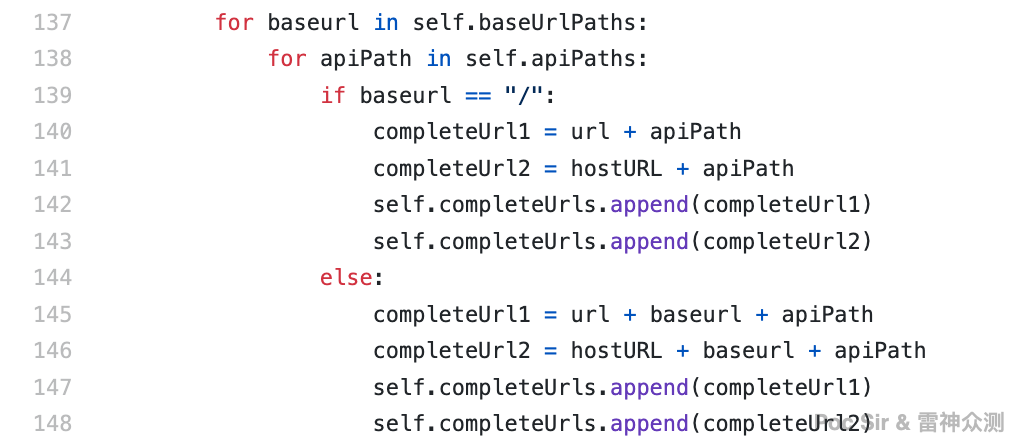
After building the full paths, the tool deduplicates them and stores their metadata in the api_tree table:
| Column | Type | Description |
|---|---|---|
| id | INT (PK, auto) | Auto-increment identifier |
| name | TEXT | API name |
| path | TEXT | Full API URL |
| option | TEXT | Parameter content |
| result | TEXT | API response content |
| success | INT | Status flag (1 = GET success, 2 = POST) |
| from_js | INT | Source JS file ID |
Since there are multiple BaseURLs and brute-force mode can produce many invalid paths, how do we validate which ones actually exist? Simple: probe all of them with multi-threaded requests and keep whatever responds. But it is not as simple as just keeping HTTP 200 responses. Consider this example:
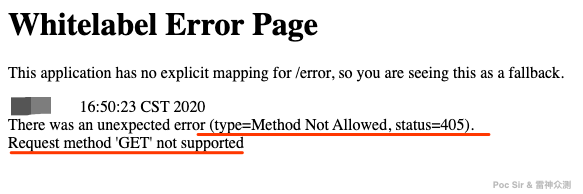
A GET request to this API returns 405—it only accepts POST requests. If we only kept 200 responses, we would incorrectly discard it. The validation logic in /lib/getApiResponse.py (lines 60–72) handles this:
code = str(s.get(url, headers=headers, timeout=6, proxies=self.proxy_data, verify=False).status_code)

if code != "404":
        self.res[url] = 1

if code == "405" or code == "401":
        self.res[url] = 2

elif code == "404":
        self.res[url] = 0
For GET requests, we always use a simple ?a=1&b=1 format. For POST requests, it is more nuanced. Some APIs only accept JSON-encoded bodies with application/json as the Content-Type, returning 415 for anything else:
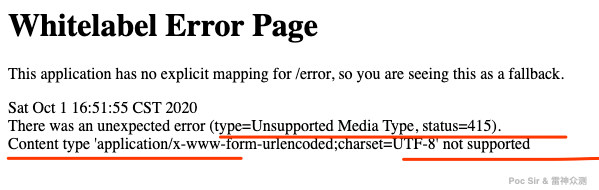
Since JSON POST bodies are extremely common, we cannot ignore this case. The check() function in /lib/PostApiText.py tries all three standard formats in order:
| Request body | Content-Type | Notes |
|---|---|---|
a=1 | application/x-www-form-urlencoded | Most common format |
{"a": 1} | application/json | JSON format |
<a>1</a> | application/xml | XML format |
If all three return 415, the API is abandoned. Once this validation pass completes, the api_tree table is updated: success is set to 1 for GET or 2 for POST, and the response body is written to the result field.
0x032 Fuzzy Parameter Extraction
Note: This is an advanced-mode feature and is not enabled in the default simple mode, as it can be time-consuming.
Having found the APIs, the natural next step is extracting their parameters—and given the nature of frontend bundlers, this is actually achievable. Because Webpack minifies JS aggressively (thousands of lines compressed into just a few), we first need a basic beautification (line-break reformatting) pass over all local JS files to make regex matching more accurate. This is done via rewrite_js() in /lib/common/beautyJS.py:
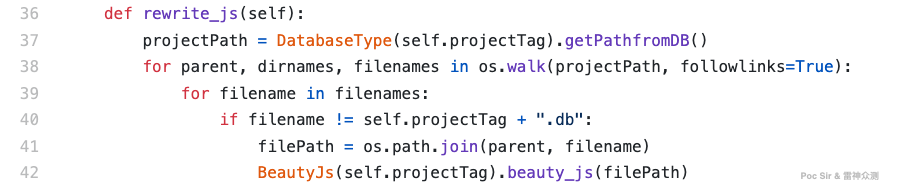
After beautification, parameter extraction begins in collect_api_str() in /lib/FuzzParam.py. Phase 1: for each API name in the database, search all JS files and, when found, extract the 5 lines above and below the match (11 lines total) to narrow the search area. Phase 2: check whether those 11 lines contain the string "GET" or "POST". If found, the parameters in that block are classified under the corresponding request type. If neither keyword appears, the block defaults to POST (given that POST is more common for data-bearing endpoints). The result is then passed to FuzzerCollect() for the actual parameter extraction.
Similar to API extraction, the tool first tries a rule-based regex. The current version ships with one rule in result_method_1():
regxs_1 = r'method\:.*?\,url\:.*?\,data\:({.*?})'
regx_key = r'(.*?)\:.*?\,|(.*?)\:.*?\}'
regx_value = r'\:(.*?)\,|\:(.*?)\}'
If no regex match is found, the tool falls back to brute-force extraction in violent_method():
violent_regx = r'(?isu)"([^"]+)'After extraction, filtering is applied based on config.ini:
[FuzzerParam]
param = success,post,get
default = id,num,number,code,type
param is a parameter blacklist to exclude items extracted by brute force that are clearly not API parameters. default lists parameter names that are expected to be integer types; if a parameter name matches this list, it is tagged as numeric. The tool then auto-generates a random 3-digit integer for numeric parameters, keeps any pre-existing default values unchanged, and generates a random 3-character string for all remaining parameters.
The final parameter extraction result is stored in this format:
{
    "get": [
        {
            "name": "id",
            "default": 152
        },
        {
            "name": "userPass",
            "default": "lQG"
        }
    ],
    "post": [
        {
            "name": "deviceType",
            "default": "PC"
        }
    ],
    "type": "post"
}
The get and post arrays contain the parameter name and its default (or randomly generated) default value. The type field indicates the request method for this API. This JSON is then written to the option column of the corresponding api_tree row for use during vulnerability scanning.
0x033 Current Limitations
That concludes the API and parameter extraction modules—the core of the project. However, there are several known shortcomings worth listing. Feedback and suggestions from readers are very welcome:
- Only 3 mature API extraction rules are currently included;
- Only 1 mature parameter extraction rule is currently included;
- Parameter extraction requires regex matching one-by-one; large JS files or a large number of APIs can cause the tool to appear frozen for an extended period;
- The GET/POST type classification logic has some edge-case issues that may produce incorrect results;
- The rule libraries for both API and parameter detection need to be expanded;
- Default parameter values may not always be extracted correctly;
- If the API endpoint and its parameter block are far apart in the code, or the code is heavily obfuscated, parameter extraction will fail;
- BaseURL extraction rules are limited—manual specification via the
-bflag is recommended.
0x04 Vulnerability Detection
All vulnerability findings are written to the vuln table in the project’s cache database:
| Column | Type | Description |
|---|---|---|
| id | INT (PK, auto) | Auto-increment identifier |
| api_id | INT | Corresponding API ID |
| js_id | INT | Corresponding JS file ID |
| type | TEXT | Vulnerability type |
| sure | INT | Confidence level |
| request_b | TEXT | Request body |
| response_b | TEXT | Response body |
| response_h | TEXT | Response headers |
| des | TEXT | Additional description |
0x041 Unauthorized Access
Unauthorized access to an API is different from unauthorized access to a whole system or database. It is endpoint-by-endpoint—one API in a system might be wide open while another requires authentication. Also note that a publicly accessible endpoint with no sensitive data or operations, accessible without logging in, technically counts as an unauthenticated API—just one that does not matter. Below is a breakdown of common API response types:
| API Response | Assessment |
|---|---|
{"msg":"hello","code":"200"} | Accessible without auth, but no sensitive data or operations |
{"msg":"","errcode":"1","log":"You are not logged in!"} | No unauthorized access vulnerability |
{"status":"200","message":"success","data":{"id":"1","user":"admin","pass":"1143720b05b5daf6f2bb83f9e4a9b5ba"}} | Unauthorized access vulnerability present; further testing with parameters required |
Since the API validation step in section 0x031 already stored all API response bodies in the database, we can now simply check those stored responses using keyword matching. The larger and more comprehensive the keyword list, the higher the accuracy. The current rule set is:
[vulnTest]
resultFilter = 未登录,请登录,权限鉴定失败,未授权,鉴权失败,unauth,状态失效,没有登录,会话超时,token???,login_failure
unauth_not_sure = 系统繁忙,系统错误,系统异常,服务器繁忙,参数错误,异常错误,服务端发生异常,服务端异常
Keywords are split into two semantic categories. resultFilter contains phrases that clearly indicate login is required or that access was denied—any API returning one of these phrases is confirmed to have no unauthorized access vulnerability. unauth_not_sure contains ambiguous phrases that do not explicitly say « access denied » but also do not return meaningful data—they may indicate the server failed due to missing parameters rather than a missing session. APIs returning these phrases are flagged as « possible unauthorized access. »
0x042 Sensitive Information Disclosure
This module does not look for server file leaks or API data leaks. Instead, it scans all downloaded JS files for hardcoded secrets—passwords, tokens, API keys, and similar values left in by developers during testing or intentionally embedded as backdoors.
The module reads a pre-configured list of sensitive variable names from config.ini:
[infoTest]
info = REDIS_PM§§§Redis Password,APP_KEY§§§Third APP Key,password§§§Password Info,BEGIN RSA PRIVATE KEY§§§RSA PRIVATE KEY,email§§§email address
Each entry is comma-separated. The §§§ delimiter separates the variable name from its description (e.g., REDIS_PM§§§Redis Password means: if REDIS_PM is found, the leaked value is a Redis database password). The module checks each JS file for these variable names, extracts the assigned value (the content inside the nearest double quotes), and also captures 77 characters of surrounding context for reference. Everything is saved to the database.
0x043 CORS Misconfiguration
This module sends exactly one request to the target’s main domain, with a crafted Origin header constructed as follows:
self.expUrl = "https://" + self.baseurl.netloc + ".example.org" + "/" + self.baseurl.netlocFor example, if the target is lei-god666.com, the probe is: Origin: https://lei-god666.com.example.org/lei-god666.com. This single payload is designed to bypass several common CORS validation mechanisms at once. The module then checks the response headers:
text = requests.get(self.url, headers=self.header, timeout=6, allow_redirects=False).headers
if 'example.org' in text['Access-Control-Allow-Origin'] and text['Access-Control-Allow-Credentials'] == 'true':
        #print("CORS vulnerability detected")
        self.flag = 1
If Access-Control-Allow-Credentials is absent or not true, or if Access-Control-Allow-Origin does not reflect our injected origin, no CORS vulnerability is flagged. If both conditions are met simultaneously, a CORS vulnerability is recorded and the response headers are saved to the database.
0x044 SQL Injection
This module performs three quick SQL injection checks (it does not attempt to extract data—just confirms whether injection is possible; for deeper testing, use tools like SQLMap or XRAY):
- Error-based injection Implemented in
errorSQLInjection()in/lib/vuln/SqlTest.py. The module takes the parameters extracted in section 0x032, appends a single quote and a double quote to each parameter value, and sends the request to provoke a classic database error message: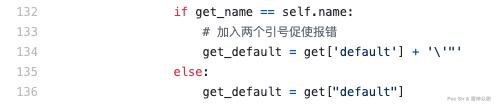 If any of the following strings appear in the response, an error-based SQL injection vulnerability is flagged:
  errors = ["You have an error in your SQL syntax","Oracle Text error","Microsoft SQL Server"]
  for error in errors:
          if error in get_resp_text:
                  #print("Possible SQL error-based injection detected")
self.error = 1- Boolean-based blind injection Implemented in
boolenSQLInjection()in/lib/vuln/SqlTest.py. Appendsand 1=1orand 1=2to each parameter value and compares the response lengths: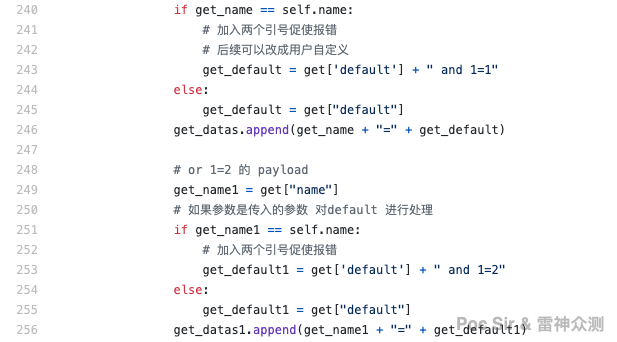
  post_len1 = len(requests.post(self.path,headers=self.header,data=post_data1,proxies=self.proxy_data).text)
  post_len2 = len(requests.post(self.path,headers=self.header,data=post_data2,proxies=self.proxy_data).text)
  post_len_default = len(requests.post(self.path,headers=self.header,data=post_data_default,proxies=self.proxy_data).text)
          if (post_len1 == post_len_default) and (post_len2 != post_len_default):
                  #print("Possible boolean-based blind injection detected")
self.boolen = 1- Time-based blind injection Implemented in
timeSQLInjction()in/lib/vuln/SqlTest.py. Appendsand sleep(10)to each parameter value and measures server response time: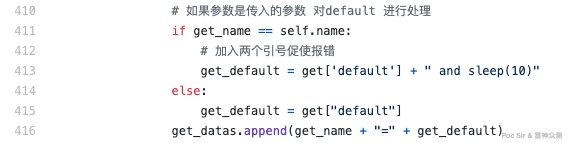
  if json_code == '415':
          pass
  elif default_time<2 and json_sec>9:
          #print("Possible time-based blind injection detected")
          self.time = 1
          try:
                  DatabaseType(self.projectTag).insertSQLInfoIntoDB(self.api_id, self.from_js, post_json, post_json_resp.text)
          except Exception as e:
                  self.log.error("[Err] %s" % e)
0x045 Horizontal Privilege Escalation
This module is in /lib/vuln/BacTest.py and only tests endpoints with numeric parameters. If no qualifying API is found, no testing is performed. The logic is simple: generate five sequential integers and build HTTP requests with them:
for value in range(1,6):
        get_req = str("".join(name)) + "=" + str(value)
        get_burp.append(get_req)
Send all five requests and collect the response lengths:
get_resp_lens = {}
try:
        get_obj = ApiText(self.get_results,self.options)
        get_obj.run()
        get_texts = get_obj.res
except Exception as e:
        self.log.error("[Err] %s" % e)
If 3 or more of the 5 responses have different lengths, the endpoint is flagged as likely vulnerable to horizontal privilege escalation:
get_repeat_nums = dict(Counter(get_all_list))
get_repeat_num = int("".join([str(key) for key, value in get_repeat_nums.items() if value > 1]))
        if len(get_select_list) >=3:
                ...
This may produce occasional false positives, but it is fast and rarely produces false negatives. Manual review of any flagged endpoints is recommended.
0x046 Weak Passwords
This module does not attempt to brute-force every API. Instead, it first reads three configuration lists from config.ini:
[vuln]
passwordtest_list = login.do,signin,login,user,admin
passworduser_list = userCode,username,name,user,nickname
passwordpass_list = userPass,password,pass,code
The passwordTest() function then applies three conditions: (1) the API name must appear in passwordtest_list, (2) the API must include a parameter matching one name in passworduser_list, and (3) the API must include a parameter matching one name in passwordpass_list. If all three conditions are met, startTest is called with the parameter details to begin brute-forcing:
if  (pass_list[3] != "none") and (pass_list[2] != "none"):
        self.startTest(pass_list[0],pass_list[1],pass_list[2],pass_list[3])
Username and password dictionaries are stored in /doc/dict/username.dic and /doc/dict/password.dic and can be freely edited or replaced. After multi-threaded brute-forcing, the tool checks each response for any of the following success indicators:
[vulnTest]
login = 登录成功,login success,密码正确,成功登录
0x047 Unrestricted File Upload
This module is in /lib/vuln/UploadTest.py. Lines 18–20 read the following config values:
[vuln]
uploadtest_list = upload,file,doc,pic,update
upload_fail = 上传失败,不允许,不合法,非法,禁止,fail,失败,错误
upload_success = 上传成功,php,asp,html,jsp,success,200,成功,已上传
uploadtest_list identifies APIs likely to handle file uploads. upload_fail is a response blacklist; upload_success is a response whitelist. The startTest() function uses a variable called ext_fuzz containing a range of file extensions to test:
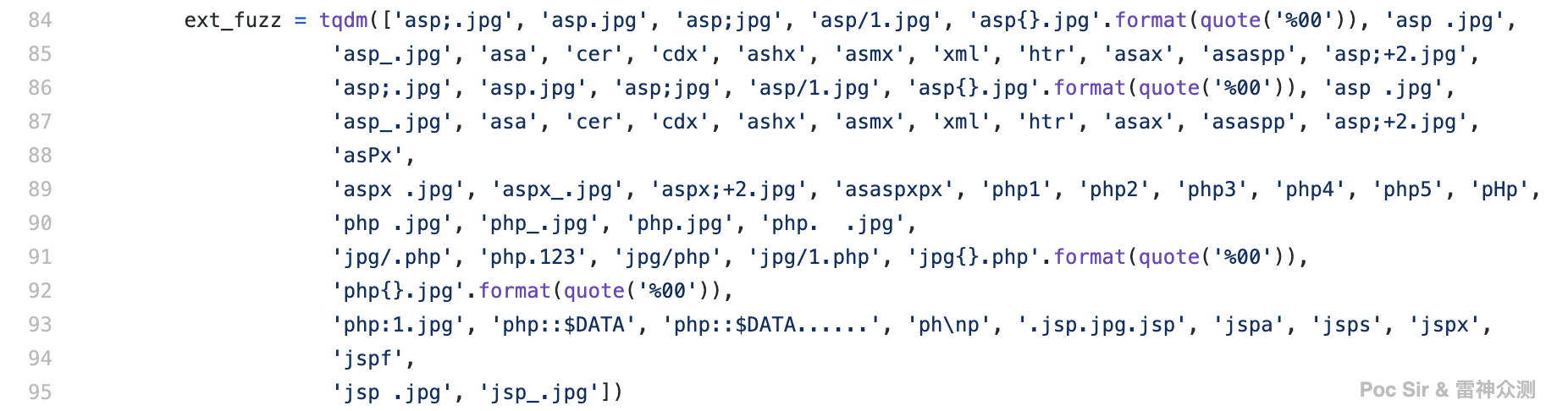
For each extension, the tool constructs a file as follows: (1) filename = random integer + . + extension, (2) file content = PNG file header bytes + random data:
files = {"file": (
                    "{}.{}".format(random.randint(1,100), ext), (b"\x89\x50\x4E\x47\x0D\x0A\x1A\x0A\x00\x00\x00\x0D\x49\x48\xD7"+rands))}
Each constructed file is uploaded and the response recorded. The module then applies a « blacklist first, whitelist second » approach—filtering out responses that match upload_fail, then checking the remainder against upload_success:
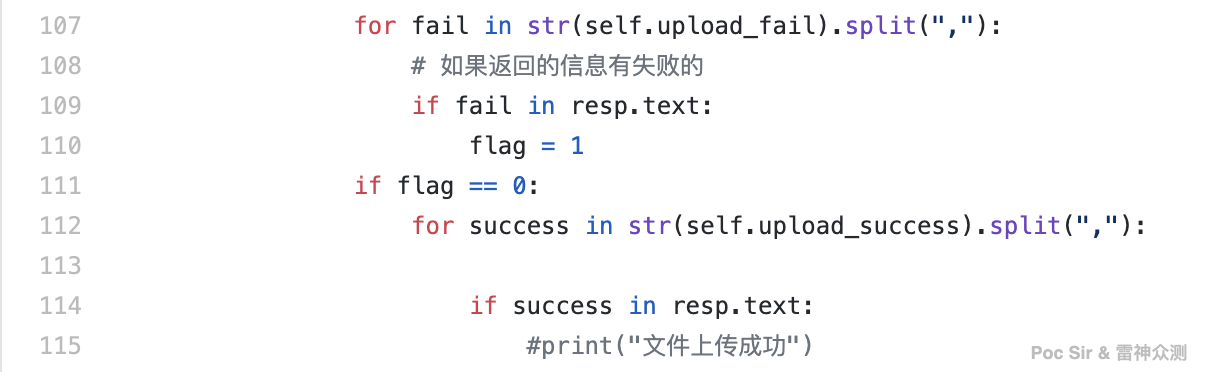
If a response passes the whitelist filter, the endpoint is flagged as potentially vulnerable to unrestricted file upload and the finding is saved to the database. This concludes all vulnerability detection. Note that SQL injection, horizontal privilege escalation, weak password, and unrestricted file upload checks are only available in advanced mode, as they depend on parameter extraction.
0x05 Report Generation and Other Features
0x051 Reports—Clean and Clear
No scanning tool is complete without report generation. Packer Fuzzer supports two report types: an interactive report and a formal report, in four formats: HTML, DOC, PDF, and TXT. By default, both an HTML and a DOC report are generated.
The HTML report uses the MobSF theme (Mobile Security Framework—an automated, all-in-one mobile application pen-testing, malware analysis, and security assessment framework for Android/iOS/Windows). It is divided into five sections: Basic Info, Vulnerability Details, API List, Security Recommendations, and Appendix. The Basic Info section includes a report summary, JS file information, and a disclaimer. The Vulnerability Details and Security Recommendations sections are auto-generated based on what was found:
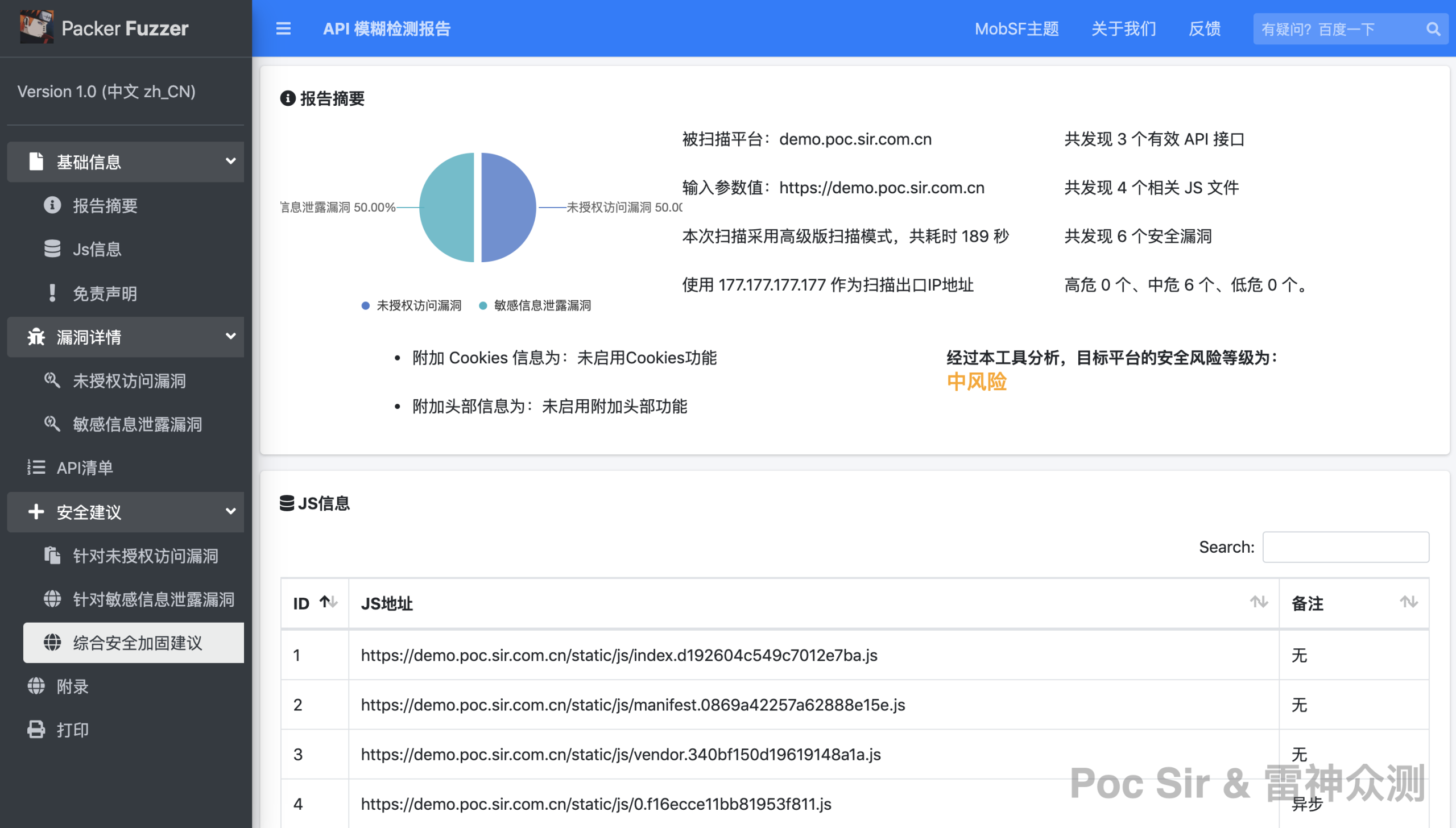
Each vulnerability entry and API listing has a « More » button to expand the full details:
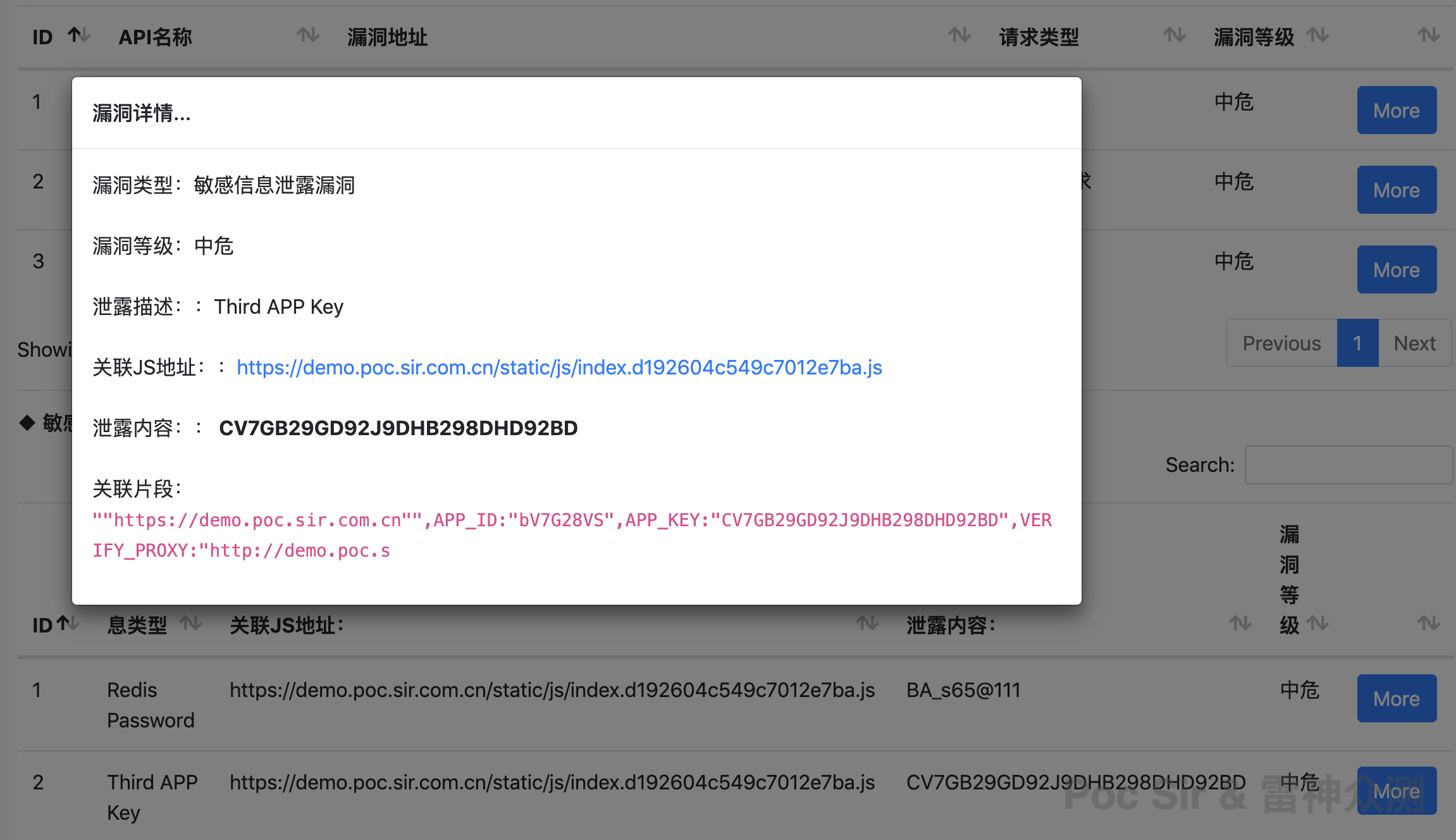
Note: to move the HTML report, you must also copy the res resource folder from the same directory.
The DOC report (PDF and TXT are derived from the DOC; Office Word is recommended since WPS or other alternatives may produce formatting issues) is more formal but less interactive:
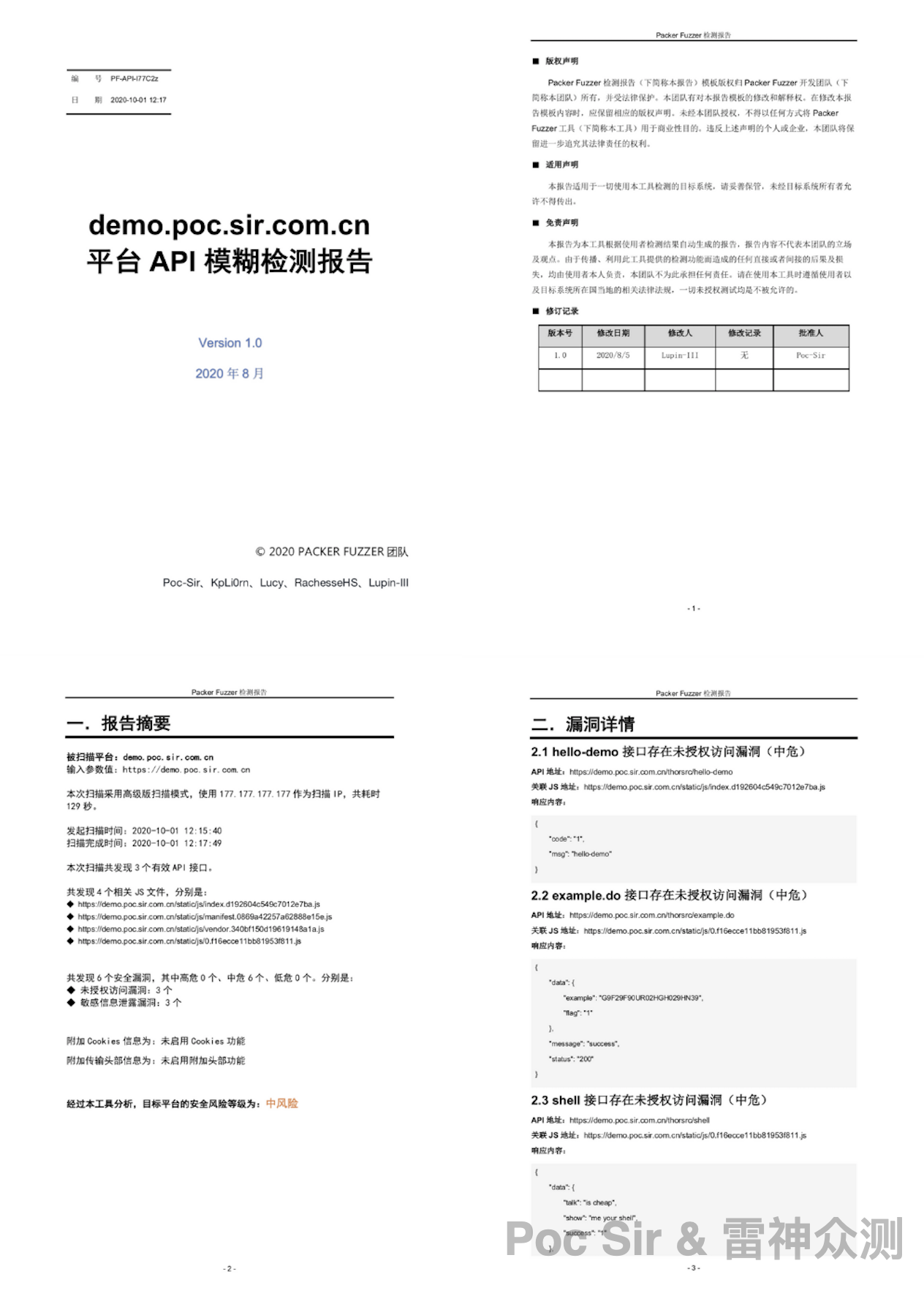
Like the HTML report, the DOC version includes: report summary, vulnerability details, API list, security recommendations, and appendix—all auto-populated from the scan results.
0x052 Languages—Global Ready
You do not need to worry about language barriers. The tool ships with five major language packs (including report templates): Simplified Chinese, French, Spanish, English, and Japanese (ranked by translation accuracy), translated by our very unprofessional team. Language files are located at /doc/lang.ini in standard INI format:
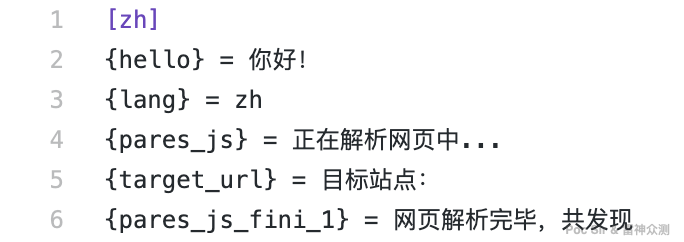
Language detection works as follows: the tool reads the system’s locale and takes the first two characters to look up the appropriate language pack. If not found (i.e., an unsupported language), English is used as the fallback. Users can also override the language via a command-line flag:
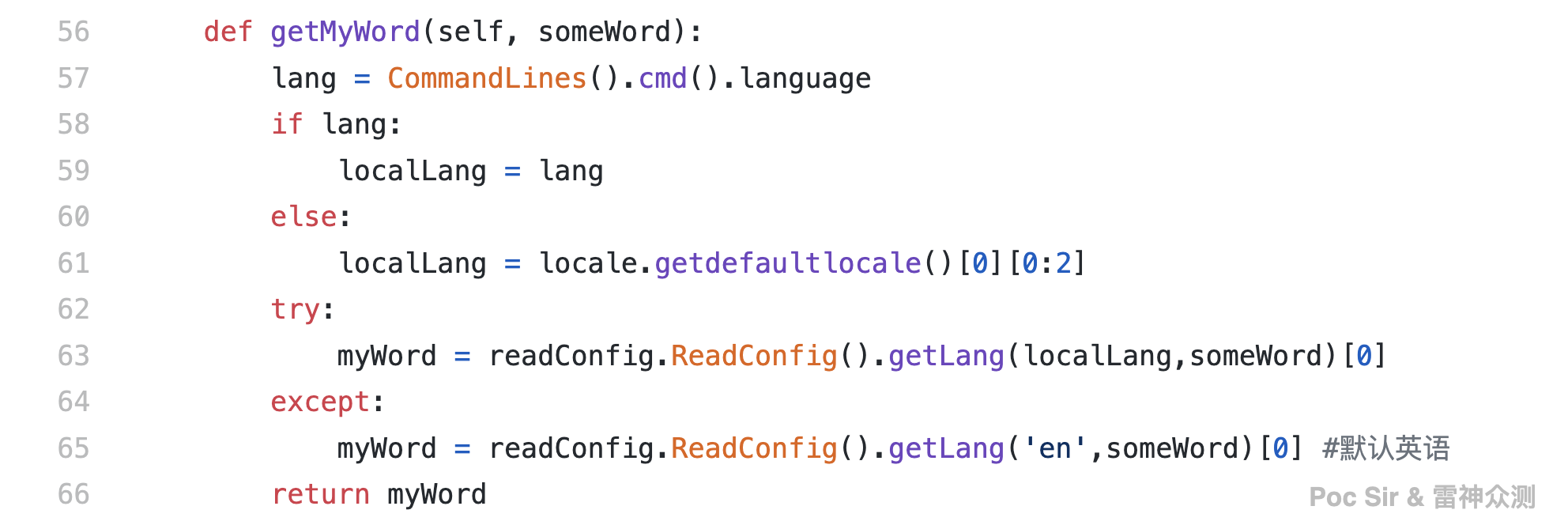
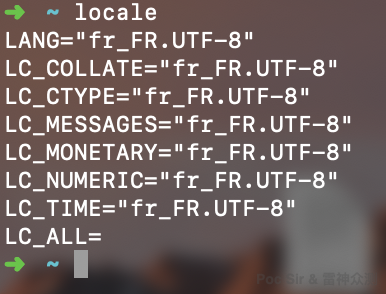
A locale value consists of: a 2-letter lowercase language code + optionally _ + 2-letter uppercase country code + optionally @ + country name in lowercase + optionally . + encoding. For example, on the author’s machine the default locale is French (fr):
Language strings can be called anywhere in the code like this: print(Utils().getMyWord("{xxx_name_nom}"))
Chinese, French, English, and Spanish are all official UN languages. If you are interested in contributing a translation for another language, or if you spot a translation error in any of the current packs, please feel free to submit a correction!
0x053 Extensions—Go Beyond
The tool supports custom plugins. Simply place any plugin file in the ext/ directory following the required format. Packer Fuzzer will automatically load and execute all enabled, valid plugin files after vulnerability scanning completes and before the report is generated. The plugin loader is in /lib/LoadExtensions.py: it reads all .py files in the extensions directory, imports every module in each file, and calls the start() method of each module’s ext class.
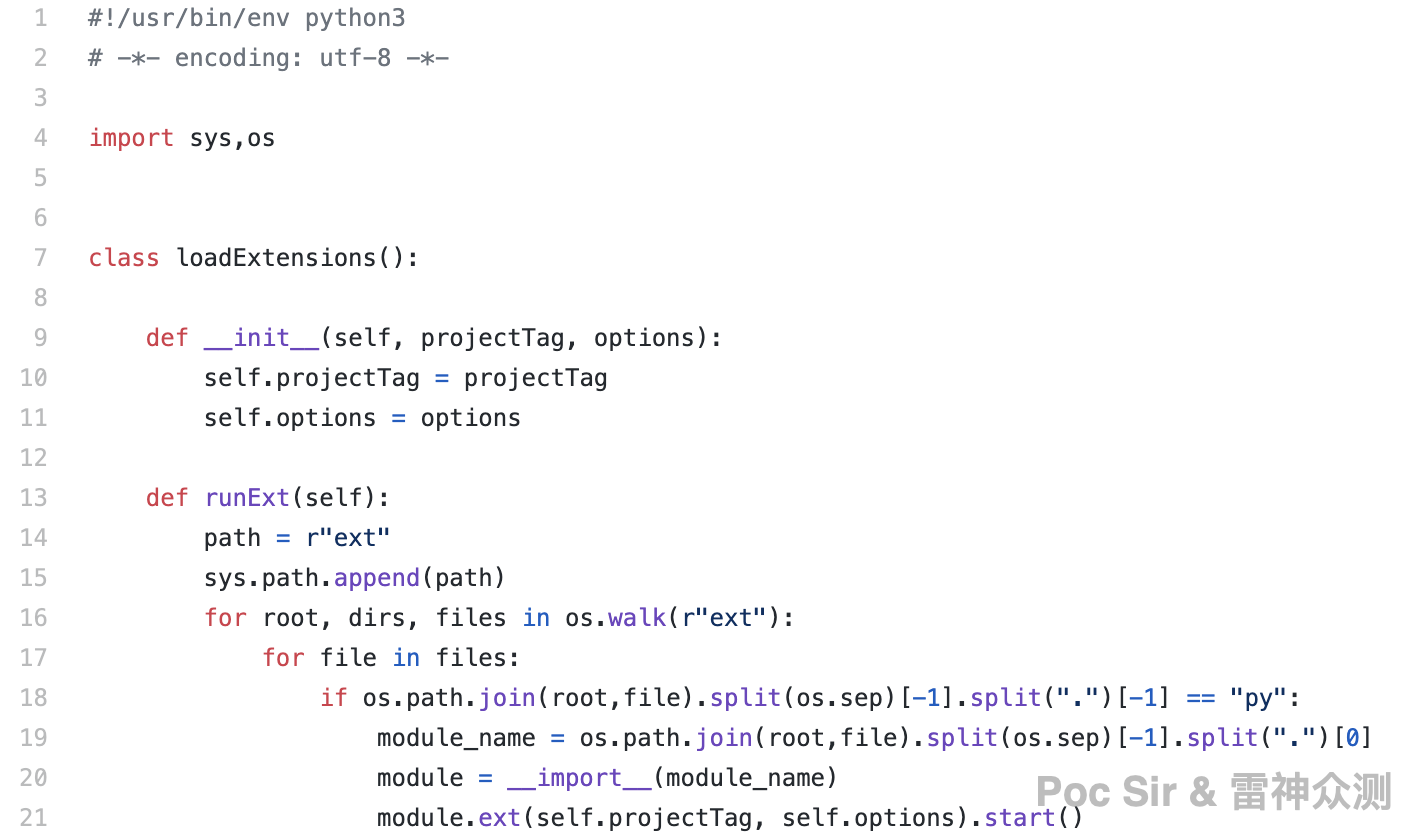
A plugin template is shown below. It imports Utils and DatabaseType, uses self.statut to control whether the plugin is active (1 = enabled, 0 or anything else = disabled), and calls run() when enabled:
#!/usr/bin/env python3
# -*- encoding: utf-8 -*-

from lib.common.utils import Utils
from lib.Database import DatabaseType


class ext():

    def __init__(self, projectTag, options):
        self.projectTag = projectTag
        self.options = options
        self.statut = 0   #0 disable  1 enable

    def start(self):
        if self.statut == 1:
            self.run()

    def run(self):
        print(Utils().tellTime() + "Hello Bonjour Hola 你好 こんにちは")
0x054 Logging—Always On
For every scan, success or failure, the tool automatically generates a real-time log file named after the current project tag, saved under the log/ directory:
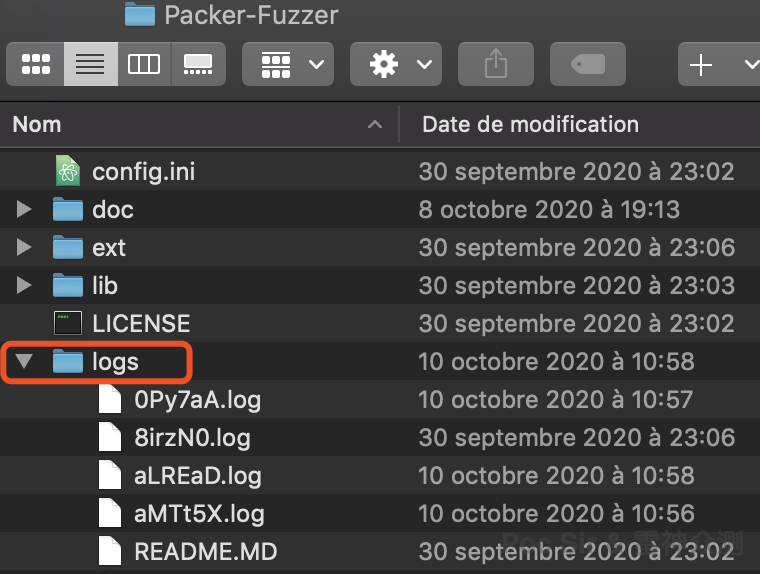
The logging module lives under /lib/. Other modules can import it with from lib.common.CreatLog import creatLog and use it as follows. The module records three types of entries: informational (all screen output), debug/notice messages, and error messages. Beyond these three categories, the tool collects no additional user data and uploads nothing to any server:
creatLog().get_logger().info("Start!")
try:
        xxx()
        creatLog().get_logger().debug("OK!")
except Exception as e:
    creatLog().get_logger().error("[Err] %s" % e)
An example of the generated log format:
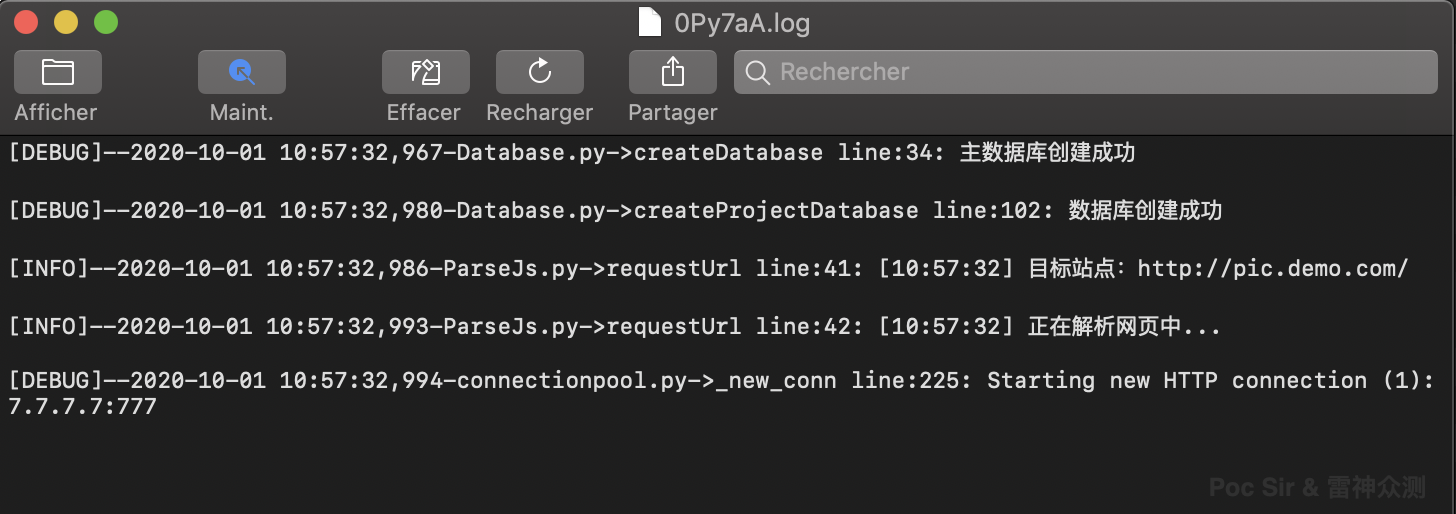
If you need to file a bug report, please include the scan log for the affected project so we can locate the issue quickly. (If the target is sensitive, feel free to send the log file as an email attachment rather than posting it publicly.)
0x06 Closing Thoughts & Acknowledgments
This covers the complete design and architecture of version 1. But the end of v1 is the starting point of v2. I know there are many gaps and shortcomings in this work, and I genuinely hope to hear feedback and suggestions from readers—and to see those GitHub Issues come in. Poc Sir thanks everyone who took the time to read this. If you find our approach useful in your work, we would greatly appreciate a Star on the GitHub repository—it means a tremendous amount to us! I also want to thank a dear friend of mine for their ongoing support and encouragement.
I looked out the window at the vivid colors of autumn, and felt something familiar.